OBJECT RECOGNITION ECU REMOVAL

Note
When replacing the object recognition ECU, make sure to perform the replacement after confirming that the headlight assembly is securely installed.
-
REMOVE LUGGAGE COMPARTMENT MAT SUB-ASSEMBLY (w/ Spare Tire)
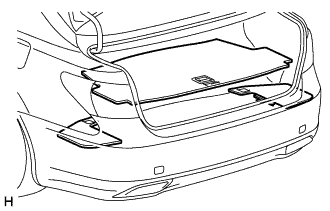
-
REMOVE DECK BOARD ASSEMBLY (w/o Spare Tire)
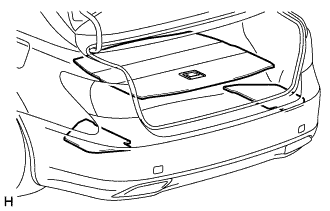
-
REMOVE ROPE HOOK ASSEMBLY
-
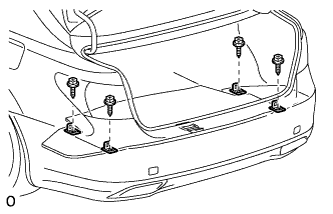
Remove the 4 bolts and 4 rope hook assemblies.
-
-
REMOVE DECK TRIM SIDE BOARD LH
-
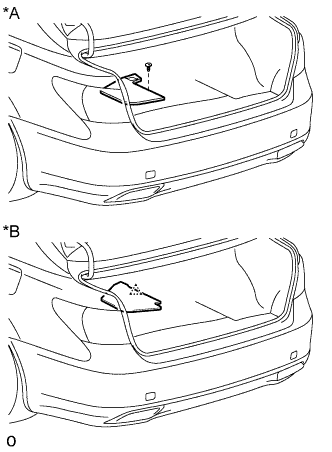
Text in Illustration *A w/ Spare Tire *B w/o Spare Tire w/ Spear Tire:
-
Remove the clip.
-
Remove the deck trim side board LH.
-
-
w/o Spear Tire:
-
Detach the clip and deck trim side board LH.
-
-
-
REMOVE DECK TRIM SIDE BOARD RH
-
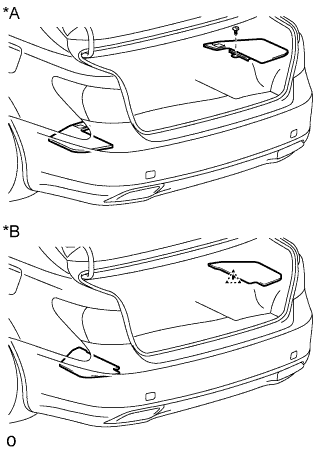
Text in Illustration *A w/ Spare Tire *B w/o Spare Tire w/ Spear Tire:
-
Remove the clip.
-
Remove the deck trim side board RH.
-
-
w/o Spear Tire:
-
Detach the clip and deck trim side board RH.
-
-
-
REMOVE NO. 1 LUGGAGE COMPARTMENT LIGHT ASSEMBLY
-

Text in Illustration *1 Protective Tape Using a screwdriver, detach the 2 claws and remove the No. 1 luggage compartment light assembly.
Tech Tips
Tape the screwdriver tip before use.
-
-
REMOVE ROPE HOOK
-
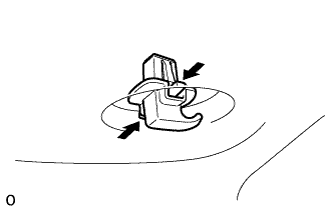
Remove the 4 rope hooks by pushing the claws in the direction of the arrows in the illustration.
-
-
REMOVE NO. 2 LUGGAGE COMPARTMENT TRIM HOOK (w/o Rear Cooler)
-
Detach the No. 2 luggage compartment trim hook.
-
-
REMOVE NO. 1 COOLER COVER (w/ Rear Cooler)
-
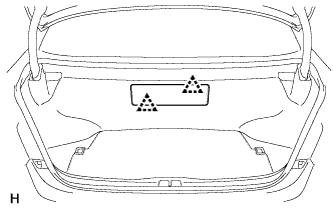
Detach the 2 clips and remove the No. 1 cooler cover.
-
-
REMOVE FRONT LUGGAGE COMPARTMENT TRIM COVER
-
w/o Rear Cooler:
-
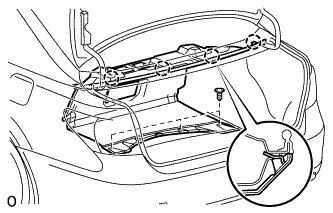
Remove the 4 claws, 3 clips and front luggage compartment trim cover.
-
-
w/ Rear Cooler:
-
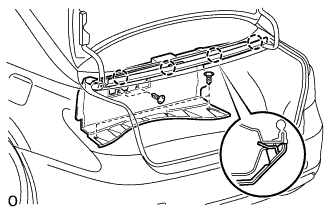
Remove the 4 claws, 5 clips and front luggage compartment trim cover.
-
-
-
REMOVE DECK BOARD ASSEMBLY (w/o Spare Tire)
-
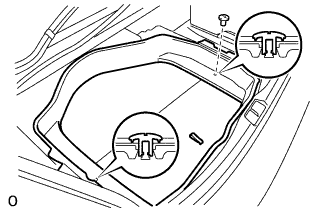
REMOVE TOOL BOX (w/o Spare Tire)
-
Remove the 2 clips and tool box.
-
-
REMOVE REAR FLOOR FINISH PLATE
-
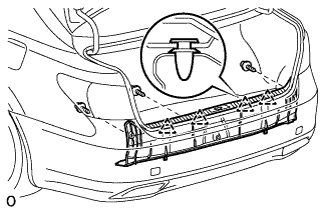
Remove the 3 clips.
-
Detach the 4 clips and remove the rear floor finish plate.
-
-
REMOVE LUGGAGE COMPARTMENT TRIM COVER ASSEMBLY RH
-
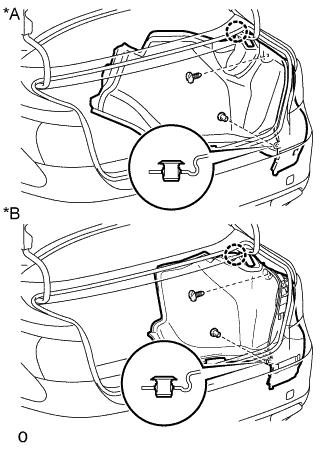
Text in Illustration *A w/o Rear Cooler *B w/ Rear Cooler Remove the 2 clips.
-
Detach the claw and luggage compartment trim cover assembly RH.
-
-
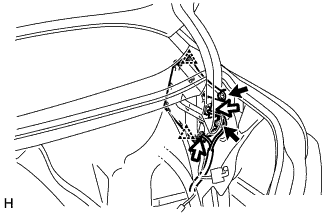
REMOVE OBJECT RECOGNITION ECU
-
Disconnect the 2 connectors.
-
Remove the 2 bolts.
-
Detach the 2 clips and remove the object recognition ECU.
Note
Do not drop or subject the object recognition ECU to strong shocks.
-