OBJECT RECOGNITION CAMERA REMOVAL

Note
-
Do not touch the camera lens or the front windshield glass in front of the camera.
-
Do not use a camera which has been dropped or subjected to an impact. Do not drop the camera or subject it to an impact.
Tech Tips
-
Use the same procedure for RHD and LHD vehicles.
-
The procedure listed below is for LHD vehicles.
-
REMOVE MAP LIGHT ASSEMBLY
-
Using a screwdriver, detach the 2 claws and open the 2 covers.
Tech Tips
Tape the screwdriver tip before use.
-
Remove the 2 screws.
-
Using moulding remover D, detach the 2 clips and remove the map light assembly.
-
Disconnect the 2 connectors.
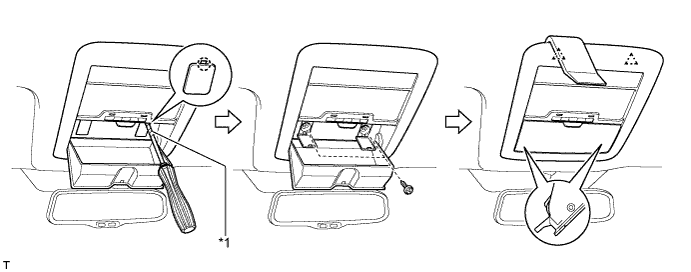
Text in Illustration *1 Protective Tape - -
-
-
REMOVE VISOR BRACKET COVER
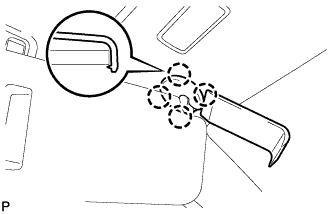
Tech Tips
Use the same procedure to remove the cover on the other side.
-
Using moulding remover D, detach the 4 claws and remove the visor bracket cover.
-
-
REMOVE VISOR ASSEMBLY LH
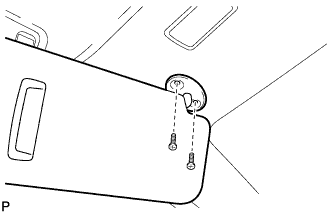
-
Remove the 2 screws and visor assembly LH.
-
-
REMOVE VISOR ASSEMBLY RH
Tech Tips
Use the same procedure described for the LH side.
-
REMOVE VISOR HOLDER
Tech Tips
Use the same procedure to remove the holder on the other side.
-
Turn the visor holder approximately 45° and pull it out as shown in the illustration.
-
Detach the 2 claws and remove the visor holder.
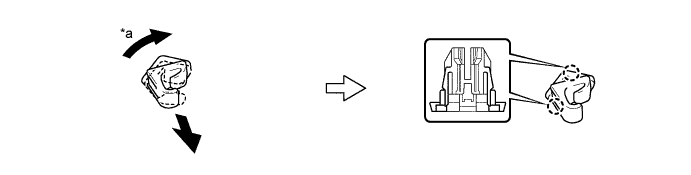
Text in Illustration *a 45° - -
-
-
REMOVE RAIN SENSOR COVER
Note
When removing and installing the rain sensor cover, do not apply force to the object recognition camera areas labeled "X".
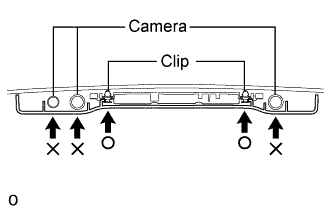
-
Pull the stopper in the direction shown in the illustration.
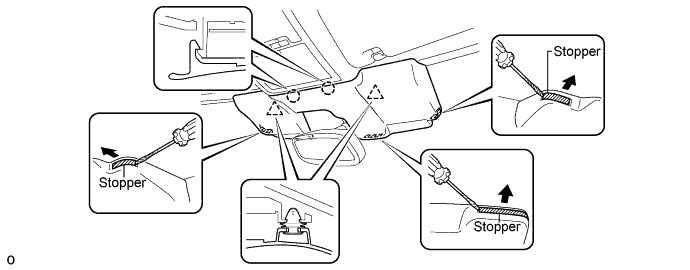
-
While being careful not to apply force to the camera area, detach the 2 clips and 2 claws and remove the rain sensor cover.
-
-
REMOVE INNER REAR VIEW MIRROR ASSEMBLY
-
w/o Automatic High Beam System, Adaptive High Beam System:
-
w/ Automatic High Beam System, Adaptive High Beam System:
-
-
REMOVE OBJECT RECOGNITION CAMERA
-
Partially remove the roof headlining assembly.
Tech Tips
It is not necessary to completely remove the roof headlining. Slightly lower the front section of the roof headlining so that the object recognition camera can be removed.
-
Disconnect the 3 connectors.
-
Detach the 2 wire harness clamps.
-
Detach the claw and disconnect the connector clamp.
-
Remove the 3 bolts.
-
Detach the clip and remove the object recognition camera.
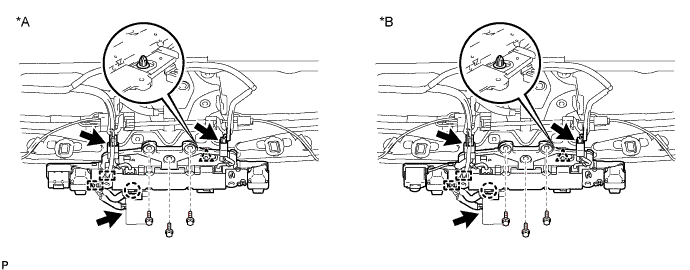
Text in Illustration *A w/o Night View System *B w/ Night View System
-