DRIVER MONITOR ECU (for RHD) INSTALLATION

Tech Tips
A bolt without a torque specification is shown in the standard bolt chart Click here.
-
INSTALL DRIVER MONITOR ECU ASSEMBLY
-
Install the driver monitor ECU assembly with the 2 nuts.
- Torque:
- 8.5 N*m { 86 kgf*cm, 75 in.*lbf }
Note
-
Avoid any impact to the driver monitor ECU assembly.
-
Do not drop the driver monitor ECU assembly. If it is dropped, replace it with a new one.
-
Attach the guide and install the suspension control ECU with the 2 nuts.
- Torque:
- 6.0 N*m { 61 kgf*cm, 53 in.*lbf }
Note
-
Avoid any impact to the suspension control ECU.
-
Do not drop the suspension control ECU. If it is dropped, replace it with a new one.
-
Install the network gateway ECU with the 2 nuts.
- Torque:
- 7.5 N*m { 76 kgf*cm, 66 in.*lbf }
Note
-
Avoid any impact to the network gateway ECU.
-
Do not drop the network gateway ECU. If it is dropped, replace it with a new one.
-
Install the ECU unit with the 2 nuts.
-
Connect the 5 connectors.
-
-
INSTALL DRIVER SIDE KNEE AIRBAG ASSEMBLY
-
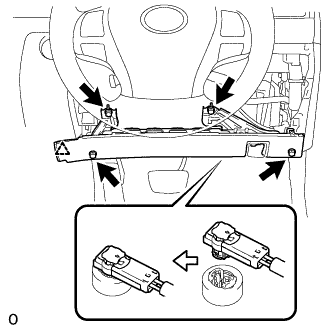
Connect the connector.
Note
When handling the airbag connector, take care not to damage the airbag wire harness.
-
Attach the clip to install the driver side knee airbag.
-
Install the 4 bolts.
- Torque:
- 10 N*m { 102 kgf*cm, 7 ft.*lbf }
-
Attach the claw to install the lock lever.
-
Install the hood lock control lever sub-assembly.
-
-
INSTALL NO. 1 INSTRUMENT PANEL SAFETY PAD SUB-ASSEMBLY
-
Connect each connector.
-
Attach the 5 clips and claw to install the No. 1 instrument panel safety pad sub-assembly.
-
Install the screw and bolt.
-
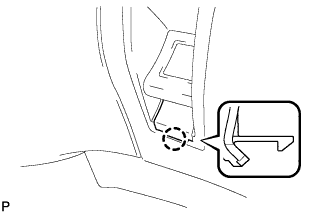
Attach the claw to install the switch base hole cover to the No. 1 instrument panel safety pad sub-assembly.
-
-
INSTALL NO. 1 INSTRUMENT PANEL UNDER COVER SUB-ASSEMBLY
-
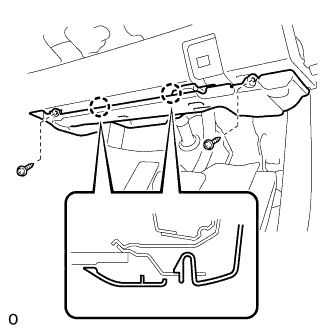
Connect each connector and each clamp.
-
Attach the 2 claws to connect the DLC3.
-
Attach the 2 claws to install the No. 1 instrument panel under cover sub-assembly.
-
Install the 2 screws.
-
-
INSTALL INSTRUMENT PANEL ORNAMENT
-
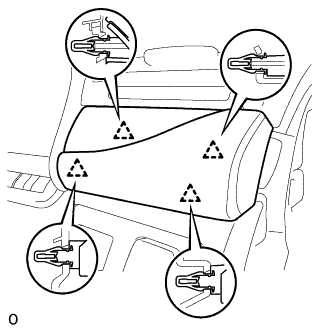
Connect the connector.
-
Attach the 4 clips to install the instrument panel ornament.
-
-
INSTALL INSTRUMENT SIDE PANEL RH
-
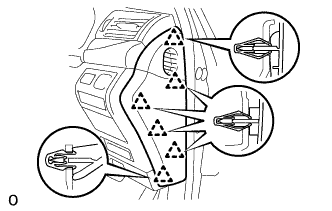
Attach the 6 clips to install the instrument side panel RH.
-
-
CONNECT CABLE TO NEGATIVE BATTERY TERMINAL
Note
When disconnecting the cable, some systems need to be initialized after the cable is reconnected Click here.
-
INSTALL COWL TOP VENTILATOR LOUVER LH
-
Install the 6 clips and cowl top ventilator louver LH.
Note
If the cowl top ventilator louver LH is not properly installed, water may leak into the engine room and cause malfunctions. Therefore, make sure the cowl top ventilator louver LH is installed properly.
-
-
CHECK SRS WARNING LIGHT