REAR MILLIMETER WAVE RADAR SENSOR REMOVAL

-
REMOVE UPPER REAR BUMPER COVER LH
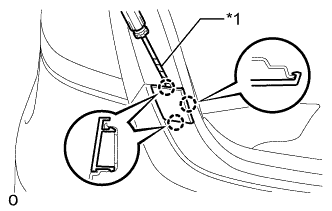
Text in Illustration *1 Protective Tape
-
Using a screwdriver, detach the 3 claws and remove the upper rear bumper cover LH.
Tech Tips
Tape the screwdriver tip before use.
-
-
REMOVE UPPER REAR BUMPER COVER RH
Tech Tips
Use the same procedure described for the LH side.
-
REMOVE REAR BUMPER COVER
-
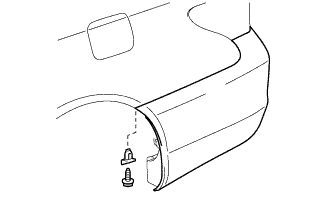
Remove the screw, and then remove the rear bumper seal bracket.
Tech Tips
Use the same procedure for both screws and rear bumper seal brackets.
-
Remove the 2 screws.
-
Put protective tape around the rear bumper cover.
-
Using a clip remover, remove the 6 clips.
-
Remove the 2 screws.
-
Detach the 14 claws and 4 guides.
-
Disconnect the No. 3 floor wire connector.
-
Remove the rear bumper cover.
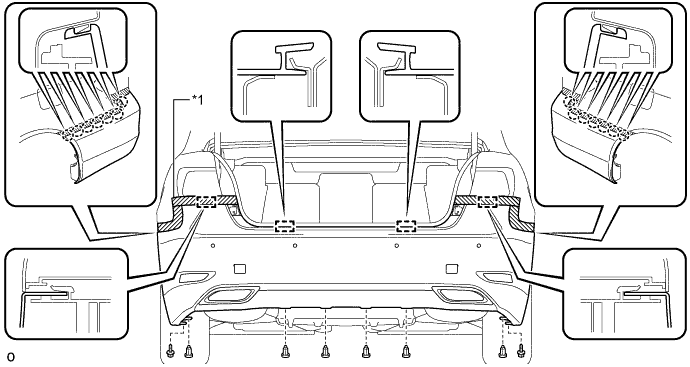
Text in Illustration *1 Protective Tape - -
-
-
REMOVE REAR BUMPER ENERGY ABSORBER
-
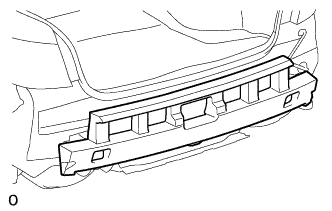
Remove the rear bumper energy absorber.
-
-
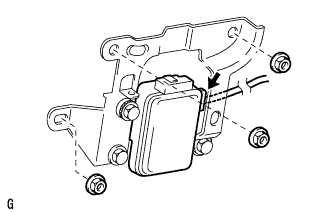
REMOVE REAR MILLIMETER WAVE RADAR SENSOR ASSEMBLY
-
Disconnect the connector.
-
Remove the 3 nuts and rear millimeter wave radar sensor assembly.
-