STEERING GEAR (for AWD with VGRS) DISASSEMBLY

-
FIX POWER STEERING LINK ASSEMBLY
-
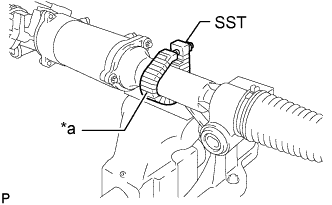
Text in Illustration *a Protective Tape Using SST, secure the power steering link assembly.
- SST
- 09612-00012
Tech Tips
Tape the SST before use.
-
-
REMOVE TIE ROD ASSEMBLY LH
-
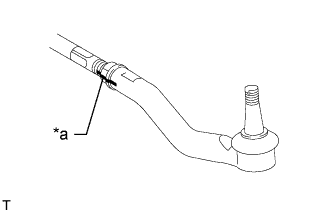
Text in Illustration *a Matchmark Put matchmarks on the tie rod assembly LH and the steering rack end sub-assembly.
-
Loosen the lock nut, and remove the tie rod assembly LH and the lock nut.
-
-
REMOVE TIE ROD ASSEMBLY RH
Tech Tips
Perform the same procedure as for the LH side.
-
REMOVE STEERING RACK BOOT CLIP
-
Using pliers, remove the 2 steering rack boot clips.
-
-
REMOVE NO. 1 STEERING RACK BOOT CLAMP
-
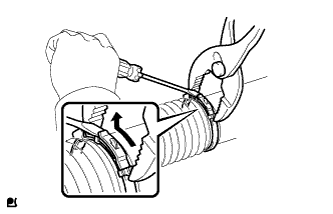
for Type A:
-
Using pliers, squeeze the No. 1 steering rack boot clamp.
-
Using a screwdriver, move the end of the No. 1 steering rack boot clamp as shown in the illustration to remove the No. 1 steering rack boot clamp.
Note
If the No. 1 steering rack boot is damaged when removing the No. 1 steering rack boot clamp, replace the No. 1 steering rack boot with a new one.
Tech Tips
Use the same procedure for the RH and LH sides.
-
-
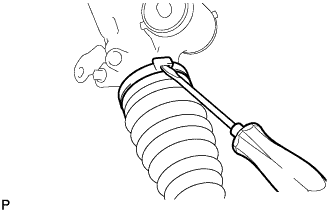
for Type B:
Using a screwdriver, unstake the No. 1 steering rack boot clamp to remove it.
Note
If the No. 1 steering rack boot is damaged when removing the No. 1 steering rack boot clamp, replace the No. 1 steering rack boot with a new one.
Tech Tips
Use the same procedure for the RH and LH sides.
-
-
REMOVE NO. 1 STEERING RACK BOOT
-
Remove the 2 No. 1 steering rack boots.
-
-
REMOVE STEERING RACK END SUB-ASSEMBLY
-
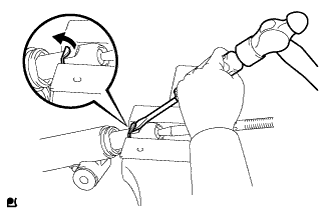
Using a screwdriver and a hammer, unstake the RH and LH claw washers.
Note
Avoid any impact to the steering rack.
-
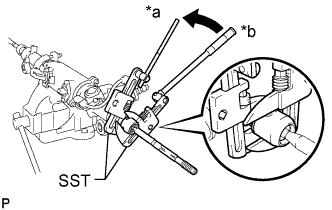
Text in Illustration *a Hold *b Turn Using SST, remove the steering rack end sub-assembly (LH side) and the claw washer.
- SST
- 09922-10010
Note
Use SST 09922-10010 following the direction shown in the illustration.
-
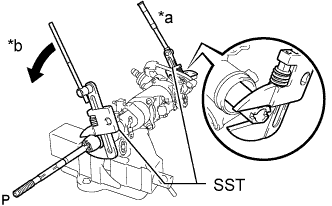
Text in Illustration *a Hold *b Turn Using SST, remove the steering rack end sub-assembly (RH side) and the claw washer.
- SST
- 09922-10010
Note
Use SST 09922-10010 following the direction shown in the illustration.
Tech Tips
Using SST, hold the rack and remove the steering rack end sub-assembly.
-
-
REMOVE HARNESS BRACKET
-
for LHD:
-
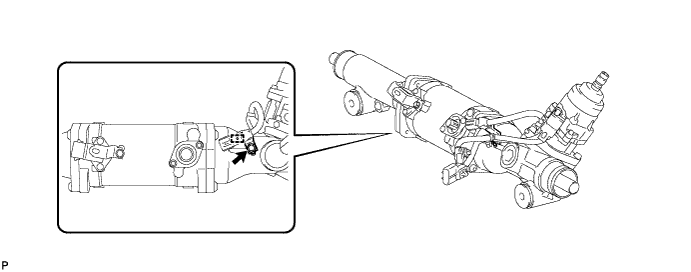
Remove the bolt and harness bracket.
-
Using a screwdriver, detach the harness clamp from the harness bracket.
-
-
for RHD:
-
Remove the 4 bolts and 4 harness brackets.
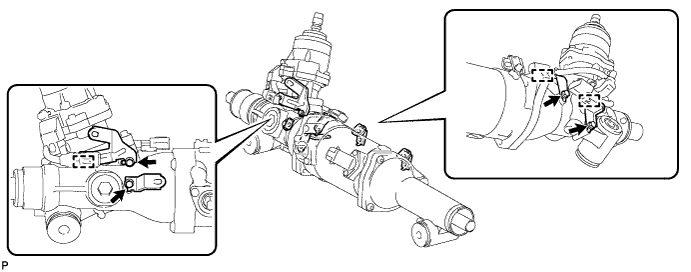
-
Using a screwdriver, detach the 3 harness clamps from the harness brackets.
-
-
-
INSPECT PRELOAD
-
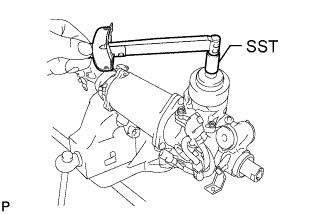
Using SST, measure the preload (turning torque) a few times.
- SST
- 09616-00011
Tech Tips
-
Take measurements in a range of 90° to the left and right.
-
Measure for approximately 3 seconds.
-
Record the average of the measurements.
-
-
REMOVE STEERING ACTUATOR ASSEMBLY
-
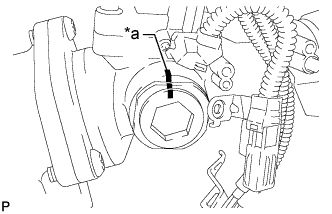
Text in Illustration *a Matchmark Place matchmarks on the rack guide spring cap and rack housing.
-
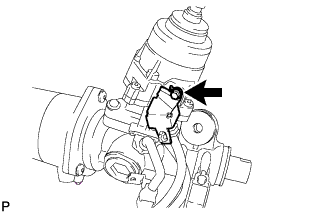
Remove the bolt and harness cover.
-
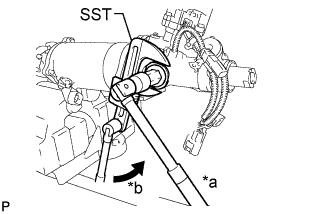
Text in Illustration *a Hold *b Turn Using SST and a hexagon wrench, fix the rack guide spring cap in place and remove the rack guide spring cap nut.
- SST
- 09922-10010
Note
Use SST as shown in the illustration.
-
Using a hexagon wrench, remove the rack guide spring cap and rack guide spring.
-
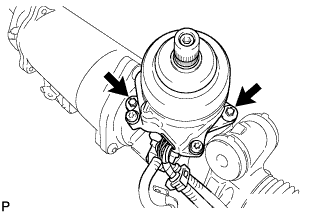
Using an "TORX" socket wrench, remove the 2 bolts and steering actuator.
-
Remove the O-ring and spacer from the steering actuator.
-