REAR SUSPENSION MEMBER REMOVAL

-
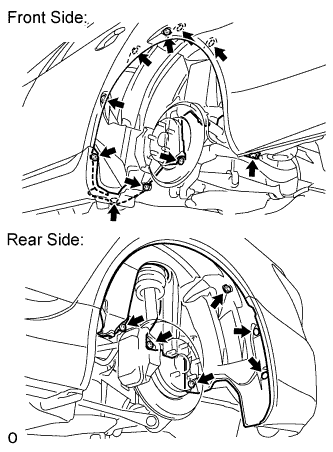
REMOVE REAR WHEEL HOUSE LINER LH
-
Remove the 3 screws, 11 nuts and 2 clips from the liner.
-
-
DISCONNECT NO. 1 ACTUATOR HARNESS CLAMP
-
REMOVE REAR AXLE ASSEMBLY LH
-
REMOVE REAR AXLE ASSEMBLY RH
Tech Tips
Use the same procedure described for the LH side.
-
REMOVE PROPELLER SHAFT WITH CENTER BEARING ASSEMBLY
-
REMOVE REAR DIFFERENTIAL CARRIER ASSEMBLY WITH DRIVE SHAFT
-
REMOVE REAR HEIGHT CONTROL SENSOR SUB-ASSEMBLY LH
-
Disconnect the connector.
-
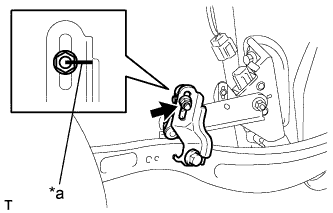
Text in Illustration *a Matchmark Place matchmarks on the height control sensor link and bracket.
-
Remove the nut and disconnect the height control sensor link from the bracket.
-
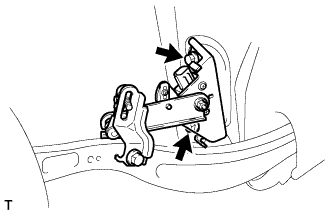
Remove the 2 bolts and height control sensor from the rear suspension member.
Note
Do not drop the height control sensor. If it is dropped, replace it with a new one.
-
-
REMOVE REAR HEIGHT CONTROL SENSOR SUB-ASSEMBLY RH
Tech Tips
Use the same procedure described for the LH side.
-
REMOVE LOAD SENSING VALVE SENSOR BRACKET
-
Remove the bolt and bracket from the lower arm.
-
-
REMOVE REAR SUSPENSION MEMBER SUB-ASSEMBLY
-
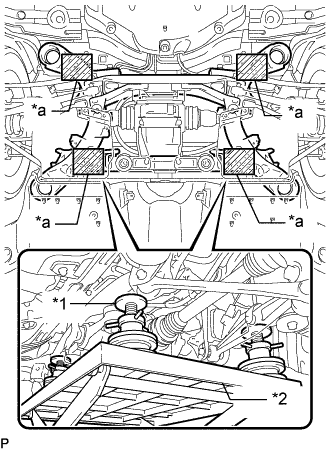
Text in Illustration *1 Attachment *2 Engine Lifter *a Attachment placement location Support the rear suspension member sub-assembly with an engine lifter using 4 attachments or equivalent tools as shown in the illustration.
Note
-
Use the attachments to keep the rear suspension member sub-assembly level.
-
The rear suspension member sub-assembly is a heavy component. Make sure that it is supported securely.
-
-
for Sports Package:
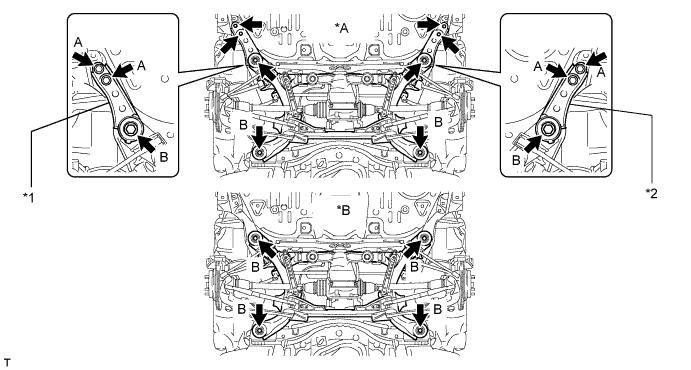
Text in Illustration *A for Sports Package *B for Standard *1 Suspension Member Stopper Lower RH *2 Suspension Member Stopper Lower LH
-
Remove the 4 bolts labeled A.
-
Remove the 4 bolts labeled B and 2 suspension member stoppers.
-
Slowly lower the rear suspension member sub-assembly.
Note
When lowering the rear suspension member sub-assembly, be careful not to damage the vehicle body or other components installed on the vehicle.
-
-
for Standard:
-
Remove the 4 bolts.
-
Slowly lower the rear suspension member sub-assembly.
Note
When lowering the rear suspension member sub-assembly, be careful not to damage the vehicle body or other components installed on the vehicle.
-
-
-
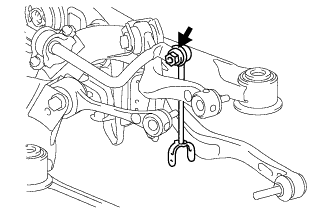
REMOVE REAR STABILIZER LINK ASSEMBLY LH
-
Remove the nut and disconnect the stabilizer link from the stabilizer bar.
Tech Tips
If the ball joint turns together with the nut, use a 6 mm hexagon wrench to hold the stud.
-
-
REMOVE REAR STABILIZER LINK ASSEMBLY RH
Tech Tips
Use the same procedures described for the LH side.
-
REMOVE ELECTRIC PARKING BRAKE ACTUATOR
-
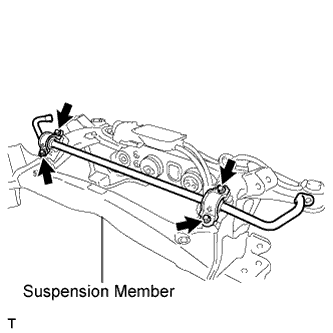
REMOVE REAR STABILIZER BAR
-
Remove the 4 bolts and stabilizer bar from the suspension member.
Tech Tips
The stabilizer bracket and bush are built onto the stabilizer bar. If the bracket and/or bush detach from the bar, replace the bar.
-
-
REMOVE REAR SUSPENSION MEMBER DAMPER
-
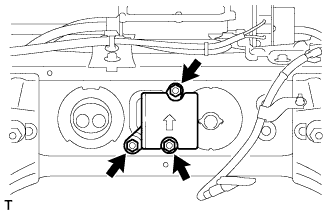
Remove the 3 bolts, and the rear suspension member damper.
-
-
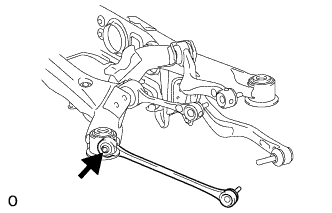
REMOVE REAR NO. 1 SUSPENSION ARM ASSEMBLY LH
-
Remove the bolt, nut and No. 1 suspension arm from the suspension member.
-
-
REMOVE REAR NO. 1 SUSPENSION ARM ASSEMBLY RH
Tech Tips
Use the same procedures described for the LH side.
-
REMOVE TOE CONTROL LINK SUB-ASSEMBLY LH

-
Place matchmarks on the No. 2 suspension toe adjust plate and suspension member.
Text in Illustration *a Matchmark -
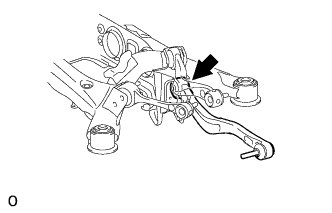
Remove the nut, No. 2 toe adjust plate, toe adjust cam and toe control link from the suspension member.
-
-
REMOVE TOE CONTROL LINK SUB-ASSEMBLY RH
Tech Tips
Use the same procedures described for the LH side.
-
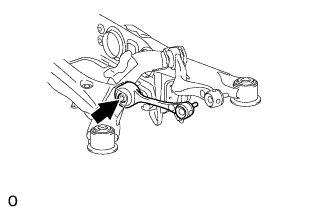
REMOVE REAR NO. 1 UPPER CONTROL ARM ASSEMBLY LH
-
Remove the nut, washer, bolt and control arm from the rear suspension member.
-
-
REMOVE REAR NO. 1 UPPER CONTROL ARM ASSEMBLY RH
Tech Tips
Use the same procedures described for the LH side.
-
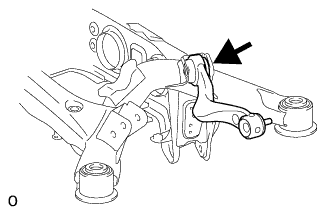
REMOVE REAR NO. 2 UPPER CONTROL ARM ASSEMBLY LH
-
Remove the nut, washer, bolt and rear control arm from the rear suspension member.
-
-
REMOVE REAR NO. 2 UPPER CONTROL ARM ASSEMBLY RH
Tech Tips
Use the same procedures described for the LH side.
-
REMOVE REAR NO. 1 DIFFERENTIAL MOUNT CUSHION
-
Pass SST bolts through the area shown in the illustration, and remove the mount cushion No. 1.
- SST
- 09316-12010
- 09570-24011
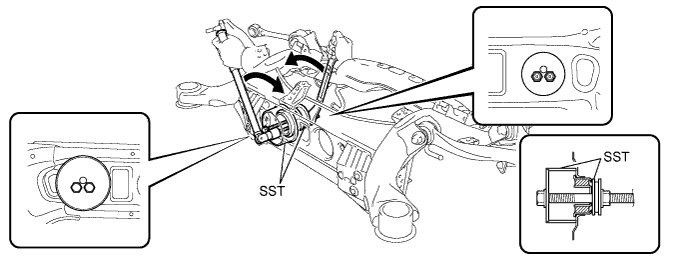
Note
-
When removing the mount cushion No. 1, do not allow the rear suspension member to contact SST (09316-12010).
-
Before using SST bolts, apply hypoid gear oil to their threads.
-
Be sure to combine SST properly.
-
Do not install SST bolts at an angle.
-
Make sure SST bolts are tightened equally.
-
-
REMOVE REAR NO. 2 DIFFERENTIAL MOUNT CUSHION
-
Pass SST bolt through the area shown in the illustration, and remove the mount cushion No. 2.
- SST
- 09316-12010
- 09570-24011
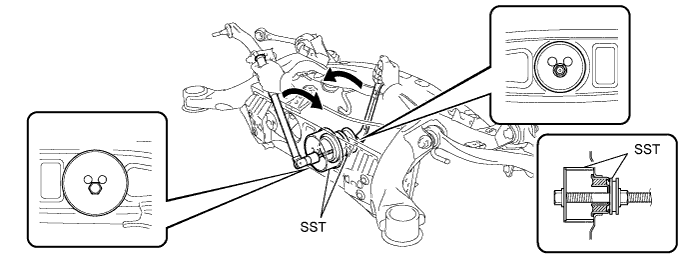
Note
-
When removing the mount cushion No. 2, do not allow the rear suspension member to contact SST (09316-12010).
-
Before using SST bolt, apply hypoid gear oil to its threads.
-
Be sure to combine SST properly.
-
Do not install SST bolts at an angle.
-
-
REMOVE REAR SUSPENSION MEMBER BODY MOUNTING CUSHION LH (for Front Side)

-
Using a chisel, widen the area between the rear suspension member and the body mounting cushion enough for the claws of SST.
-

Using SST, remove the rear suspension member body mounting cushion.
- SST
- 09950-40011 ( 09951-04020, 09952-04010, 09953-04030, 09954-04020, 09957-04010, 09958-04011 )
- 09950-60010 ( 09951-00540 )
Note
-
Be careful as the rear suspension member body mounting cushion may come out with force.
-
Do not reuse the removed rear suspension body mounting cushion.
-
If the outer cylinder of the rear suspension member body mounting cushion remains, insert SST into the gaps between the rear suspension member and the body mounting cushion and remove it.
-
Cut off the mounting cushion until SST can be set.
-

Using SST, remove the outer cylinder of the body mounting cushion.
- SST
- 09608-06041
- 09950-40011 ( 09951-04020, 09952-04010, 09953-04030, 09954-04020, 09957-04010, 09958-04011 )
- 09950-60010 ( 09951-00540 )
- 09950-60020 ( 09951-00680 )
-
-
-
REMOVE REAR SUSPENSION MEMBER BODY MOUNTING CUSHION RH (for Front Side)
Tech Tips
Use the same procedures described for the LH side.
-
REMOVE REAR SUSPENSION MEMBER BODY MOUNTING CUSHION (for Rear Side)

-
Using SST, remove the rear suspension member body mounting cushion.
- SST
- 09950-00020
- 09950-00030
- 09950-40011 ( 09957-04010 )
- 09950-60010 ( 09951-00540 )
Note
-
Be careful as the rear suspension member body mounting cushion may come out with force.
-
Do not reuse the removed rear suspension body mounting cushion.
-
If the outer cylinder of the rear suspension member body mounting cushion remains, insert SST into the gaps between the rear suspension member and the body mounting cushion and remove it.
-
Cut off the mounting cushion until SST can be set.
-

Using SST, remove the outer cylinder of the body mounting cushion.
- SST
- 09608-06041
- 09950-00020
- 09950-00030
- 09950-60020
-
-