REAR AXLE HUB REMOVAL

Tech Tips
-
Use the same procedures for the RH side and LH side.
-
The procedures listed below are for the LH side.
-
REMOVE REAR WHEEL
-
REMOVE LOAD SENSING VALVE SENSOR BRACKET
-
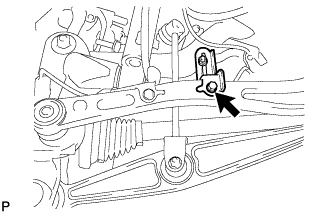
Remove the bolt and load sensing valve sensor bracket from the toe control link sub-assembly.
-
-
DISCONNECT REAR STABILIZER LINK ASSEMBLY LH
-
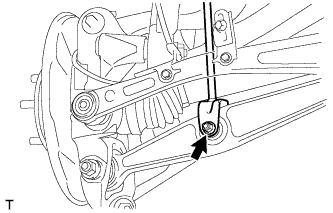
Remove the bolt and nut, and then disconnect the rear stabilizer link assembly LH from the rear No. 2 suspension arm assembly LH.
-
-
REMOVE REAR AXLE SHAFT LH NUT
-
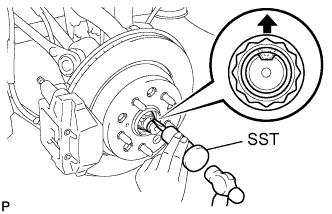
Using SST and a hammer, release the staked part of the rear axle shaft LH nut.
- SST
- 09930-00010
Note
Release the staked part of the nut completely, otherwise the screw of the drive shaft may be damaged.
-
While applying the brakes, remove the rear axle shaft LH nut.
-
-
DISCONNECT REAR DISC BRAKE CALIPER ASSEMBLY LH
-
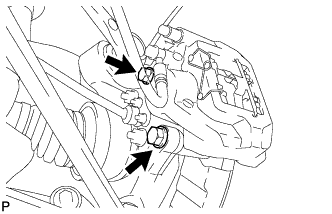
Remove the 2 bolts and disconnect the rear disc brake caliper assembly.
Note
-
Hang the caliper with wire or equivalent.
-
Do not damage the brake hose.
-
-
-
DISCONNECT SPEED SENSOR REAR LH
-
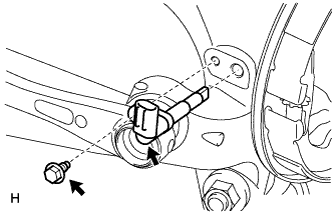
Remove the bolt and sensor.
Note
-
The rear speed sensor is easily damaged. When pulling out the rear speed sensor from the rear axle hub RH, do not use excessive force to rotate and remove it.
-
Prevent foreign matter from attaching to the sensor tip.
-
Do not drop the sensor. If the sensor has been dropped, replace the sensor with a new one.
-
-
-
REMOVE PARKING BRAKE ASSEMBLY
-
DISCONNECT REAR SHOCK ABSORBER ASSEMBLY LH (for Coil suspension)
-
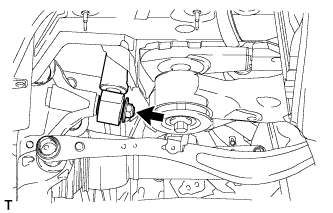
Remove the nut and disconnect the shock absorber from axle carrier side.
-
-
DISCONNECT PNEUMATIC CYLINDER WITH REAR SHOCK ABSORBER ASSEMBLY LH (for Air suspension)
-
Remove the nut and disconnect the pneumatic cylinder from axle carrier side.
-
-
REMOVE REAR NO. 2 SUSPENSION ARM ASSEMBLY LH
-
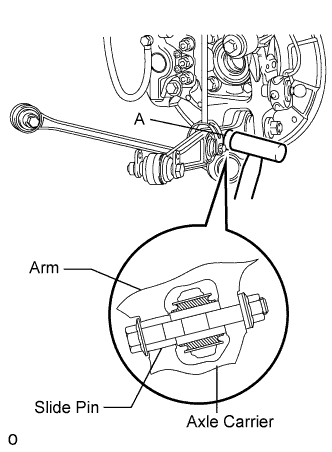
Using a plastic-faced hammer or equivalent, strike the part labeled A from the rear of the vehicle to maintain the clearance at the slide pin area.
Note
Be careful not to damage the arm.
-
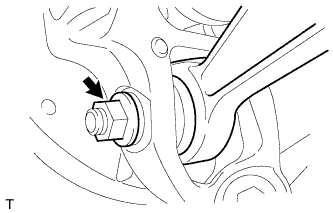
Remove the bolt and nut, and then disconnect the rear No. 2 suspension arm assembly LH from the rear axle carrier.
-
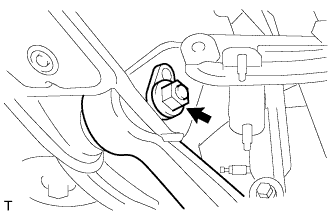
Remove the nut, rear suspension attachment sub-assembly, and rear No. 2 suspension toe adjust plate. Then remove the rear No. 2 suspension arm assembly.
-
-
DISCONNECT REAR NO. 1 SUSPENSION ARM ASSEMBLY LH
-
Remove the nut from the rear No. 1 suspension arm.
-
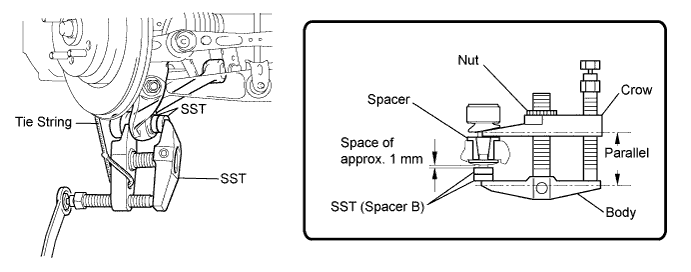
Install 2 spacers (SST spacer B) onto the rear No. 1 suspension arm so that there is a space of approximately 1 mm (0.0394 in.) between the arm and spacers.
- SST
- 09960-20010 ( 09961-02060 )
Note
-
Make sure to install the spacers (SST spacer B) as the steering knuckle spacer may shift.
-
As SST may become damaged, make sure the space between the arm and spacers is not 1 mm (0.0394 in.) or less.
-
Using SST, disconnect the rear No. 1 suspension arm from the axle carrier.
- SST
- 09960-20010 ( 09961-02010 )
Note
-
Apply molybdenum grease to the threads and end of the SST bolt.
-
Do not damage the ball joint dust cover.
-
As the dust cover may be damaged, adjust SST with the center nut so that the body and crow are parallel.
-
Make sure to tie the string of SST to the vehicle to prevent SST from dropping.
-
-
DISCONNECT TOE CONTROL LINK SUB-ASSEMBLY LH
-
Remove the nut on the rear axle carrier side.
-
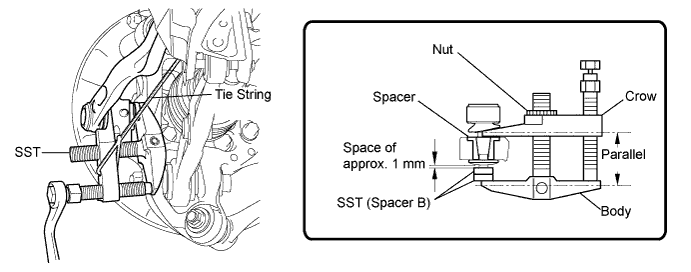
Install 2 spacers (SST spacer B) onto the toe control link so that there is a space of approximately 1 mm (0.0394 in.) between the arm and spacers.
- SST
- 09960-20010 ( 09961-02060 )
Note
-
Make sure to install the spacers (SST spacer B) as the steering knuckle spacer may shift.
-
As SST may become damaged, make sure the space between the arm and spacers is not 1 mm (0.0394 in.) or less.
-
Using SST, disconnect the toe control link from the axle carrier.
- SST
- 09960-20010 ( 09961-02010 )
Note
-
Apply molybdenum grease to the threads and end of the SST bolt.
-
Do not damage the ball joint dust cover.
-
As the dust cover may be damaged, adjust SST with the center nut so that the body and crow are parallel.
-
Make sure to tie the string of SST to the vehicle to prevent SST from dropping.
-
-
DISCONNECT REAR UPPER NO. 1 CONTROL ARM ASSEMBLY LH
-
Remove the nut on the rear axle carrier side.
-
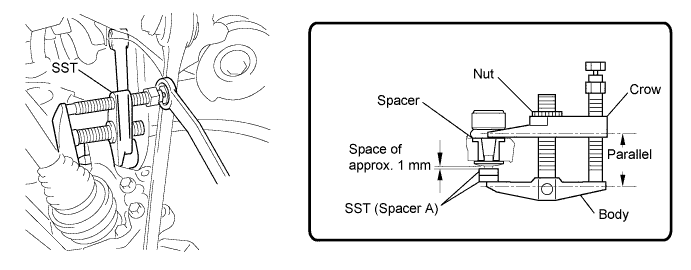
Install 2 spacers (SST spacer A) onto the rear upper No. 1 control arm so that there is a space of approximately 1 mm (0.0394 in.) between the arm and spacers.
- SST
- 09960-20010 ( 09961-02050 )
Note
-
Make sure to install the spacers (SST spacer A) as the steering knuckle spacer may shift.
-
As SST may become damaged, make sure the space between the arm and spacers is not 1 mm (0.0394 in.) or less.
-
Using SST, disconnect the upper No. 1 control arm from the axle carrier.
- SST
- 09960-20010 ( 09961-02010 )
Note
-
Apply molybdenum grease to the threads and end of the SST bolt.
-
Do not damage the ball joint dust cover.
-
As the dust cover may be damaged, adjust SST with the center nut so that the body and crow are parallel.
-
Make sure to tie the string of SST to the vehicle to prevent SST from dropping.
-
-
DISCONNECT REAR UPPER NO. 2 CONTROL ARM ASSEMBLY LH
-
Remove the nut on the rear axle carrier side.
-
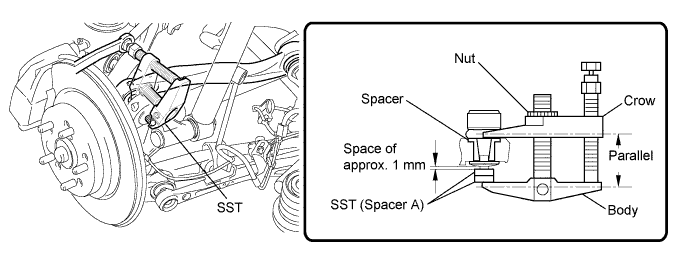
Install 2 spacers (SST spacer A) onto the rear upper No. 2 control arm so that there is a space of approximately 1 mm (0.0394 in.) between the arm and spacers.
- SST
- 09960-20010 ( 09961-02050 )
Note
-
Make sure to install the spacers (SST spacer A) as the steering knuckle spacer may shift.
-
As SST may become damaged, make sure the space between the arm and spacers is not 1 mm (0.0394 in.) or less.
-
Using SST, disconnect the upper No. 2 control arm from the axle carrier.
- SST
- 09960-20010 ( 09961-02010 )
Note
-
Apply molybdenum grease to the threads and end of the SST bolt.
-
Do not damage the ball joint dust cover.
-
As the dust cover may be damaged, adjust SST with the center nut so that the body and crow are parallel.
-
Make sure to tie the string of SST to the vehicle to prevent SST from dropping.
-
-
REMOVE REAR AXLE ASSEMBLY LH
-
Using a plastic-faced hammer, separate the drive shaft from the rear axle carrier sub-assembly.
-
Remove the rear axle assembly.
Note
-
Be careful not to damage the boots.
-
Use a wire or an equivalent to keep the rear drive shaft assembly from hanging down.
-
-
-
REMOVE REAR NO. 1 WHEEL BEARING DUST DEFLECTOR LH
-
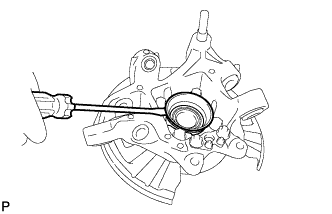
Using a screwdriver, remove the bearing dust deflector from the rear axle carrier.
Note
Be careful not to dent or damage the axle carrier, as it is made of aluminum.
-
-
REMOVE REAR AXLE HUB AND BEARING ASSEMBLY LH
-
Hold the axle hub and bearing in a vise between aluminum plates.
Note
Do not overtighten the vise.
-
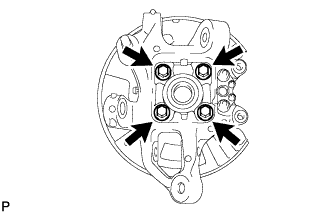
Remove the 4 bolts and axle hub and bearing from the rear axle carrier.
-
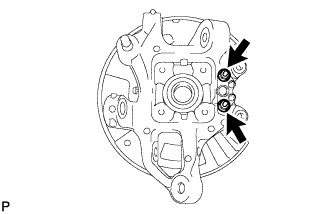
Remove the 2 nuts, parking brake anchor block, parking brake cable support bracket, and parking brake plate from the rear axle carrier.
-