FLOOR SHIFT ASSEMBLY DISASSEMBLY

Tech Tips
-
Use the same procedure for the RHD and LHD sides.
-
The procedure listed below is for the LHD sides.
-
REMOVE SHIFT POSITION INDICATOR
-
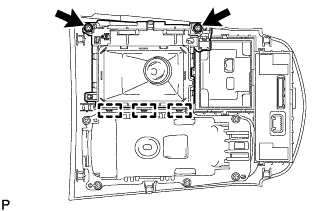
Remove the 2 screws and detach the 3 hooks. Then remove the shift position indicator from the rear upper console panel sub-assembly.
-
-
REMOVE SHIFT LEVER BOOT COVER
-
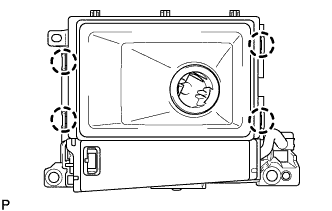
Detach the 4 claws and remove the shift lever boot cover.
-
-
REMOVE SHIFTING HOLE COVER SUB-ASSEMBLY
-
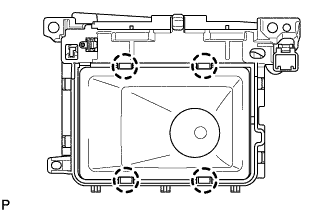
Detach the 4 claws and remove the shifting hole cover sub-assembly.
-
-
REMOVE SHIFT LEVER CAP
-
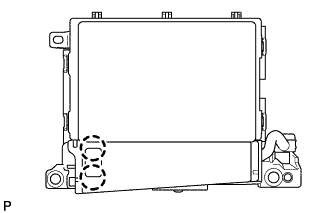
Detach the 2 claws and remove the shift lever cap.
-
-
REMOVE CONTROL POSITION INDICATOR PLATE
-
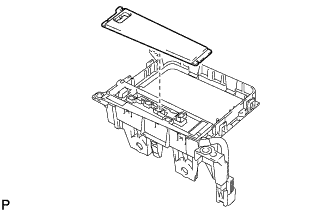
Remove the control position indicator plate.
-
-
REMOVE SHIFT LOCK RELEASE BUTTON
-
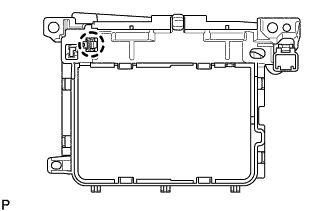
Detach the claw and remove the shift lock release button.
-
-
REMOVE INDICATOR LIGHT WIRE SUB-ASSEMBLY
-
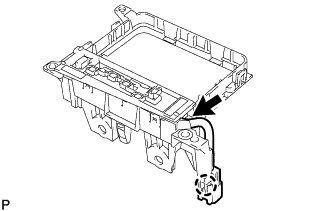
Disconnect the connector.
-
Detach the connector clamp and remove the indicator light wire sub-assembly.
-