CAMSHAFT (for Bank 2) REMOVAL

-
REMOVE CHAIN SUB-ASSEMBLY
-
REMOVE CAMSHAFT BEARING CAP (for Bank 2)
-
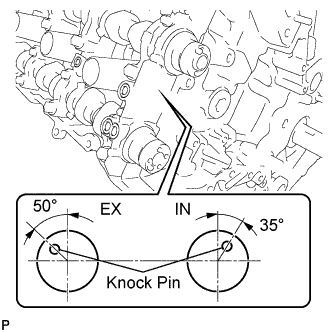
Make sure that the knock pin of the camshaft is positioned as shown in the illustration.
-
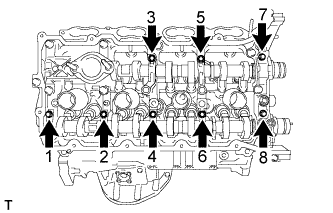
Uniformly loosen and remove the 8 bearing cap bolts in the sequence shown in the illustration.
-
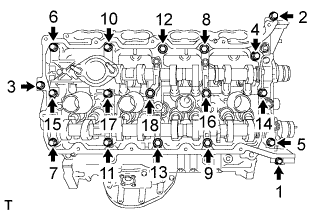
Uniformly loosen and remove the 18 bearing cap bolts in the sequence shown in the illustration.
Note
Uniformly loosen the bolts while keeping the camshaft level.
-
Remove the 7 bearing caps.
Note
Arrange the removed parts in the correct order.
-
Remove the No. 1 and No. 2 camshafts.
-
-
REMOVE CAMSHAFT HOUSING SUB-ASSEMBLY (for Bank 2)
-
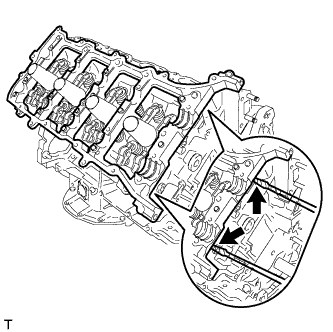
Remove the camshaft housing by prying between the cylinder head and camshaft housing with a screwdriver.
Note
Be careful not to damage the contact surfaces of the cylinder head and camshaft housing.
Tech Tips
Tape the screwdriver tip before use.
-