VVT SENSOR REMOVAL

-
REMOVE V-BANK COVER SUB-ASSEMBLY
-
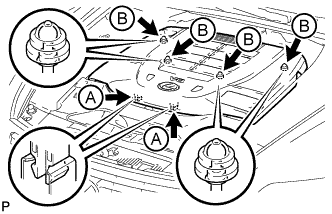
Using both hands, lift the rear side of the cover upwards to detach the 4 clips labeled B. Then slide the cover toward the front of the vehicle to detach the 2 clips labeled A and remove the V-bank cover sub-assembly.
Note
-
The V-bank cover sub-assembly may be damaged if its front and rear are lifted at the same time.
-
When detaching the clips labeled A, be sure to slide the cover toward the front of the vehicle.
-
-
-
REMOVE AIR CLEANER INLET COVER SUB-ASSEMBLY
-
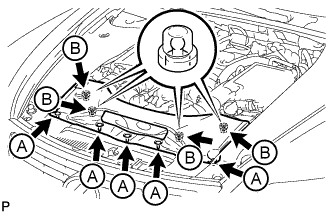
Remove the 5 clips labeled A.
-
Lift up the air cleaner inlet cover sub-assembly to detach the 4 clips labeled B, and remove the air cleaner inlet cover sub-assembly.
-
-
REMOVE NO. 1 AIR CLEANER INLET
-

Remove the 2 bolts.
-
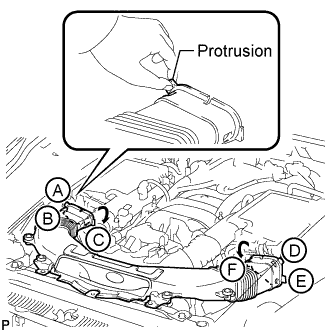
Hold the No. 1 air cleaner inlet by the protrusions labeled A and labeled B, and detach the connections.
-
Rotate the No. 1 air cleaner inlet as shown in the illustration to detach the protrusion labeled C.
-
Hold the No. 1 air cleaner inlet by the protrusions labeled D and labeled E, and detach the connections.
-
Rotate the No. 1 air cleaner inlet as shown in the illustration to detach the protrusion labeled F.
-
-
REMOVE AIR CLEANER ASSEMBLY LH
-
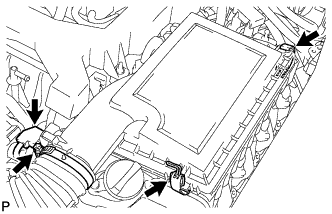
Disconnect the MAF meter connector.
-
Remove the 2 clips, hose clamp and air cleaner cap.
-
Remove the element from the air cleaner case.
-
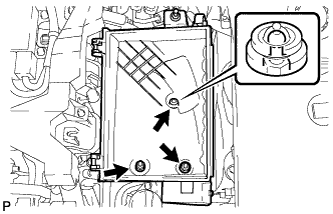
Remove the 2 nuts, clip and air cleaner case.
-
-
REMOVE AIR CLEANER ASSEMBLY RH
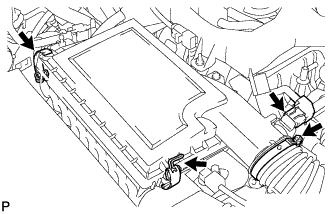
-
Disconnect the MAF meter connector.
-
Remove the 2 clips, hose clamp and air cleaner cap.
-
Remove the element from the air cleaner case.
-
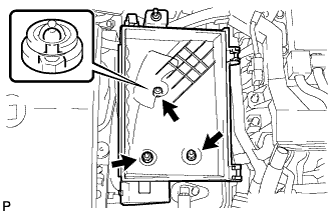
Remove the 2 nuts, clip and air cleaner case.
-
-
REMOVE VVT SENSOR
-
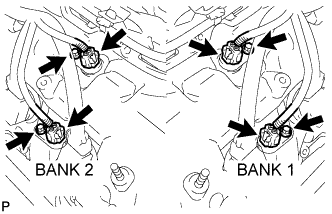
Disconnect the 4 VVT sensors.
-
Remove the 4 bolts and 4 VVT sensors.
-