AUDIO AND VISUAL SYSTEM (w/o Microphone) Radio Broadcast cannot be Received (Bad Reception)
INSPECTION PROCEDURE
PROCEDURE
-
CHECK WHETHER RADIO AUTO-SEARCH FUNCTIONS PROPERLY
-
Check whether the radio auto-search functions properly.
-
Perform the auto-search of the radio and check that it functions normally.
OK The radio auto-search functions properly.
-
OK 
REPLACE RADIO RECEIVER
NG 
-
-
CHECK FOR OPTIONAL COMPONENTS
-
Check for the optional components such as sun shade film and telephone antenna.
-
Check whether or not any optional component, such as the sunshade film and the telephone antenna, is installed.
OK An optional components are installed.
-
OK
EFFECT FROM OPTIONAL COMPONENTS
NG
-
-
CHECK ANTENNA FOR NOISE PRODUCTION
-
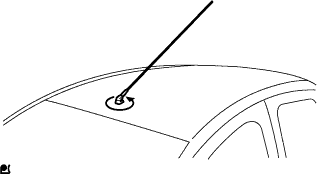
Check for noise from the antenna.
-
Remove the pull top antenna pole by turning it in the direction shown by the arrow in the illustration.
-
With the ignition switch ON (ACC), turn on the radio and choose the AM mode.
-
Place the tip of a screwdriver on the antenna base and check that noise is heard from the speakers.
OK Noise occurs. 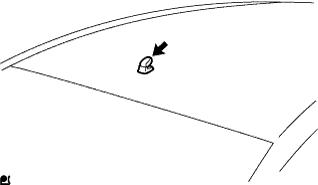
-
OK
REPLACE PULL TOP ANTENNA POLE
NG
-
-
INSPECT RADIO RECEIVER (ANTENNA)
-
Prepare for the check.
-
Remove the antenna plug of the radio receiver.
-
-
Check for noise.
-
With the radio receiver connector connected, turn the ignition switch to ACC.
-
Turn on the radio and choose the AM mode.
-
Place a flat-head screwdriver or metal object such as a thin wire on the antenna jack of the radio receiver and check that noise is heard from the speakers.
OK Noise occurs. 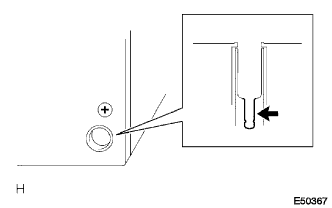
-
NG
REPLACE RADIO RECEIVER ASSEMBLY
OK 
REPLACE ANTENNA CORD
-