AUDIO AND VISUAL SYSTEM (w/o Microphone) CD Sound Skips
INSPECTION PROCEDURE
Tech Tips
The sound may skip when driving on an unpaved road.
PROCEDURE
-
DISC CLEANING
-
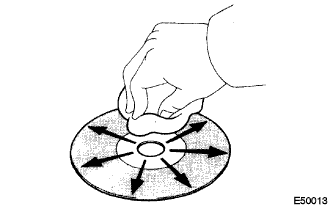
Clean the disc.
-
If the disc gets dirty, clean the disc by wiping the surface from the center to the outside, in a radial direction, with a soft cloth as shown in the illustration.
Note
Do not use a conventional record cleaner or anti-static preservative.
OK The malfunction disappears.
-
OK 
DISC IS DIRTY
NG 
-
-
REPLACE CD WITH ANOTHER AND RECHECK
-
Replace the CD with another and recheck.
-
Replace the CD with another normal one to see whether the same trouble occurs again.
OK The malfunction disappears.
-
OK
CD IS FAULTY
NG
-
-
CHECK RADIO RECEIVER INSTALLATION
-
Check the radio receiver assembly installation condition.
-
Check that the radio receiver is installed properly.
OK Installed properly.
-
NG
INSTALL THE RADIO RECEIVER PROPERLY
OK
-
-
CHECK WHETHER RAPID TEMPERATURE CHANGE OCCURRED IN CABIN
-
Check whether or not a rapid temperature change occurred in the cabin.
OK A rapid temperature change occurred. Tech Tips
A rapid temperature change creates condensation inside the CD player, which may prevent CDs from being played.
NG
REPLACE RADIO RECEIVER
OK 
CONDENSATION DUE TO TEMPERATURE CHANGE (LET IT SIT FOR A WHILE BEFORE USING)
-