AUDIO AND VISUAL SYSTEM (w/ Microphone) CD cannot be Inserted / Played or CD is Ejected Right After Insertion
INSPECTION PROCEDURE
PROCEDURE
-
CHECK IF A PROPER CD IS INSERTED
-
Check whether a normal CD is inserted.
-
Make sure that the CD is a normal audio CD, and that there is no deformation, flaws, stains, burrs or other defects on the CD.
OK A normal audio CD is inserted. Tech Tips
-
Translucent or oddly-shaped CDs cannot be played.
-
Computer CD-ROMs (even those with music) and CD-R discs cannot be played.
-
-
NG 
CD IS FAULTY
OK 
-
-
CHECK THAT CD IS INSERTED PROPERLY
-
Check whether or not the CD is inserted upside down.
OK CD is properly inserted.
NG
SET CD PROPERLY
OK
-
-
CLEAN CD AND RECHECK
-
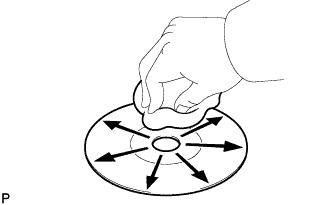
Disc cleaning
-
If dirt is on the disc surface, wipe it clean with a soft cloth from the inside to outside in a radial direction.
OK Malfunction disappears. Note
Do not use a conventional record cleaner or anti-static preservative.
-
NG 
REPLACE CD AND RECHECK Click here
OK 
END
-
-
REPLACE CD AND RECHECK
-
Replace the CD with a known good one and check that the malfunction disappears.
OK Malfunction disappears.
NG
REPLACE RADIO RECEIVER ASSEMBLY Click here
OK
END
-