AUDIO AND VISUAL SYSTEM (w/ Microphone) SYSTEM DESCRIPTION

-
CD (Compact Disc) PLAYER OUTLINE
-
A compact disc player uses a laser pickup to read digital signals recorded on a compact disc (CD). By converting the digital signals to analog, it can play music and audio.
CAUTION:
Do not look directly at the laser pickup because the CD player uses an invisible laser beam. Be sure to operate the player only as instructed.
Note
-
Do not disassemble any part of the CD player.
-
Do not apply oil to the CD player.
-
Do not insert anything but a CD into the CD player.
-
-
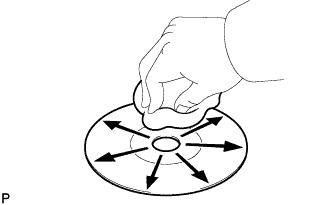
Cleaning
Note
Do not use a lens cleaner because it may cause a malfunction in the pickup portion of the player.
-
If dirt is on the disc surface, wipe it clean with a soft dry cloth such as an eyeglass cleaner for plastic lenses from the inside to the outside in a radial direction.
Note
-
Pressing on the disc by hand or rubbing the disc with a hard cloth may scratch the disc surface.
-
Use of solvents such as record spray, antistatic agents, alcohol, benzine, thinners or a chemical cloth may cause damage to the disc, making the disc unusable.
-
-
-
-
"Bluetooth" OUTLINE
-
"Bluetooth" is a trademark owned by Bluetooth SIG, Inc.
-
"Bluetooth" is a wireless connection technology that uses the 2.4 GHz frequency band.
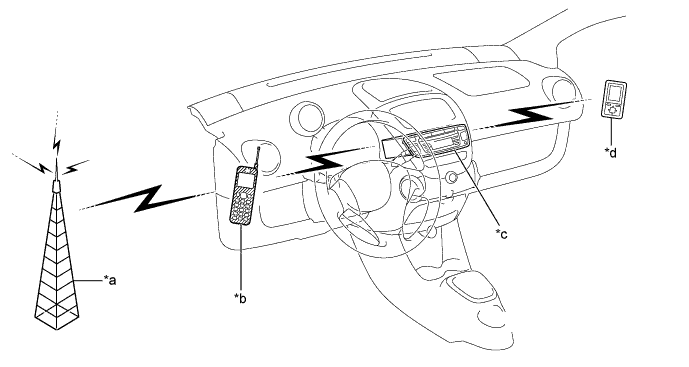
Text in Illustration *a Cellular Tower *b Cellular Phone
("Bluetooth" compatible type)
*c Radio Receiver Assembly
(Built-in "Bluetooth" receiver antenna)
*d Portable Audio Player
("Bluetooth" compatible type)
Tech Tips
The communication performance of "Bluetooth" may vary depending on obstructions or radio wave conditions between communication devices, electromagnetic radiation, communication device sensitivity or antenna capacity.
-
Hands-free function
-
The "Bluetooth" built-in radio receiver assembly and a "Bluetooth" compatible cellular phone* can be connected using a "Bluetooth" wireless connection. This enables the use of the hands-free function on the cellular phone even if the phone is in a pocket or bag. For this reason, it is not necessary to use a connector or cable to connect the cellular phone.
*: Some versions of "Bluetooth" compatible cellular phones may not function.
-
-
"Bluetooth" audio function
-
The "Bluetooth" built-in radio receiver assembly and a "Bluetooth" compatible portable audio player* can be connected using a "Bluetooth" wireless connection. This enables files stored in the portable audio player to be heard from the vehicle speakers. In addition, operations such as play/stop can be performed directly from the radio receiver assembly.
*: Some versions of "Bluetooth" compatible audio players may not be able to operate the "Bluetooth" function, or music may play, but functions available using the radio receiver assembly may be limited.
-
-
-
RADIO DESCRIPTION
-
Radio frequency band
-
Radio broadcasts use the radio frequency bands shown in the table below.
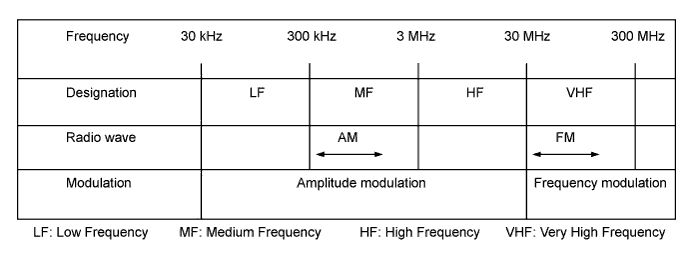
-
-
Service area
-
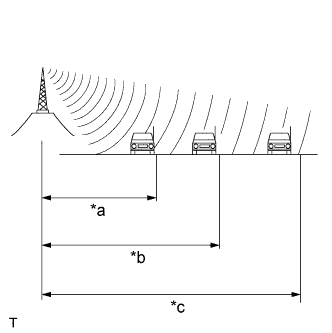
Text in Illustration *a FM (Stereo) *b FM (Monaural) *c AM The service areas of AM and FM broadcasts are vastly different. Sometimes an AM broadcast can be received very clearly but an FM stereo broadcast cannot. FM stereo has the smallest service area, and is prone to pick up static and other types of interference such as noise.
-
-
Radio reception problems
Tech Tips
In addition to static, other problems such as "phasing", "multipath" and "fade out" exist. These problems are not caused by electrical noise, but by the radio signal propagation method itself.
-
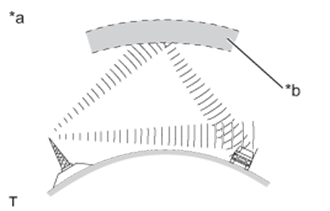
Text in Illustration *a Phasing *b Ionosphere Phasing
AM broadcasts are susceptible to electrical interference and another kind of interference called phasing. Occurring only at night, phasing is the interference created when a vehicle receives 2 radio wave signals from the same transmitter. One signal is reflected off the ionosphere and the other signal is received directly from the transmitter.
-
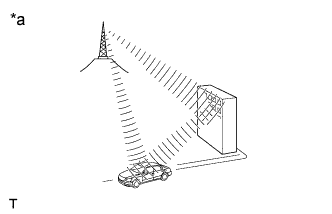
Text in Illustration *a Multipath Multipath
Multipath is a type of interference created when a vehicle receives 2 radio wave signals from the same transmitter. One signal is reflected off buildings or mountains and the other signal is received directly from the transmitter.
-
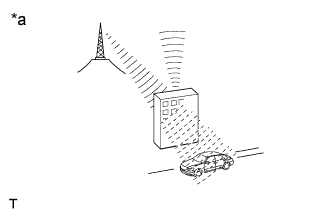
Text in Illustration *a Fade Out Fade out
Fade out is caused by objects (buildings, mountains and other such large obstacles) that deflect away part of a signal, resulting in a weaker signal when the object is between the transmitter and vehicle. High frequency radio waves, such as FM broadcasts, are easily deflected by obstructions. Low frequency radio waves, such as AM broadcasts, are less likely to deflect.
-
-
Noise problem
Technicians must have a clear understanding about each customer's noise complaint. Use the following table to diagnose noise problems.
Radio Frequency Noise Occurrence Condition Presumable Cause AM Noise occurs in a specific area Foreign noise AM Noise occurs when listening to an intermittent broadcast An identical program transmitted from multiple towers can cause noise where the signals overlap AM Noise occurs only at night Signal phasing FM Noise occurs while driving in a specified area Multipath resulting from a change in FM frequency
-
-
USB AUDIO SYSTEM FUNCTION OUTLINE
-
The No. 1 stereo jack adapter assembly is equipped with a USB terminal. Connecting a USB device or "iPod" to the No. 1 stereo jack adapter assembly allows music files to be played.
-