ELECTRONIC POWER STEERING SYSTEM DTC CHECK / CLEAR

-
CHECK FOR DTCs
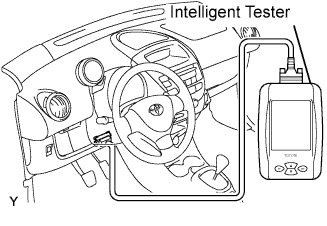
-
When using an intelligent tester to check the DTC.
-
Connect the intelligent tester to the DLC3.
-
Turn the ignition switch ON and turn on the tester.
-
On the tester select the following menu items and check for DTCs: Chassis / EMPS / DTC / Current.
-
-
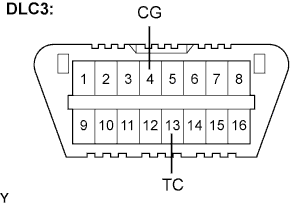
When not using an intelligent tester.
-
Using SST, connect terminals TC and CG of the DLC3.
- SST
- 09843-18040
-
Turn the ignition switch ON.
-
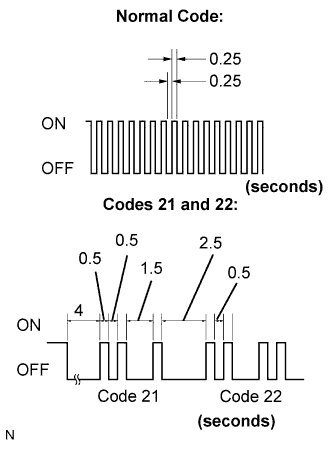
Read and record any DTCs from the P/S warning light on the combination meter. Refer to the chart on the left for examples of a normal code and codes 21 and 22.
Tech Tips
-
If the P/S warning light does not blink any DTCs or the normal code, inspect the circuit shown in the charts below.
Trouble Area See page TC Terminal Circuit EPS Warning light circuit
-
If 2 or more malfunctions are detected at the same time, DTCs will be displayed in ascending numerical order.
-
-
Refer to the Diagnostic Trouble Code Chart ( Click here for DTC information.
-
-
-
CLEAR DTCs
-
When using an intelligent tester to clear the DTC.
-
Connect the intelligent tester to the DLC3.
-
Turn the ignition switch ON and turn on the tester.
-
On the tester select the following menu items and clear the DTCs: Chassis / EMPS / DTC / Clear.
-
-
When not using an intelligent tester to clear the DTC.
-
Using SST, connect terminals TS and CG of the DLC3.
- SST
- 09843-18040
-
Turn the ignition switch ON.
-
Disconnect the SST check wire from the CG terminal and reconnect it within 8 seconds, and repeat this procedure 4 times or more.
-
Check that the P/S warning light blinks a nomal code.
-
Turn the ignition switch OFF.
-
Remove the SST from the DLC3.
-
-