ELECTRONIC POWER STEERING SYSTEM CALIBRATION

-
TORQUE SENSOR ZERO POINT CALIBRATION
Note
Perform the torque sensor zero point calibration under the following conditions.
-
The steering column assembly (containing the torque sensor) has been replaced.
-
The power steering ECU assembly has been replaced.
-
The steering wheel has been replaced.
-
The steering gear assembly has been replaced.
-
There is a difference in steering effort between turning right and left.
-
Center the steering wheel and align the front wheels straight ahead.
-
Connect the intelligent tester to the DLC3.
-
Turn the ignition switch ON and turn on the tester. On the tester select the following menu item: chassis / EMPS / utility / Torque sensor adjustment.
-
Initialize the torque sensor zero point calibration signal and perform the zero point calibration by following the tester screen.
-
Confirm that no DTCs are output after completing the operation.
-
When DTC C1515/15 is output, Click here.
-
When DTC C1516/16 is output, Click here.
-
When DTC C1534/34 is output, Click here.
Note
Do not touch the steering wheel during calibration.
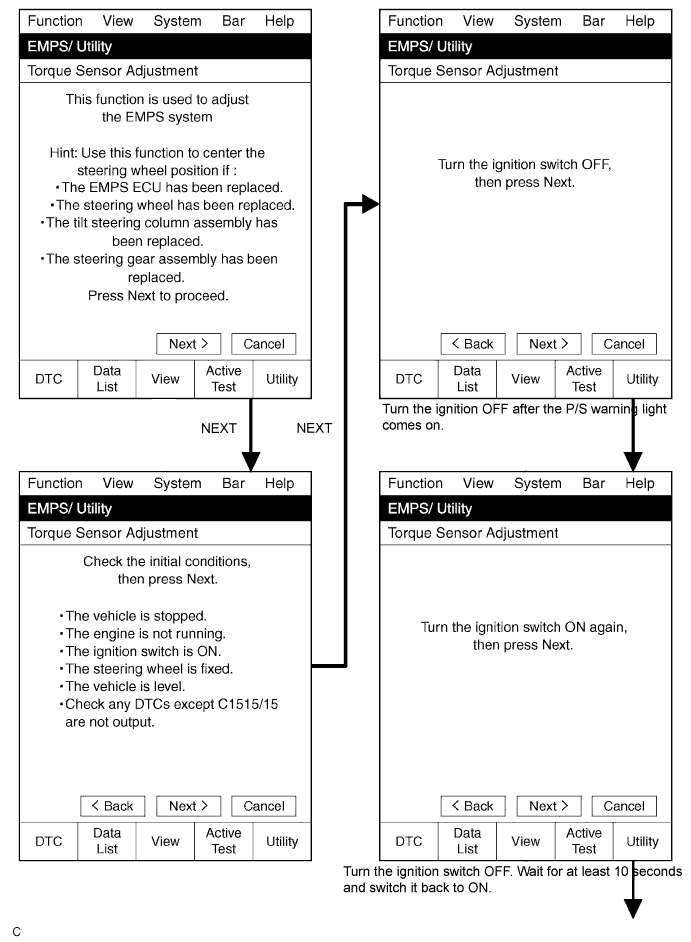
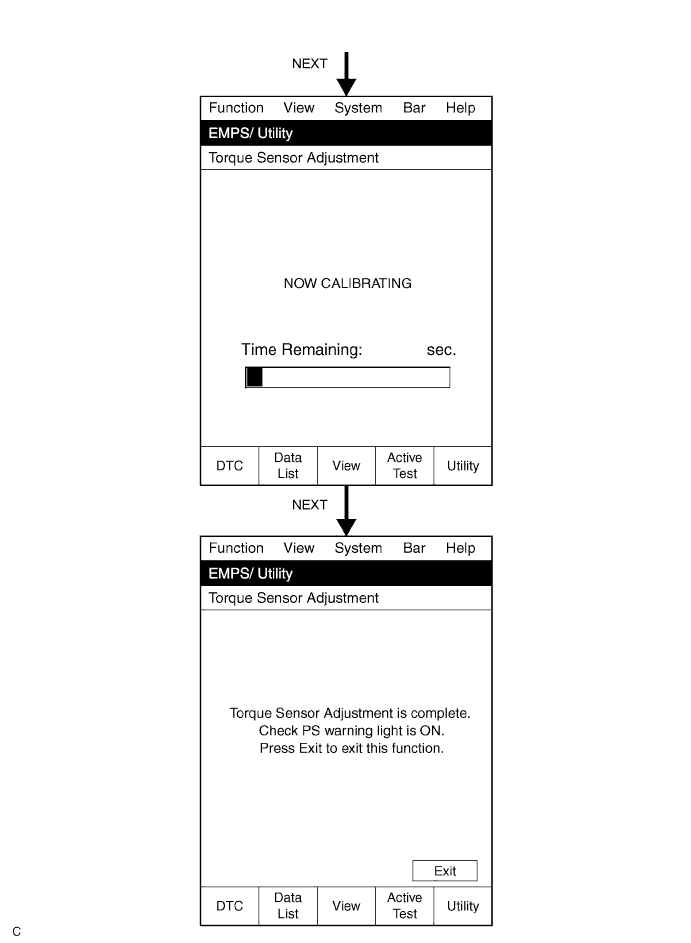
-
-
TORQUE SENSOR ZERO POINT CALIBRATION (USING SST CHECK WIRE)
-
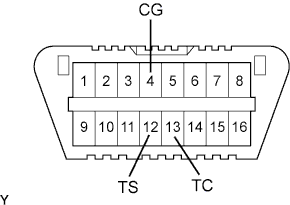
Center the steering wheel and align the front wheels straight ahead.
-
Initialize the torque sensor zero point calibration signal.
Tech Tips
If the power steering ECU assembly is replaced, initialization is not necessary.
-
Stop the vehicle and turn the ignition switch OFF.
-
Using SST, connect terminals TS and CG of the DLC3.
- SST
- 09843-18040
-
Using SST, connect terminals TC and CG of the DLC3.
- SST
- 09843-18040
-
Turn the ignition switch ON.
-
Disconnect and reconnect terminal TC of the DLC3 20 times within 20 seconds.
-
Check that DTC C1515/15 is output.
-
-
Perform the torque sensor zero point calibration.
Note
Do not touch the steering wheel during calibration.
Tech Tips
Check whether any DTCs except C1515/15 are output.
-
Stop the vehicle and turn the ignition switch OFF.
-
Using SST, connect terminals TS and CG of the DLC3 and turn the ignition switch ON.
- SST
- 09843-18040
-
Disconnect the SST.
- SST
- 09843-18040
-
Confirm that no DTC is output.
-
-