STEERING COLUMN ASSEMBLY REMOVAL

CAUTION:
Some of these service operations affect the SRS airbags system. Be sure to read the precautionary notices concerning the SRS airbags system before servicing Click here.
Tech Tips
Use the same procedure for both the RH and LH sides.
-
PRECAUTION
Note
After turning the ignition switch off, waiting time may be required before disconnecting the cable from the negative (-) battery terminal. Therefore, make sure to read the disconnecting the cable from the negative (-) battery terminal notices before proceeding with work Click here.
-
POSITION FRONT WHEELS FACING STRAIGHT AHEAD
-
DISCONNECT CABLE FROM NEGATIVE BATTERY TERMINAL
Note
Wait at least 90 seconds after disconnecting the cable from the negative (-) battery terminal to disable the SRS system.
-
REMOVE COMBINATION METER ASSEMBLY
-
REMOVE INSTRUMENT PANEL ASSEMBLY
-
REMOVE STEERING PAD
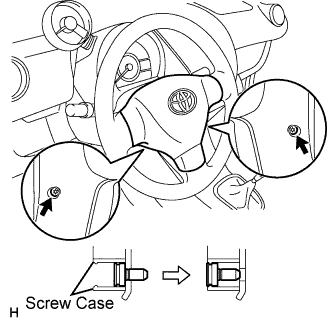
-
Place the front wheels facing straight ahead.
-
Using "Torx" socket wrench T30, loosen the 2 screws until the screw thread catches on the screw case.
-
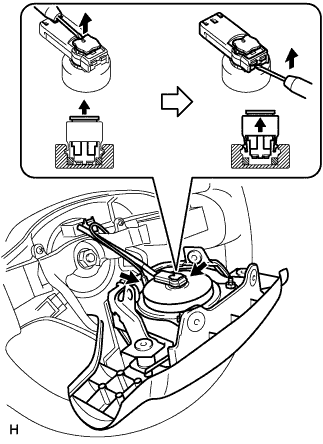
Pull the steering pad out of the steering wheel and support the steering pad with one hand, as shown in the illustration.
Note
When removing the steering pad, do not pull the airbag wire harness.
-
Disconnect the horn connector.
-
Disconnect the airbag connector, as shown in the illustration.
Note
When handling the airbag connector, do not damage the airbag wire harness.
-
Remove the steering pad.
-
-
REMOVE STEERING WHEEL ASSEMBLY
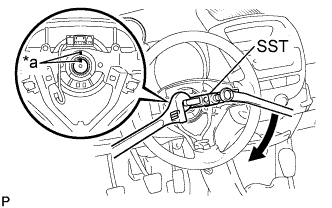
Text in Illustration *a Matchmark
-
Remove the nut and place matchmarks on the steering wheel assembly and the steering main shaft.
-
Using SST, remove the steering wheel assembly.
- SST
- 09950-50013 ( 09951-05010, 09952-05010, 09953-05020, 09954-05021 )
-
-
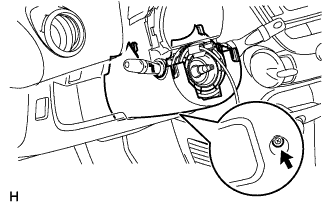
REMOVE STEERING COLUMN LOWER COVER
-
Remove the screw and steering column lower cover.
-
-
REMOVE SPIRAL CABLE SUB-ASSEMBLY
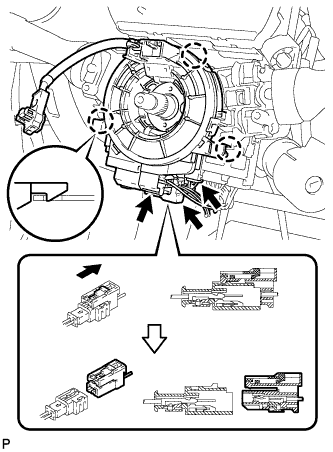
-
Disconnect the horn connector.
-
Disconnect the airbag connector, as shown in the illustration.
Note
When handling the airbag connector, do not damage the airbag wire harness.
-
Disconnect the steering angle sensor connector (w/ VSC).
-
Disengage the 3 claws and remove the spiral cable.
-
-
REMOVE COMBINATION SWITCH ASSEMBLY
-
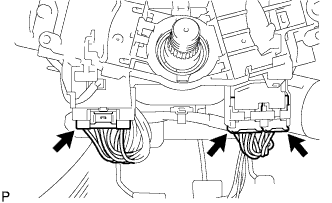
Disconnect the 3 connectors.
-
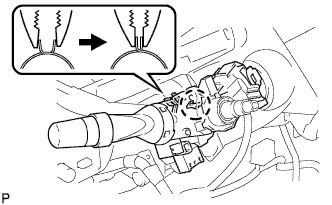
Remove the combination switch assembly, as shown in the illustration.
-
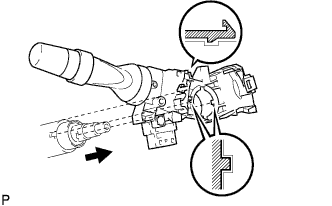
Disengage the 2 claws and remove the combination switch assembly.
-
-
REMOVE COWL SIDE TRIM BOARD LH
-
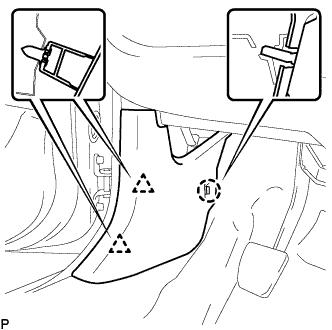
Disengage the 2 clips and claw, and remove the cowl side trim board LH.
-
-
REMOVE COWL SIDE TRIM BOARD RH
Tech Tips
Perform the same as for the LH.
-
REMOVE HEATER CONTROL ASSEMBLY (for LHD)
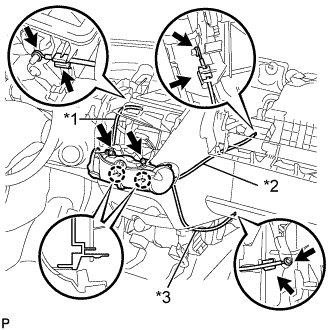
Text in Illustration *1 Defroster Cable *2 Air Inlet Cable *3 Air Mix Cable Note
Do not bend the cable when removing the heater control assembly.
-
Separate the black air mix cable from the clamp and remove the cable ring from the temperature control link.
-
Separate the white air inlet cable from the clamp and remove the cable ring from the air inlet control link.
-
Separate the blue defroster cable from the clamp and remove it from the mode link.
-
Remove the 2 screws, disengage the 2 claws and remove the heater control assembly.
-
-
REMOVE HEATER CONTROL ASSEMBLY (for RHD)
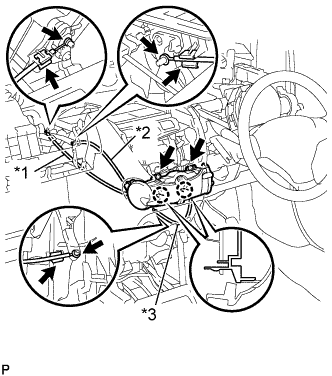
Text in Illustration *1 Air Inlet Cable *2 Defroster Cable *3 Air Mix Damper Cable Note
Do not bend the cable when removing the heater control assembly.
-
Separate the black air mix cable from the clamp and remove the cable ring from the temperature control link.
-
Separate the white air inlet cable from the clamp and remove the cable ring from the air inlet control link.
-
Separate the blue defroster cable from the clamp and remove it from the mode link.
-
Remove the 2 screws, disengage the 2 claws and remove the heater control assembly.
-
-
REMOVE FLOOR SHIFT POSITION INDICATOR HOUSING SUB-ASSEMBLY (for Multi-Mode Manual Transaxle)
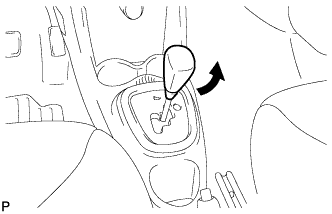
-
Turn the shift knob in the direction indication by the arrow in the illustration to remove it.
-
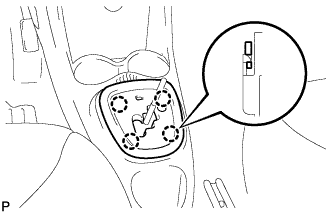
Disengage the 4 claws and remove the floor shift position indicator housing sub-assembly
-
-
REMOVE CONSOLE BOX (for Multi-Mode Manual Transaxle)
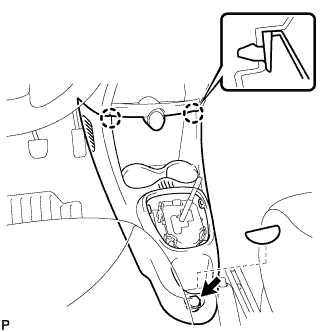
-
Remove the box bottom mat.
-
Remove the bolt <B>.
-
Disengage the 2 claws and remove the console box.
-
-
REMOVE CONSOLE BOX (for Manual Transaxle)
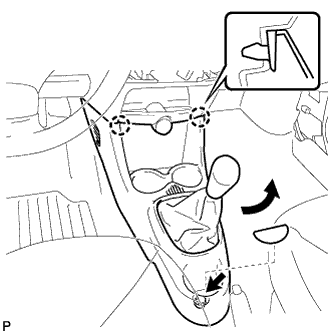
-
Turn the shift knob in the direction indication by the arrow in the illustration to remove it.
-
Remove the box bottom mat.
-
Remove the bolt <B>.
-
Disengage the 2 claws and remove the console box.
-
-
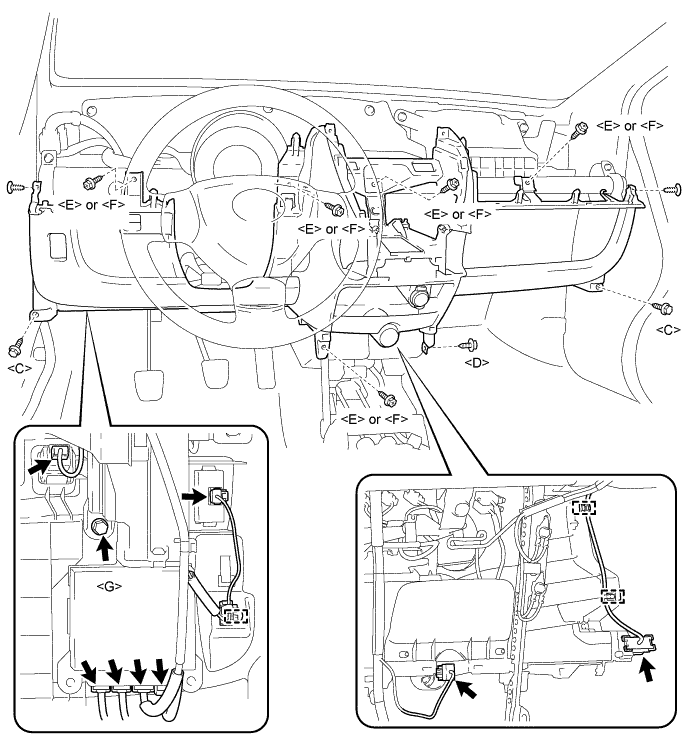
REMOVE INSTRUMENT PANEL ASSEMBLY LOWER
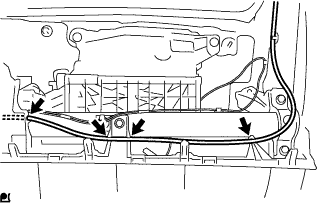
-
Disconnect the antenna cord by disengaging the 4 fastenings.
-
Disconnect the connectors and disengage the 3 wire harness clamps.
-
Remove the 2 bolts <C>, 5 screws <E> or <F>, screw <D>, screw <G> and 2 clips and remove the instrument panel lower.
-
-
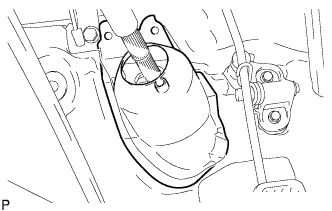
REMOVE STEERING COLUMN HOLE COVER PLATE
-
Turn back the floor carpet and disengage the 2 claws from the steering column hole cover plate.
-
-
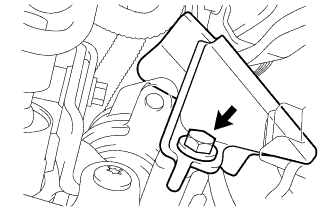
REMOVE NO. 1 STEERING COLUMN PROTECTOR (for Manual Transaxle RHD)
-
Remove the bolt and the No. 1 steering column protector from the power steering motor assembly.
-
-
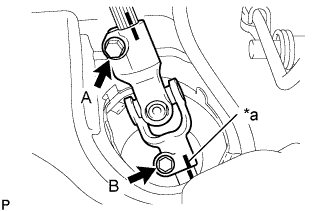
SEPARATE NO. 2 STEERING INTERMEDIATE SHAFT ASSEMBLY
Text in Illustration *a Matchmark
-
Loosen bolt A.
-
Place matchmarks, as shown in the illustration.
-
Remove bolt B and separate the No. 2 steering intermediate shaft assembly from the steering gear assembly.
-
-
REMOVE STEERING COLUMN ASSEMBLY
-
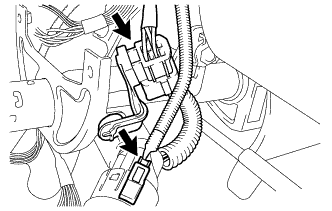
Disconnect the 2 connectors.
-
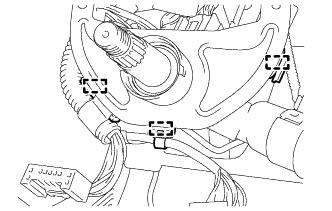
Disengage the 3 clamps and disconnect the wire harness.
-
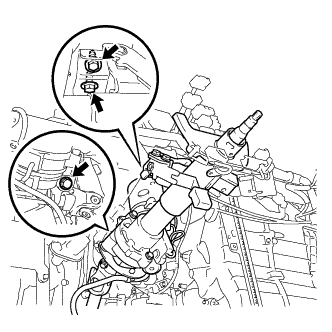
Remove the 3 bolts and the steering column assembly.
-
-
REMOVE NO. 2 STEERING INTERMEDIATE SHAFT ASSEMBLY
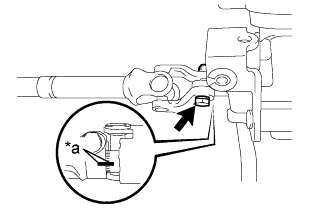
Text in Illustration *a Matchmark
-
Place matchmarks, as shown in the illustration.
-
Remove the bolt and the No. 2 steering intermediate shaft assembly from the steering column assembly.
-