MULTI-MODE MANUAL TRANSAXLE ASSEMBLY REMOVAL

-
CLUTCH POSITION ADJUSTMENT
Tech Tips
-
The multi-mode manual transmission system has a load controlled clutch cover (adjustment system). The pressure plate moves depending on the wear quantity of the clutch disc lining.
-
When removing or installing any parts related to the multi-mode manual transmission system, move the clutch actuator to the clutch clamp position. This is for normal operation of the load controlled clutch cover (adjustment system).
-
If the clutch position adjustment operation input fails, perform the operation again from step (a) more than 15 seconds after turning the ignition switch to OFF.
Note
Do not depress the brake pedal while performing the clamp position adjustment using an intelligent tester.
-
Prepare the vehicle:
-
Stop the vehicle.
-
Shift the lever into the N position.
-
Turn the ignition switch to OFF.
-
Apply the parking brake.
-
-
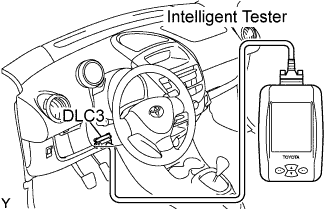
Connect the intelligent tester to the DLC3.
-
Turn the ignition switch to ON.
-
Turn the intelligent tester ON.
-
Select the following menu items: Powertrain / Multi-Mode M/T / Utility / Parts Exchange.
-
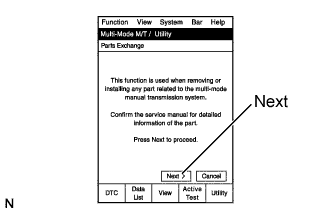
Read the information.
-
Press the Next key.
-
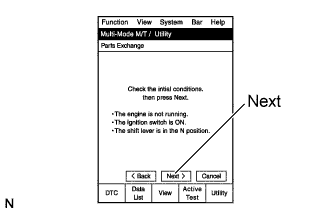
Read the information.
-
After checking the vehicle condition, press the Next key.
-
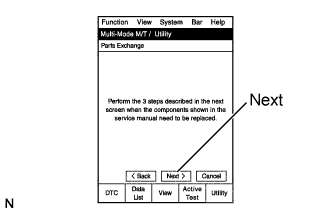
Read the information.
-
Press the Next key.
-
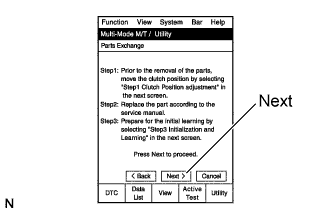
Read the information.
-
Press the Next key.
-
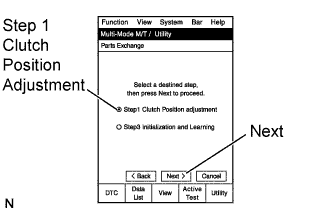
On the Multi-Mode M/T / Utility screen, select Step 1 Clutch Position Adjustment (Clamp Position Adjustment).
-
Press the Next key.
-
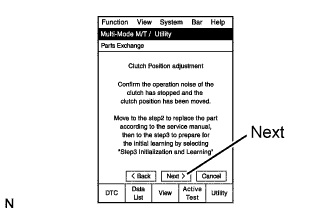
Read the information.
-
Press the Next key.
-
Complete Clutch Position Adjustment.
-
Turn the intelligent tester OFF.
-
Turn the ignition switch to OFF.
-
Replace the malfunctioning parts.
Tech Tips
Perform [Initialization and Learning] after repairing the multi-mode manual transmission control system Click here.
-
-
DISCONNECT CABLE FROM NEGATIVE BATTERY TERMINAL
-
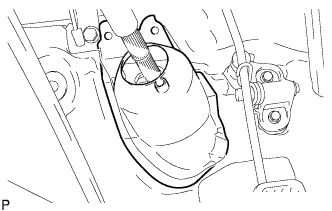
REMOVE STEERING COLUMN HOLE COVER PLATE
-
Turn back the floor carpet and disengage the 2 claws from the steering hole cover plate.
-
-
SEPARATE STEERING INTERMEDIATE SHAFT ASSEMBLY NO.2
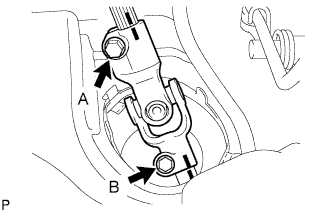
-
Loosen bolt A.
-
Put matchmarks, as shown in the illustration.
-
Remove bolt B and separate the steering intermediate shaft assembly No. 2 from the steering gear assembly.
-
-
REMOVE FRONT WHEELS
-
DRAIN TRANSAXLE OIL
-
Remove the filler plug and the gasket.
-
Remove the drain plug and gasket and drain the transaxle oil.
-
Install a new gasket and the drain plug.
- Torque:
- 39 N*m { 400 kgf*cm, 29 ft.*lbf }
-
-
REMOVE WINDSHIELD WIPER ARM COVER
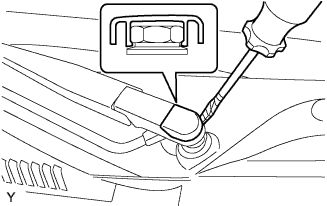
-
Using a screwdriver with its tip wrapped in protective tape, remove the front wiper arm head cap.
-
-
REMOVE FR WIPER ARM LH
-
Operate the wiper, then stop the windshield wiper motor assembly in the automatic stop position.
-
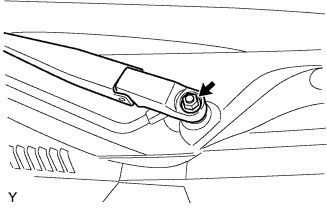
Remove the nut and front wiper main arm.
-
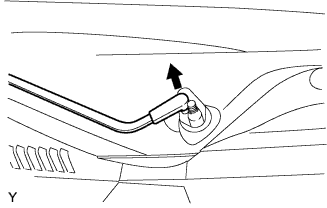
Disengage the meshing of the secondary arm from the front wiper motor and link assembly.
Note
Do not bend the secondary arm when removing it.
-
-
REMOVE HOOD TO COWL TOP SEAL
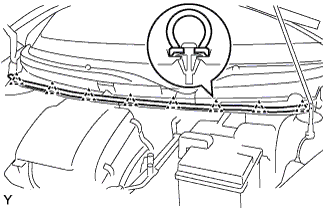
-
Disengage the 8 clips and remove the hood to cowl top seal.
-
-
REMOVE COWL TOP VENTILATOR LOUVER LH
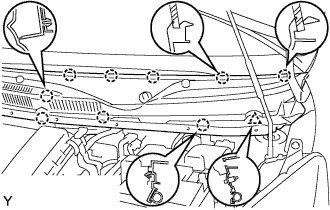
-
Remove the clip.
-
Disengage the 9 claws and remove the cowl top ventilator louver LH.
-
Disconnect the washer hose.
-
-
REMOVE COWL TOP VENTILATOR LOUVER RH
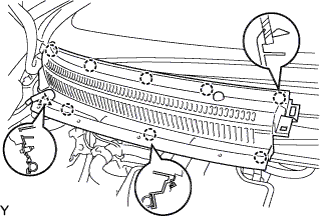
-
Remove the clip.
-
Disengage the 8 claws and remove the cowl top ventilator louver RH.
-
Disconnect the washer hose.
-
-
REMOVE FR WIPER MOTOR & LINK ASSEMBLY
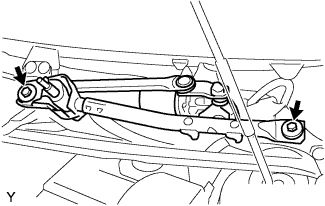
-
Remove the 2 bolts.
-
Disconnect the connector and remove the front wiper motor and link assembly.
-
-
REMOVE COWL TOP PANEL OUTER
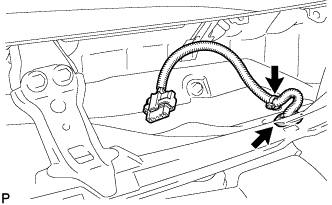
-
Remove the clamp of the wire harness.
-
Remove the grommet of the wire harness.
-
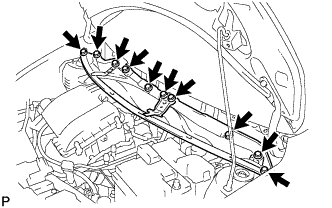
Remove the 10 bolts and cowl top panel.
-
-
REMOVE BATTERY
-
Loosen the nut and disconnect the battery positive terminal.
-
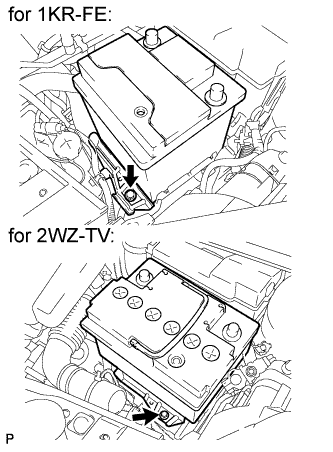
Remove the bolt and battery clamp.
-
Remove the battery.
-
-
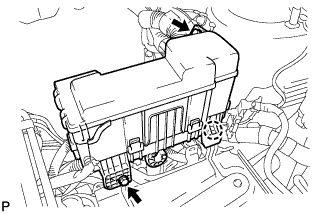
SEPARATE ENGINE ROOM RELAY BLOCK
-
Remove the 2 bolts.
-
Disengage the claw and separate the engine room relay block.
-
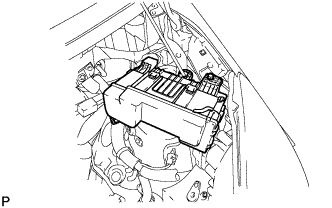
Provisionally set the relay block to the hood support rod.
-
-
REMOVE BATTERY CLAMP SUB-ASSEMBLY
-
Disengage the 2 wire harness clamps.
-
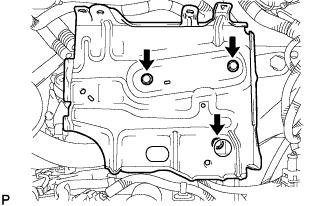
Remove the 3 bolts and battery clamp.
-
-
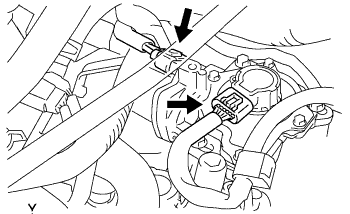
REMOVE CLUTCH ACTUATOR ASSEMBLY
-
Disconnect the clutch stroke sensor connector and motor connector.
Note
Do not forcibly pull the connector as this may damage the wire harness.
-
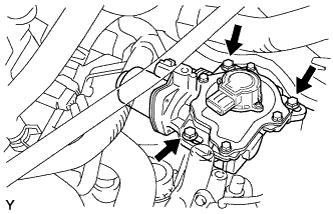
Remove the 3 bolts and clutch actuator assembly.
Note
-
Loosen the bolts slowly, and be careful not to get your fingers caught as the clutch actuator assembly moves due to the reaction force from the clutch cover.
-
Do not drop the removed clutch actuator assembly or subject it to any impacts.
-
-
-
REMOVE ENGINE WIRE NO.3
-
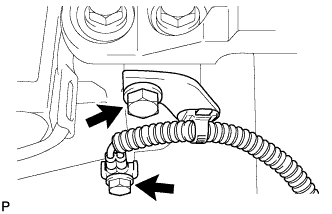
Remove the 2 bolts and disconnect engine wire No. 3.
-
-
DISCONNECT CONNECTOR
-
Disconnect the shift stroke sensor connector.
-
Disconnect the select stroke sensor connector.
-
Disconnect the transmission revolution sensor connector.
-
Disconnect the back-up light switch connector.
-
Disconnect the neutral start switch connector.
-
Disconnect the shift and select motor connectors.
-
-
REMOVE STARTER ASSEMBLY
-
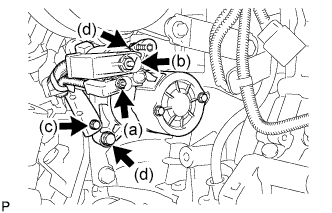
Open the terminal cap, remove the nut and disconnect the wire harness from terminal 50.
-
Open the terminal cap, remove the nut and disconnect the wire harness from terminal 30.
-
Remove the bolt, and wire harness clamp.
-
Remove the 2 bolts, and the starter.
-
-
REMOVE EXHAUST PIPE ASSEMBLY FRONT
-
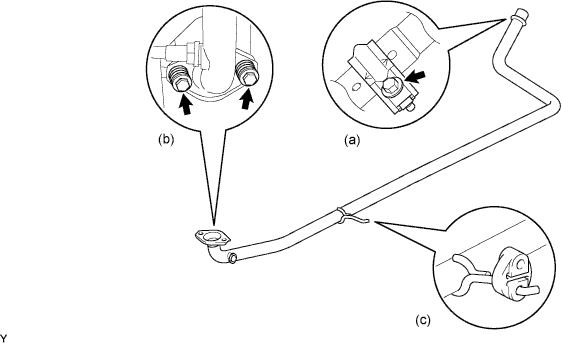
Remove the bolt and clamp.
-
Remove the 2 bolts, 2 compression springs and exhaust pipe gasket.
-
Remove the exhaust pipe No.4 support and exhaust front pipe assembly.
-
-
REMOVE FRONT AXLE SHAFT LH NUT
-
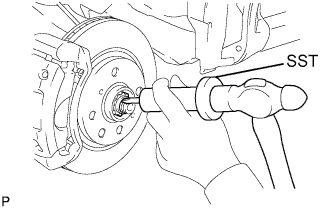
Using SST and a hammer, release the staked part of the front axle hub nut.
- SST
- 09930-00010
Note
Release the staked part of the lock nut completely. Otherwise, the screw of the drive shaft may be damaged.
-
While applying the brake, remove the front axle hub nut.
-
-
REMOVE FRONT AXLE SHAFT RH NUT
Tech Tips
The removal procedure for the RH side is the same as that for the LH side.
-
SEPARATE TIE ROD END SUB-ASSEMBLY LH
-
Remove the cotter pin and castle nut.
-
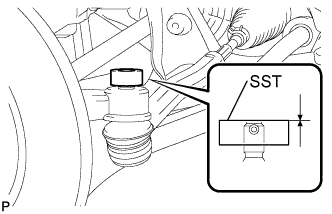
Install SST (spacer B) to the threaded section of the tie rod end.
- SST
- 09960-20010 ( 09961-02060 )
Tech Tips
Make sure the upper ends of the threaded section of the tie rod end and SST (spacer B) are aligned.
-
Using SST, separate the tie rod end from the front axle assembly.
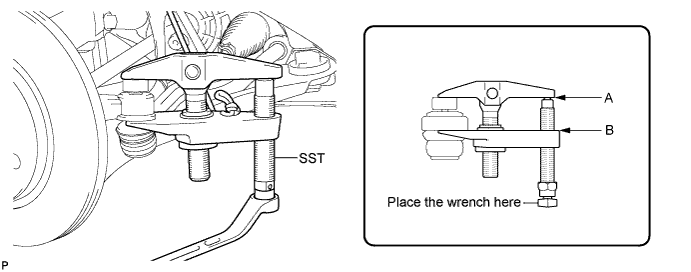
- SST
- 09960-20010 ( 09961-02010 )
Note
-
Make sure to tie the string of SST to the vehicle to prevent SST from dropping.
-
Install SST so that A and B are parallel.
-
Be sure to place the wrench on the part indicated in the illustration.
-
Do not damage the ball joint dust cover.
-
Do not damage the front disc brake dust cover.
-
-
SEPARATE TIE ROD END SUB-ASSEMBLY RH
Tech Tips
The separation procedure for the RH side is the same as that for the LH side.
-
REMOVE STABILIZER BAR FRONT
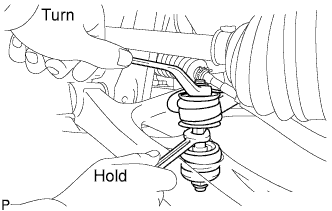
-
Hold the bolt with a spanner (10 mm) and remove the nut.
-
Remove the 2 cushion retainers and 2 cushions, and separate the front stabilizer bar.
-
-
SEPARATE FRONT SUSPENSION ARM SUB-ASSEMBLY LOWER NO.1 LH
-
Remove the clip and castle nut.
-
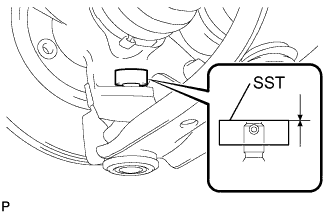
Install SST (spacer B) to the threaded section of the lower ball joint.
- SST
- 09960-20010 ( 09961-02060 )
Tech Tips
Make sure the upper ends of the threaded section of the lower ball joint and SST (spacer B) are aligned.
-
Using SST, separate the lower arm.
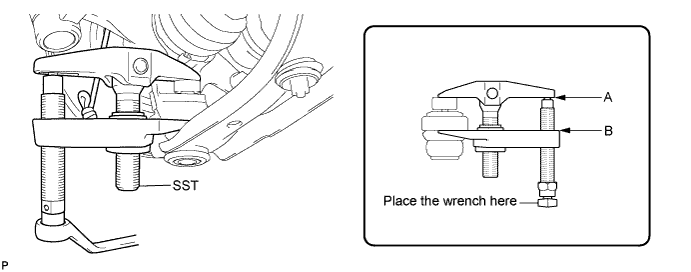
- SST
- 09960-20010 ( 09961-02010 )
Note
-
Make sure to tie the string of SST to the vehicle to prevent SST from dropping.
-
Install SST so that A and B are parallel.
-
Be sure to place the wrench on the part indicated in the illustration.
-
Do not damage the lower ball joint dust cover.
-
Do not damage the drive shaft outboard joint boots.
-
Do not damage the front disc brake dust cover.
-
-
SEPARATE FRONT SUSPENSION ARM SUB-ASSEMBLY LOWER NO.1 RH
Tech Tips
The separation procedure for the RH side is the same as that for the LH side.
-
REMOVE FRONT AXLE ASSEMBLY LH
-
Using a plastic hammer, tap the end of the front drive shaft assembly and disengage the fitting between the front drive shaft assembly and front axle assembly.
Tech Tips
If it is difficult to disengage the fitting, tap the end of the front drive shaft assembly with a brass bar and hammer.
-
Push the front axle assembly out of the vehicle to remove the front drive shaft assembly from the front axle assembly.
Note
-
Do not push the front axle assembly further out of the vehicle than is necessary.
-
Do not damage the front axle outboard joint boot.
-
Do not damage the speed sensor rotor.
-
Hang the front drive shaft assembly down with a piece of string or equivalent.
-
When removing the drive shaft, do not hit the sensor with it.
-
-
-
REMOVE FRONT AXLE ASSEMBLY RH
Tech Tips
The removal procedure for the RH side is the same as that for the LH side.
-
REMOVE FRONT DRIVE SHAFT ASSEMBLY LH
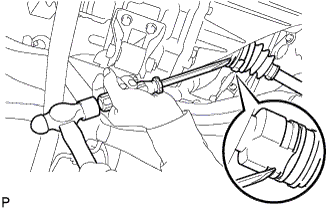
-
Using a screwdriver and hammer, remove the front drive shaft assembly.
Note
-
Do not damage the oil seal or the boot.
-
Do not drop the drive shaft assembly.
-
-
-
REMOVE FRONT DRIVE SHAFT ASSEMBLY RH
Tech Tips
The removal procedure for the RH side is the same as that for the LH side.
-
SUSPEND ENGINE ASSEMBLY
-
REMOVE FRONT SUSPENSION CROSSMEMBER SUB-ASSEMBLY
-
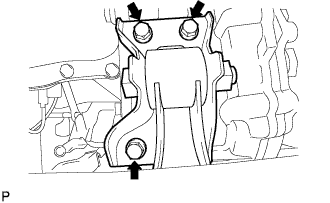
Remove the 3 bolts, then separate the engine mounting control bracket (for 1KR-FE).
-
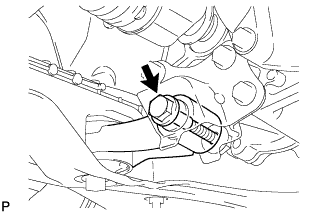
Remove the bolt, then separate the control rod from the engine mounting control bracket (for 2WZ-TV).
-
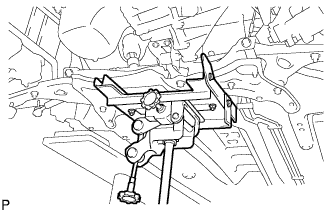
Using a transmission jack, support the front suspension crossmember sub-assembly.
-
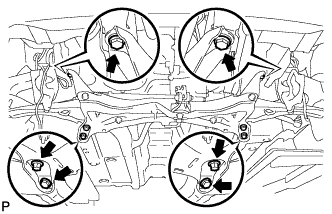
Remove the 6 bolts and the front suspension crossmember sub-assembly.
-
-
REMOVE FLYWHEEL HOUSING UNDER COVER
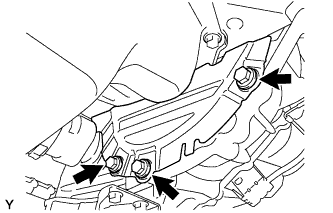
-
Remove the 3 bolts and flywheel housing under cover.
-
-
SUPPORT MULTI-MODE MANUAL TRANSAXLE ASSEMBLY
-
Support the multi-mode manual transaxle with a transmission jack.
-
-
REMOVE TRANSVERSE ENGINE ENGINE MOUNTING INSULATOR
-
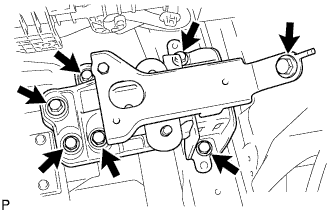
Remove the 7 bolts and engine mounting insulator together with the engine mounting bracket.
-
-
REMOVE MULTI-MODE MANUAL TRANSAXLE ASSEMBLY
-
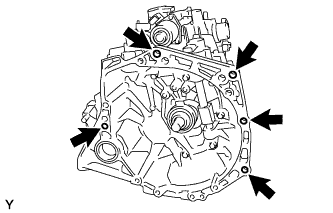
Remove the 5 bolts and multi-mode manual transaxle from the engine.
-