CLUTCH UNIT (for C551A) REMOVAL

-
REMOVE MULTI-MODE MANUAL TRANSAXLE ASSEMBLY
-
REMOVE SHIFT STROKE SENSOR
-
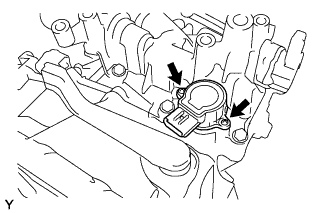
Remove the 2 screws and the shift stroke sensor from the shift and select actuator.
-
Remove the O-ring from the shift stroke sensor.
-
-
REMOVE CLUTCH RELEASE BEARING ASSEMBLY
-
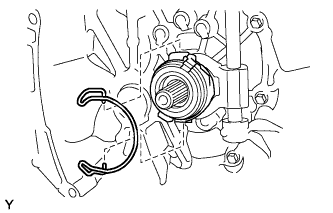
Remove the clip from the clutch release bearing assembly.
-
Remove the clutch release bearing assembly from the clutch release fork.
-
-
REMOVE CLUTCH RELEASE FORK LEVER
-
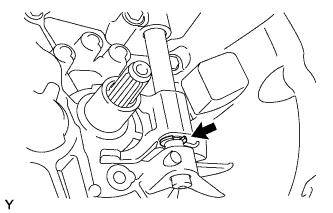
Remove the E-ring from the clutch release fork lever.
-
Remove the clutch release fork lever and the clutch release fork from the transaxle case.
-
-
REMOVE CLUTCH RELEASE FORK LEVER SHAFT OIL SEAL
-
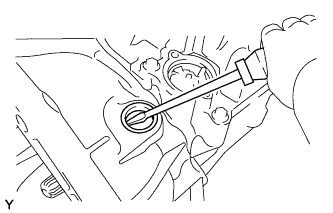
Using a screwdriver, remove the clutch release fork lever shaft oil seal from the transaxle case.
-
-
REMOVE NO. 1 CLUTCH HOUSING COVER
-
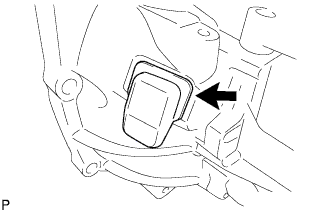
Remove the No. 1 clutch housing cover from the transaxle case.
-
-
REMOVE CLUTCH COVER ASSEMBLY
-
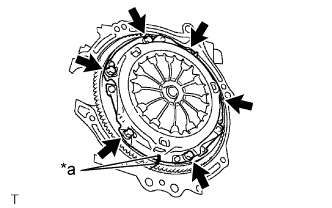
Text in Illustration *a Matchmark Place matchmarks on the clutch cover assembly and the flywheel sub-assembly.
-
Loosen each bolt by one turn at a time until the spring tension is released.
-
Remove the 6 bolts, and pull off the clutch cover assembly with the clutch disc assembly.
Note
-
Do not drop the clutch disc assembly.
-
When replacing the clutch disc assembly, be sure to replace it together with the clutch cover assembly as a set.
-
-
-
REMOVE CLUTCH DISC ASSEMBLY
Note
Do not attach any oil or foreign matter to the lining part of the clutch disc assembly or the surfaces of the pressure plate and flywheel sub-assembly.