SFI SYSTEM (w/o Electronic Throttle Control System) DTC CHECK / CLEAR

-
CHECK DTC
-
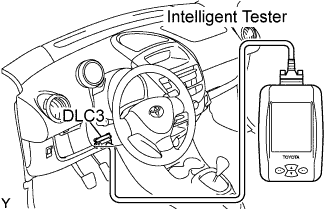
Connect the intelligent tester to the DLC3.
-
Turn the ignition switch to ON and turn the intelligent tester ON.
-
Select the following menu items: Powertrain / Engine and ECT / DTC.
-
Check DTCs and freeze frame data, and then write them down.
Tech Tips
If you need help when using the intelligent tester, refer to the instruction manual.
-
Confirm the details, referring the DTC chart.
-
-
FREEZE FRAME DATA
-
Connect the intelligent tester to the DLC3.
-
Turn the ignition switch to ON and turn the intelligent tester ON.
-
Read DTCs by selecting the following menu items: Powertrain / Engine and ECT / DTC.
-
Select a parameter(s) to check the freeze frame data.
-
Note down the DTC(s) and freeze frame data.
Tech Tips
If you need help when using the intelligent tester, refer to the instruction manual.
-
-
CLEAR DTC AND FREEZE FRAME DATA (using the intelligent tester)
-
Connect the intelligent tester to the DLC3.
-
Turn the ignition switch to ON (do not start the engine) and turn the intelligent tester ON.
-
Select the following menu items: Powertrain / Engine and ECT / DTC / Clear.
-
Erase DTCs and freeze frame data by pressing the YES button on the tester.
Tech Tips
If you need help when using the intelligent tester, refer to the instruction manual.
-
-
CLEAR DTC AND FREEZE FRAME DATA (not using the intelligent tester)
-
Remove the EFI fuse from the engine room R/B for more than 60 seconds, or disconnect the negative battery cable for more than 60 seconds. When disconnecting the negative battery cable, perform the "INITIALIZE" procedure.
-