| DTC Code | DTC Name |
|---|---|
| P0722 | Output Speed Sensor Circuit No Signal |
DESCRIPTION
The speed sensor SP2 detects the rotation speed of the transmission output shaft and sends signals to the ECM. The ECM determines the vehicle speed based on these signals.
An AC voltage is generated in the speed sensor SP2 coil as the rotor mounted on the output shaft rotates, and this voltage is sent to the ECM.
The gear shift point and lock-up timing are controlled by the ECM based on the signals from this speed sensor and throttle position sensor.
| DTC No. | DTC Detection Condition | Trouble Area |
|---|---|---|
| P0722 |
|
|
Reference (Using an oscilloscope):
Check the waveform between terminals SP2+ and SP2- of the ECM connector.
| Standard |
|---|
| Refer to the illustration. |
Gauge setting.
| Terminal | SP2+ - SP2- |
| Tool setting | 2 V/DIV., 20 ms/DIV. |
| Vehicle condition | Vehicle speed 20 km/h (12 mph) |
MONITOR DESCRIPTION
The output speed sensor SP2 monitors the output shaft speed. The ECM controls the gearshift point and the lock up timing based on the signals from the output speed sensor SP2 and throttle position sensor.
If the ECM detects no signal from the output shaft speed sensor SP2 even while the vehicle is moving, it will conclude that is a malfunction of the output speed sensor SP2. The ECM will illuminate the MIL and set a DTC.
INSPECTION PROCEDURE
Click here
-
DATA LIST
Tip:Using the intelligent tester to read the Data List allows the values or states of switches, sensors, actuators and other items to be read without removing any parts. This non-intrusive inspection can be very useful because intermittent conditions or signals may be discovered before parts or wiring is disturbed. Reading the Data List information early in troubleshooting is one way to save diagnostic time.
Note:In the table below, the values listed under "Normal Condition" are reference values. Do not depend solely on these reference values when deciding whether a part is faulty or not.
-
Warm up the engine.
-
Turn the ignition switch off.
-
Connect the Intelligent Tester to the DLC3.
-
Turn the ignition switch to the ON position.
-
Turn on the tester.
-
Select the item "Enter / Powertrain / Engine and ECT / Data List".
-
Follow the instructions on the tester and read the Data List.
Item Measurement Item/
Range (display)
Normal Condition SPD (SP2) Output shaft Speed/
min.: 0 km/h (0 mph)
max.: 255 km/h (158 mph)
Vehicle stopped: 0 km/h (0 mph)
Tip:Equal to vehicle speed
Tip:
-
SPD (SP2) is always 0 while driving:
Open or short in the sensor or circuit.
-
The SPD (SP2) value displayed on the tester is much lower than the actual vehicle speed:
Sensor trouble, improper installation, or intermittent connection trouble of the circuit.
-
-
PROCEDURE
- Click here
INSPECT SPEED SENSOR INSTALLATION
-
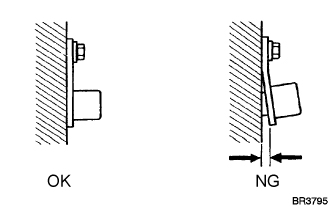
Check the speed sensor (SP2) installation.
OK The installation bolt is tightened properly and there is no clearance between the sensor and transmission case.
- OKClick here
- NGClick here
-
- Click here
INSPECT SPEED SENSOR (SP2)
-
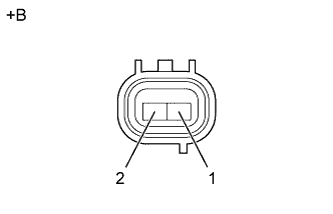
Disconnect the speed sensor (SP2) connector from the transmission.
-
Measure the resistance according to the value(s) in the table below.
Resistance Tester Connection Specified Condition
20°C (68°F)
1 - 2 560 to 680 Ω Table 1. Text in Illustration *a Component without harness connected
(Speed Sensor (SP2))
- OKClick here
- NGClick here
-
- Click here
CHECK HARNESS AND CONNECTOR (SPEED SENSOR -ECM)
-
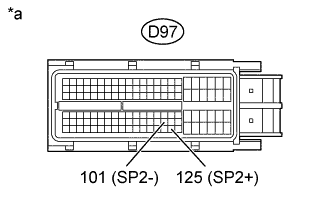
Connect the speed sensor connector.
-
Disconnect the ECM connector.
-
Measure the resistance according to the value(s) in the table below.
Resistance Tester Connection Specified Condition
20°C (68°F)
D97-125 (SP2+) - D97-101 (SP2-) 560 to 680 Ω -
Measure the resistance according to the value(s) in the table below.
Resistance (Check for short) Tester Connection Specified Condition D97-125 (SP2+) - Body ground 10 kΩ or higher D97-101 (SP2-) - Body ground ↑ Table 2. Text in Illustration *a Front view of wire harness connector
(to ECM)
- OKClick here
- NGClick here
-
- Click here
REPLACE ECM
- Click here
REPLACE SPEED SENSOR (SP2)
- Click here
REPAIR OR REPLACE HARNESS OR CONNECTOR