REAR SUSPENSION MEMBER (for 4WD) REMOVAL
-
REMOVE REAR WHEELS
-
REMOVE TAIL EXHAUST PIPE ASSEMBLY
-
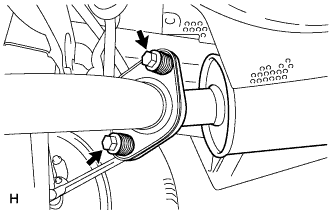
Remove the 2 bolts and 2 compression springs.
-
Disconnect the exhaust pipe support and remove the tail exhaust pipe assembly.
-
Remove the gasket from the center exhaust pipe assembly.
-
-
REMOVE CENTER EXHAUST PIPE ASSEMBLY
-
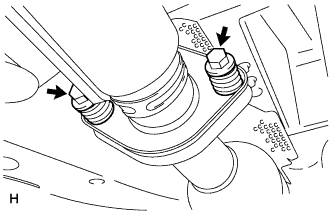
Remove the 2 bolts and 2 compression springs.
-
Disconnect the 3 exhaust pipe supports and remove the center exhaust pipe assembly.
-
Remove the gasket from the No. 3 exhaust pipe sub-assembly.
-
-
REMOVE PROPELLER WITH CENTER BEARING SHAFT ASSEMBLY
-
Depress the brake pedal and hold it.
-
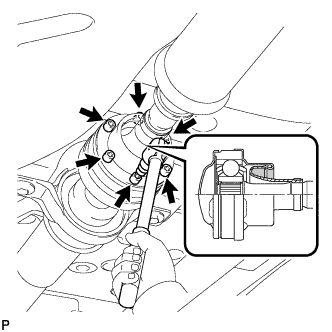
Using a hexagon wrench (6 mm), loosen the cross groove joint set bolts 1/2 turn.
Tech Tips
Put a piece of cloth or equivalent into the inside of the universal joint cover so that the boot does not touch the inside of the universal joint cover.
-
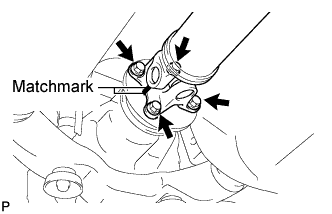
Place matchmarks on the rear propeller shaft and rear drive pinion flange sub-assembly.
-
Remove the 4 nuts, 4 bolts and 4 washers.
-
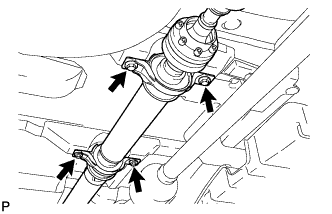
Remove the 4 bolts and 4 adjusting shims.
-
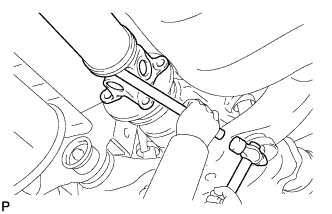
Using a brass bar and a hammer, remove the propeller shaft with center bearing shaft assembly.
-
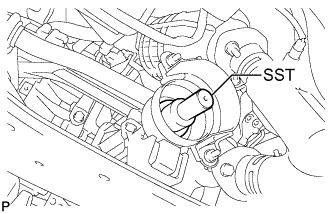
Insert SST into the transfer to prevent oil leakage.
- SST
- 09325-20010
-
-
SEPARATE REAR SPEED SENSOR LH
-
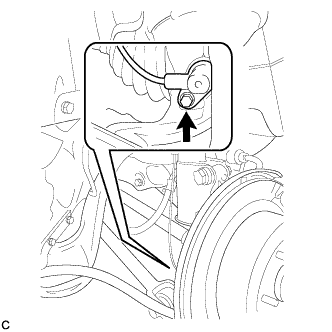
Remove the bolt and separate the rear speed sensor from the rear axle carrier sub-assembly.
Note
Keep the sensor tip and rear speed sensor installation hole free from foreign matter.
-
-
SEPARATE REAR SPEED SENSOR RH
Tech Tips
Perform the same procedure as the LH side.
-
REMOVE REAR AXLE SHAFT NUT LH
-
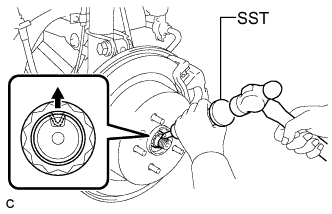
Using SST and a hammer, release the staked part of the rear axle shaft nut.
- SST
- 09930-00010
Note
Loosen the staked part of the nut completely, otherwise the threads of the drive shaft may be damaged.
-
While applying the brakes, remove the rear axle shaft nut.
-
-
REMOVE REAR AXLE SHAFT NUT RH
Tech Tips
Perform the same procedure as the LH side.
-
SEPARATE REAR DISC BRAKE CALIPER ASSEMBLY LH
-
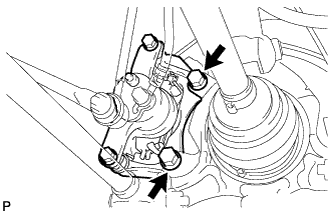
Remove the 2 bolts and separate the rear disc brake caliper assembly.
Note
Use wire or an equivalent tool to keep the brake caliper from hanging down by the flexible hose.
-
-
SEPARATE REAR DISC BRAKE CALIPER ASSEMBLY RH
Tech Tips
Perform the same procedure as the LH side.
-
REMOVE REAR DISC (for LH Side)
-
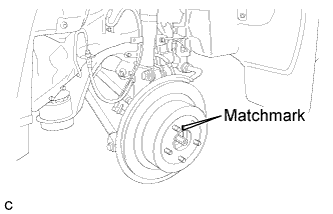
Put matchmarks on the rear disc and the axle hub.
-
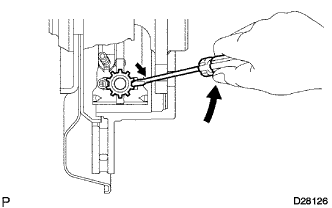
Release the parking brake and remove the rear disc.
Tech Tips
If the disc cannot be removed easily, turn and press firmly the shoe adjuster until the wheel comes free.
-
-
REMOVE REAR DISC (for RH Side)
Tech Tips
Perform the same procedure as the LH side.
-
REMOVE REAR AXLE HUB AND BEARING ASSEMBLY LH
-
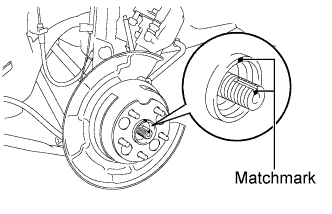
Put matchmarks on the drive shaft and axle hub.
Note
Do not punch the marks.
-
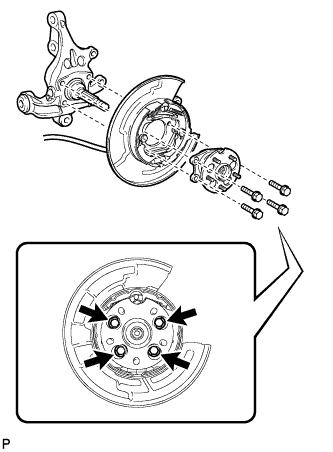
Remove the 4 bolts and the rear axle hub and bearing assembly.
Note
-
Do not rotate the drive shaft with the rear axle hub and bearing assembly removed.
-
Use wire or an equivalent tool to keep the parking brake assembly from hanging down by the parking brake cable assembly.
-
-
-
REMOVE REAR AXLE HUB AND BEARING ASSEMBLY RH
Tech Tips
Perform the same procedure as the LH side.
-
SEPARATE NO. 3 PARKING BRAKE CABLE ASSEMBLY
-
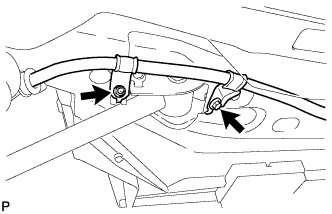
Remove the bolt and the nut, and separate the No. 3 parking brake cable assembly.
-
-
SEPARATE NO. 2 PARKING BRAKE CABLE ASSEMBLY
Tech Tips
Perform the same procedure as the No. 3 parking brake cable assembly.
-
REMOVE REAR STRUT ROD ASSEMBLY LH
-
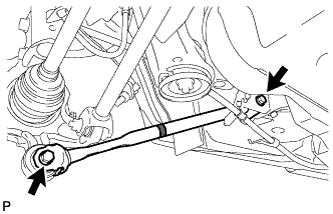
Remove the 2 bolts, the 2 nuts, and the rear strut rod assembly.
Note
Since stopper nuts are used, loosen the bolts.
-
-
REMOVE REAR STRUT ROD ASSEMBLY RH
Tech Tips
Perform the same procedure as the LH side.
-
REMOVE REAR AXLE CARRIER SUB-ASSEMBLY LH
-
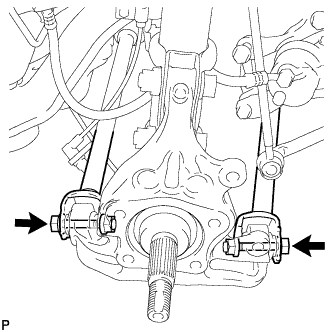
Loosen the 2 bolts.
Note
Since stopper nuts are used, loosen the bolts.
-
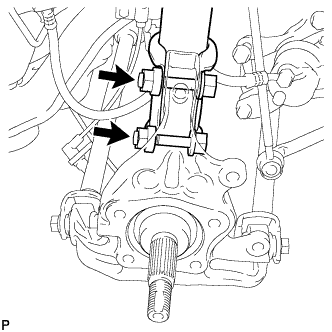
Remove the 2 bolts and 2 nuts, and separate the rear shock absorber with coil spring (lower side) from the rear axle carrier sub-assembly.
Note
-
Be careful not to damage the outboard joint boot.
-
Be careful not to damage the speed sensor rotor.
-
-
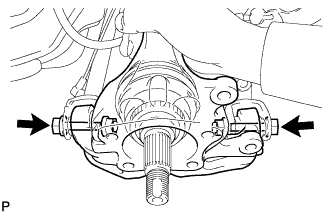
Remove the 2 bolts, the 2 nuts, and the rear axle carrier sub-assembly.
Note
-
Be careful not to damage the outboard joint boot.
-
Be careful not to damage the speed sensor rotor.
Tech Tips
Use wire or an equivalent tool to keep the rear drive shaft assembly from hanging down.
-
-
-
REMOVE REAR AXLE CARRIER SUB-ASSEMBLY RH
Tech Tips
Perform the same procedure as the LH side.
-
REMOVE REAR NO. 2 SUSPENSION ARM ASSEMBLY LH
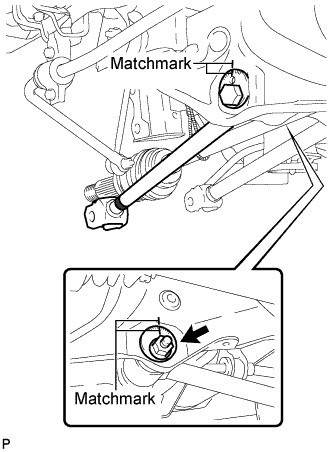
-
Put matchmarks on the adjust cams and the rear suspension member sub-assembly.
-
Remove the nut, the No. 2 camber adjust cam, the rear suspension toe adjust cam sub-assembly, and the rear No. 2 suspension arm assembly LH.
Note
Mark the removed parts to distinguish left from right and keep them in order for reinstallation.
Tech Tips
When removing the nut, keep the rear suspension toe adjust cam sub-assembly from rotating.
-
-
REMOVE REAR NO. 2 SUSPENSION ARM ASSEMBLY RH
Tech Tips
Perform the same procedure as the LH side.
-
REMOVE REAR NO. 1 SUSPENSION ARM ASSEMBLY RH
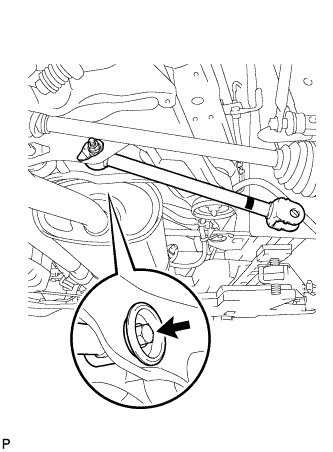
-
Remove the bolt, the nut, and the rear No. 1 suspension arm assembly RH from the rear suspension member sub-assembly.
Note
-
Since a stopper nut is used, loosen the bolt.
-
Mark the removed parts to distinguish left from right and keep them in order for reinstallation.
-
-
-
REMOVE REAR DIFFERENTIAL FILLER PLUG
-
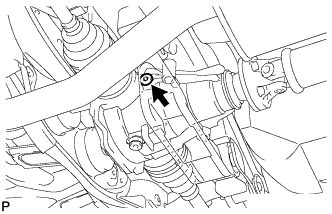
Using a hexagon wrench (10 mm), remove the rear differential filler plug and rear differential filler plug gasket.
-
-
REMOVE REAR DIFFERENTIAL DRAIN PLUG
-
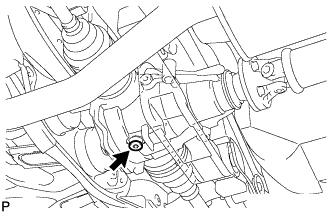
Using a hexagon wrench (10 mm), remove the rear differential drain plug and rear differential drain plug gasket, and drain the oil.
-
-
REMOVE REAR DRIVE SHAFT ASSEMBLY LH
-
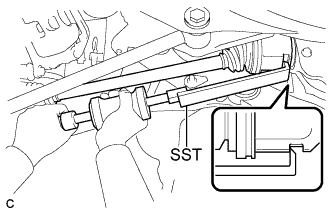
Using SST, remove the rear drive shaft assembly as shown in the illustration.
- SST
- 09520-01010
- 09520-24010 ( 09520-32040 )
Note
Remove the rear drive shaft assembly while keeping it level.
-
-
REMOVE REAR DRIVE SHAFT SNAP RING LH
-
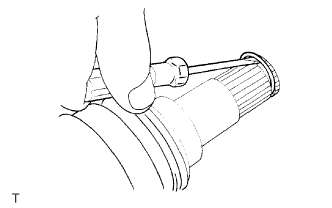
Using a screwdriver, remove the rear drive shaft snap ring.
-
-
REMOVE REAR DRIVE SHAFT ASSEMBLY RH
Tech Tips
Perform the same procedure as the LH side.
-
REMOVE REAR DRIVE SHAFT SNAP RING RH
Tech Tips
Perform the same procedure as the LH side.
-
REMOVE REAR SUSPENSION MEMBER
-
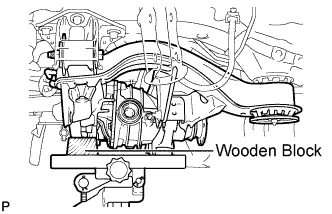
Support the rear suspension member with a jack using a wooden block.
Tech Tips
Use a properly sized wooden block to keep the jack and suspension member level.
-
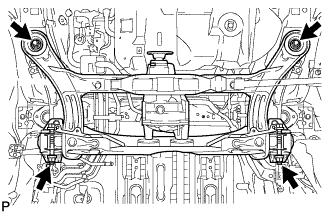
Remove the 4 nuts, 2 bolts and 2 rear lower suspension member stopper retainers.
-
Lower the rear suspension member.
-
Remove the 2 rear upper suspension member stoppers.
-
-
REMOVE REAR NO. 1 SUSPENSION ARM ASSEMBLY LH
-
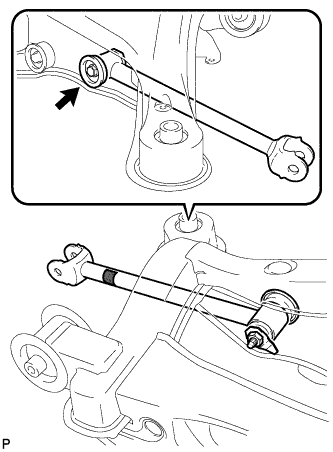
Remove the bolt, the nut, and the rear No. 1 suspension arm assembly LH from the rear suspension member sub-assembly.
Note
Since a stopper nut is used, loosen the bolt.
-
-
REMOVE REAR DIFFERENTIAL CARRIER ASSEMBLY
-
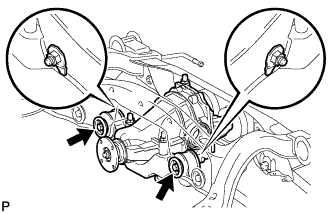
Support the rear differential carrier assembly with a jack.
-
Remove the 2 bolts and 2 lock nuts, and separate the No. 1 rear differential support from the rear suspension member sub-assembly.
-
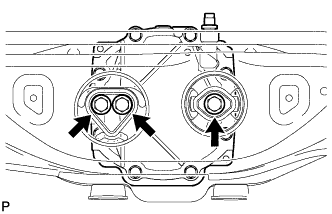
Remove the 3 bolts and rear differential carrier assembly from the rear suspension member sub-assembly.
Note
Be careful not to drop the rear differential carrier assembly.
-
-
REMOVE REAR NO. 1 DIFFERENTIAL MOUNT CUSHION
-
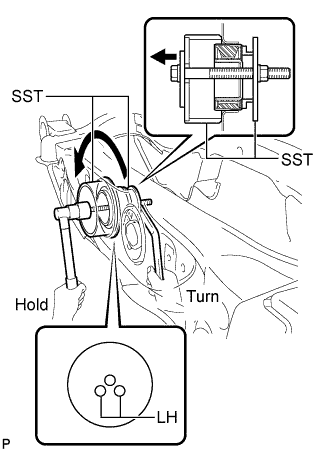
Using SST, remove the rear No. 1 differential mount cushion.
- SST
- 09570-24011
- 09316-12010
Note
-
Do not bring SST into contact with the sub-frame.
-
Do not slant the SST bolt.
-
Do not set SST in the wrong direction.
-
Tighten the SST bolt equally into the 2 No. 1 rear differential mount cushion hole.
Tech Tips
Perform this operation only if the No. 1 rear differential mount cushion is damaged.
-
-
REMOVE REAR NO. 2 DIFFERENTIAL MOUNT CUSHION
-
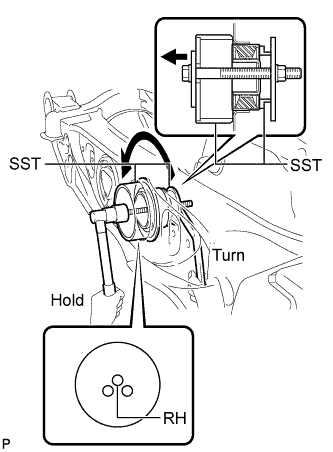
Using SST, remove the rear No. 2 differential mount cushion.
- SST
- 09570-24011
- 09316-12010
Note
-
Do not bring SST into contact with the sub-frame.
-
Do not slant the SST bolts.
-
Do not set SST in the wrong direction.
Tech Tips
Perform this operation only if the No. 2 rear differential mount cushion is damaged.
-
-
REMOVE REAR SUSPENSION MEMBER BODY MOUNTING FRONT CUSHION (for LH Side)
-
Using SST, remove the rear suspension member body mounting front cushion.
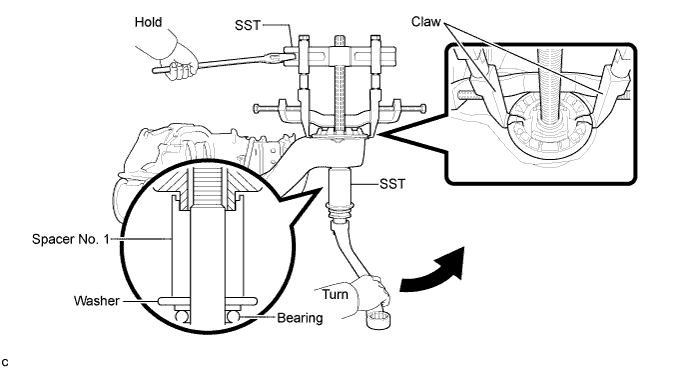
- SST
- 09830-10010 ( 09830-01010, 09830-01040, 09830-01050 )
- 09950-40011 ( 09951-04020, 09952-04010, 09955-04011, 09954-04010, 09958-04011 )
Note
-
Set the tips of the claws in the cutouts of the body mounting cushion.
-
Securely install the spacer No. 1 to the inner cylinder of the body mounting cushion as shown in the illustration.
-
Apply a small amount of grease to the threads of SST (center bolt) before use.
-
Tighten SST slowly and evenly.
-
Be careful as the body mounting cushion may fly out.
-
The body mounting cushion cannot be reused.
-
-
REMOVE REAR SUSPENSION MEMBER BODY MOUNTING FRONT CUSHION (for RH Side)
Tech Tips
Perform the same procedure as the LH side.
-
REMOVE REAR SUSPENSION MEMBER BODY MOUNTING REAR CUSHION (for LH Side)
-
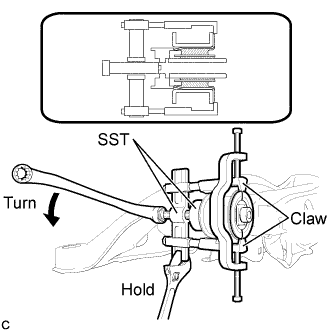
Using SST, temporarily remove the rear suspension member body mounting rear cushion.
- SST
- 09710-30050
- 09950-40011 ( 09951-04020, 09955-04031, 09954-04010, 09952-04010, 09958-04011, 09953-04010 )
Note
-
Set the tips of the claws in the cutouts of the body mounting cushion.
-
Securely install the spacer No. 1 to the inner cylinder of the body mounting cushion as shown in the illustration.
-
Apply a small amount of grease to the threads of SST (center bolt) before use.
-
Tighten SST slowly and evenly.
-
Be careful as the body mounting cushion may fly out.
-
The body mounting cushion cannot be reused.
-
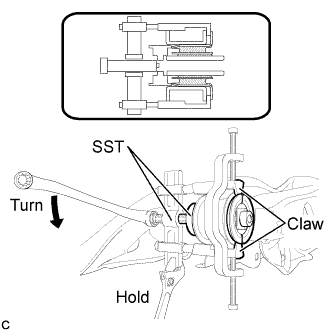
When the mounting cushion protrudes approximately 6 mm, reassemble SST as shown in the illustration and remove the mounting cushion.
- SST
- 09710-30050
- 09950-40011 ( 09951-04020, 09955-04031, 09954-04010, 09952-04010, 09958-04011, 09953-04010, 09953-04020 )
Note
-
Set the tips of the claws in the cutouts of the body mounting cushion.
-
Securely install the spacer No. 1 to the inner cylinder of the body mounting cushion as shown in the illustration.
-
Apply a small amount of grease to the threads of SST (center bolt) before use.
-
Tighten SST slowly and evenly.
-
Be careful as the body mounting cushion may fly out.
-
The body mounting cushion cannot be reused.
Tech Tips
Use the shorter center bolt first, and then change it to the longer center bolt.
-
-
REMOVE REAR SUSPENSION MEMBER BODY MOUNTING REAR CUSHION (for RH Side)
Tech Tips
Perform the same procedure as the LH side.
-
REMOVE HOLE PLUG
-
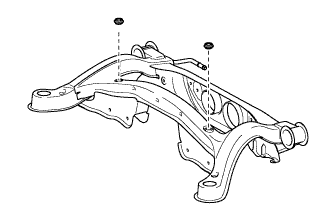
Remove the 2 hole plugs.
-
-
REMOVE REAR NO. 2 BODY MOUNTING BRACKET SUB-ASSEMBLY LH
-
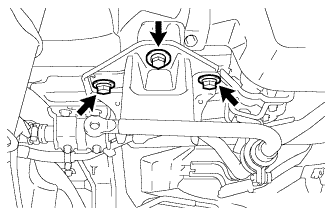
Remove the 3 bolts and rear No. 2 body mounting bracket sub-assembly LH.
-
-
REMOVE REAR NO. 2 BODY MOUNTING BRACKET SUB-ASSEMBLY RH
-
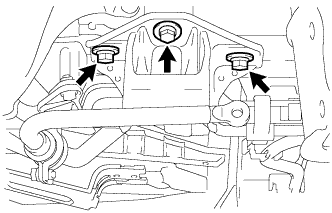
Remove the 3 bolts and rear No. 2 body mounting bracket sub-assembly RH.
-
-
REMOVE STUD BOLT (for LH Side)
-
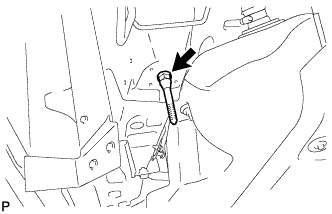
Remove the stud bolt.
-
-
REMOVE STUD BOLT (for RH Side)
Tech Tips
Perform the same procedure as the LH side.