FRONT WHEEL ALIGNMENT ADJUSTMENT
Note
If the wheel alignment has been adjusted, and if suspension or underbody components have been removed/installed or replaced, be sure to perform the following initialization procedure in order for the system to function normally:
-
Disconnect the cable from the negative battery terminal for more than 2 seconds.
-
Reconnect the cable to the negative battery terminal.
-
Perform zero point calibration of the yaw rate and acceleration sensor and test mode inspection.
Tech Tips
-
INSPECT TIRES
-
Inspect the tires Click here.
-
-
MEASURE VEHICLE HEIGHT
Note
-
Before inspecting the wheel alignment, adjust the vehicle height to the specified value.
-
Be sure to perform measurement on a level surface.
-
If it is necessary to go under the vehicle for measurement, confirm that the parking brake is applied and the vehicle is secured with chocks.
-
Bounce on the vehicle up and down at the corners to stabilize the suspension.
-
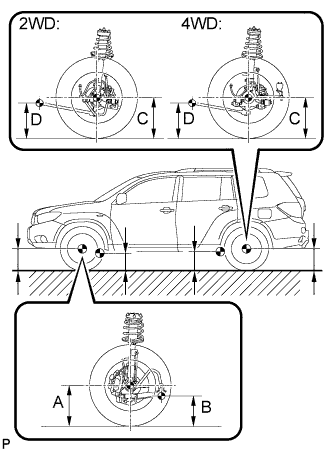
Measure the vehicle height.
Measuring points A Ground clearance of front wheel center B Ground clearance of No. 1 lower suspension arm bushing set bolt center C Ground clearance of rear wheel center D Ground clearance of strut rod set bolt center Vehicle height Model Front A - B Rear C - D 2WD 115.2 mm (4.54 in.) 34.9 mm (1.37 in.) 4WD 115.3 mm (4.54 in.) 33.8 mm (1.33 in.)
-
-
INSPECT WHEEL ANGLE
-
Put tread center marks on the rearmost points of the turning radius gauge.
-
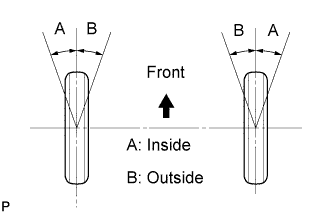
Turn the steering wheel to the left and right full lock positions, and measure the turning angle.
Wheel turning angle Model Inside wheel Outside wheel Reference 2WD 35°07' +/- 1°30'
(35.12° +/- 1.5°)
31°20' (31.33°) 4WD 35°07' +/- 1°30'
(35.12° +/- 1.5°)
31°20' (31.33°) If the angles are not as specified, check and adjust the right and left rack end lengths.
-
-
INSPECT CAMBER, CASTER AND STEERING AXIS INCLINATION
-
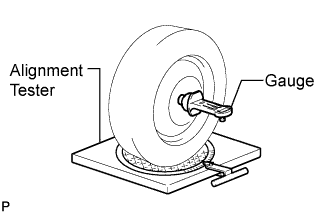
Install the camber-caster-kingpin gauge or place the front wheels on the center of the wheel alignment tester.
-
Inspect the camber, caster and steering axis inclination.
Camber, caster and steering axis inclination Model Camber Inclination Caster Inclination Steering Axis Inclination Right-left difference 2WD -0°38' +/- 45'
(-0.63° +/- 0.75°)
2°37' +/- 45'
(2.62° +/- 0.75°)
11°01' +/- 45'
(11.02° +/- 0.75°)
45' (0.75°) or less 4WD -0°38' +/- 45'
(-0.63° +/- 0.75°)
2°37' +/- 45'
(2.62° +/- 0.75°)
11°01' +/- 45'
(11.02° +/- 0.75°)
-
-
ADJUST CAMBER
Note
Inspect toe-in after the camber has been adjusted.
-
Remove the front wheel.
-
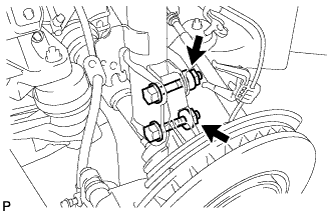
Remove the 2 nuts on the lower side of the front shock absorber.
Note
Keep the bolts inserted.
-
Clean the installation surfaces of the front shock absorber and the steering knuckle.
-
Temporarily install the 2 nuts (Step A).
-
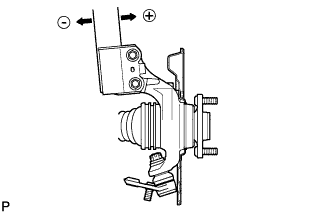
Fully push or pull the front axle hub in the direction of the required adjustment (Step B).
-
Tighten the nuts.
- Torque:
- 290 N*m { 2956 kgf*cm, 214 ft.*lbf }
Note
Keep the bolts from rotating when tightening the nuts.
-
Install the front wheel.
- Torque:
- 103 N*m { 1050 kgf*cm, 76 ft.*lbf }
-
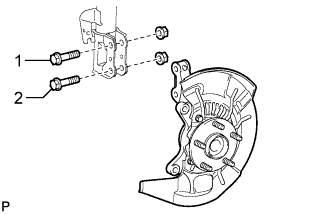
Check the camber.
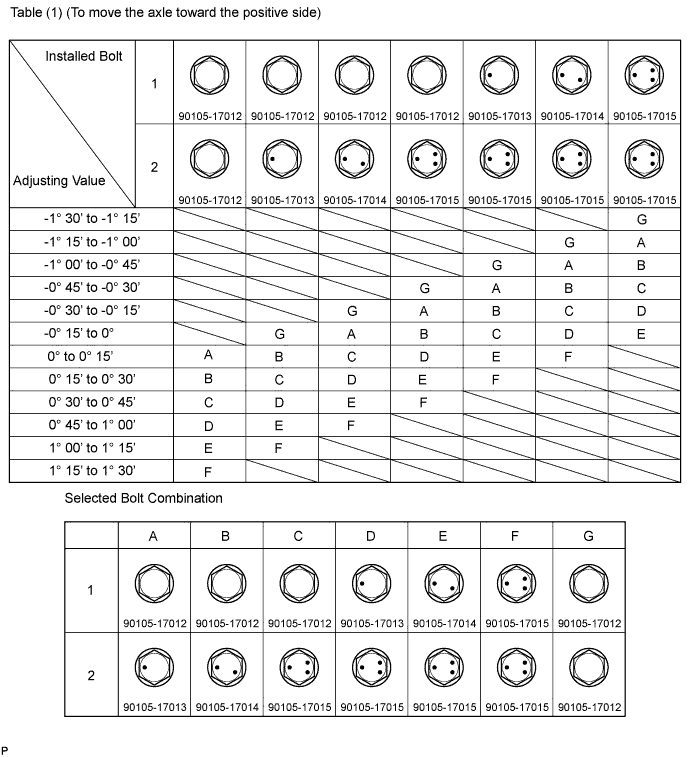
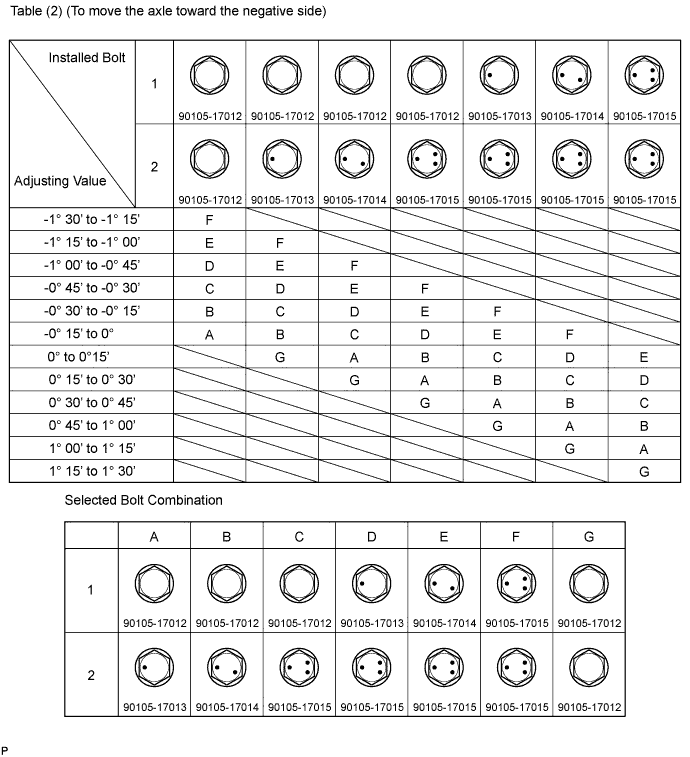
If the measured value is not within the specification, calculate the required adjustment amount using the formula below.
Camber adjustment amount = center value of the specified range - measured value.
Check the combination of installed bolts. Select appropriate bolts from the table below to adjust the camber to the specified values.
Tech Tips
Try to adjust the camber to the center of the specified values.
To move the axle toward (+) in step (B) To move the axle toward (-) in step (B) Refer to table (1) (Move the axle toward positive side) Refer to table (2) (Move the axle toward negative side) The body and suspension may be damaged if the camber is not correctly adjusted according to the above table.
Note
Replace the nut with a new one when replacing the bolt.
-
Repeat the steps mentioned above. In step (A), replace 1 or 2 selected bolts.
Tech Tips
Replace one bolt at a time when replacing 2 bolts.
-
-
INSPECT TOE-IN
-
Bounce the vehicle up and down at the corners to stabilize the suspension.
-
Release the parking brake and move the shift lever to the neutral position.
-
Push the vehicle straight ahead approximately 5 m (16.4 ft.). (*1)
-
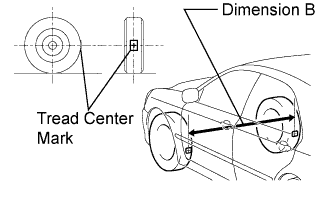
Put tread center marks on the rearmost points of the front wheels and measure the distance between the marks (dimension B).
-
Slowly push the vehicle straight ahead to cause the front wheels to rotate 180°. Use the front tire valve as a reference point.
Tech Tips
Do not allow the wheels to rotate more than 180°. If the wheels rotate more than 180°, perform the procedure from (*1) again.
-
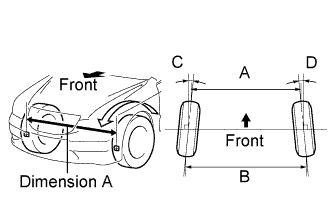
Measure the distance between the tread center marks on the front side of the wheels (dimension A).
Toe-in Item Specified Condition Toe-in
(total)
C + D: 0°02' +/- 12' (0.04° +/- 0.2°)
B - A: 0.9 +/- 2 mm (0.04 +/- 0.08 in.)
If toe-in is not within the specified range, adjust it at the rack ends.
Tech Tips
Measure "B - A" only when "C + D" cannot be measured.
-
-
ADJUST TOE-IN
-
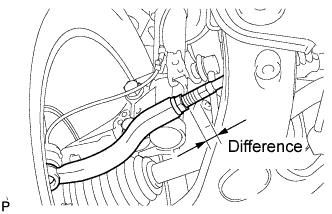
Make sure that the lengths of the right and left rack ends are almost the same.
Standard difference 1.5 mm (0.06 in.) or less -
Remove the rack boot set clips.
-
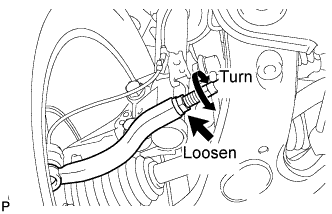
Loosen the tie rod end lock nuts.
-
Adjust the rack ends if the difference in thread length between the right and left rack ends is not within the specified range.
-
Extend the shorter rack end if the measured toe-in deviates toward the outer-side.
-
Shorten the longer rack end if the measured toe-in deviates toward the inner-side.
-
-
Turn the right and left rack ends by an equal amount to adjust the toe-in to the center value.
-
Make sure that the lengths of the right and left rack ends are the same.
-
Tighten the tie rod end lock nuts.
- Torque:
- 88 N*m { 897 kgf*cm, 65 ft.*lbf }
Note
Temporarily tighten the lock nut while holding the hexagonal part of the steering rack end so that the lock nut and the steering rack end do not turn together. Hold the width across flat of the tie rod end and tighten the lock nut.
-
Place the boots on the seats and install the clips.
Tech Tips
Make sure that the boots are not twisted.
-
-
PLACE FRONT WHEELS FACING STRAIGHT AHEAD
-
DISCONNECT CABLE FROM NEGATIVE BATTERY TERMINAL
Note
When disconnecting the cable, some systems need to be initialized after the cable is reconnected Click here.
Tech Tips
Disconnect the cable from the negative battery terminal for more than 2 seconds.
-
CONNECT CABLE TO NEGATIVE BATTERY TERMINAL
Note
When disconnecting the cable, some systems need to be initialized after the cable is reconnected Click here.
-
PERFORM YAW RATE SENSOR ZERO POINT CALIBRATION
Tech Tips
Perform yaw rate sensor zero point calibration Click here.
-
CHECK STEERING ANGLE SENSOR ZERO POINT CALIBRATION
Tech Tips
Check steering angle sensor zero point calibration Click here.