- Click here
INSTALL REAR AXLE CARRIER SUB-ASSEMBLY
-
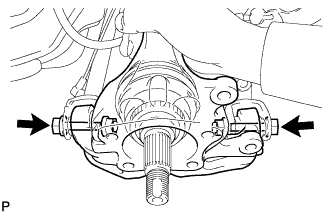
Temporarily install the the rear axle carrier sub-assembly with the 2 bolts and the 2 nuts.
Note:
-
Be careful not to damage the outboard joint boot.
-
Be careful not to damage the speed sensor rotor.
-
Prevent foreign matter from adhering to the speed sensor rotor.
-
-
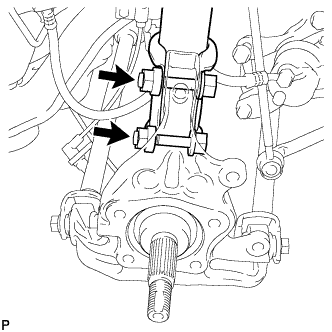
Install the rear axle carrier sub-assembly with the 2 bolts and the 2 nuts.
290 N*m 2956 kgf*cm 213 ft.*lbf Note:
-
Be careful not to damage the outboard joint boot.
-
Be careful not to damage the speed sensor rotor.
-
Prevent foreign matter from adhering to the speed sensor rotor.
-
Do not rotate the drive shaft with the rear axle hub and bearing assembly removed.
Tip:Insert the bolts from the rear side.
-
-
- Click here
TEMPORARILY INSTALL REAR STRUT ROD ASSEMBLY
-
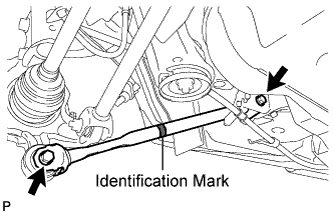
Check that the identification mark of the rear strut rod assembly is positioned on the inner side of the vehicle.
-
Temporarily install the rear strut rod assembly with the 2 bolts and the 2 nuts.
Note:Since stopper nuts are used, temporarily tighten the bolts.
-
- Click here
INSTALL REAR AXLE HUB AND BEARING ASSEMBLY
-
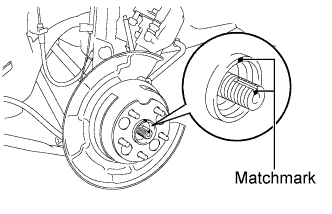
Align the matchmarks on the drive shaft and rear axle hub.
Note:Do not rotate the drive shaft.
-
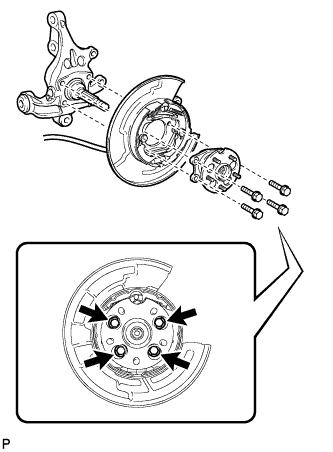
Install the parking brake assembly and the rear axle hub and bearing assembly with the 4 bolts.
75 N*m 764 kgf*cm 55 ft.*lbf Note:Do not twist the No. 3 parking brake cable assembly when installing it.
-
- Click here
INSTALL REAR DISC
-
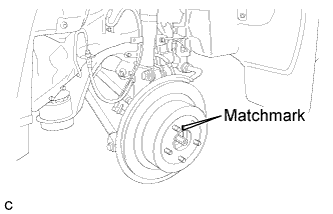
Align matchmarks and install the rear disc.
Note:When replacing the rear disc with a new one, select the installation position where the rear disc has minimal runout.
-
- Click here
INSTALL REAR DISC BRAKE CALIPER ASSEMBLY
-
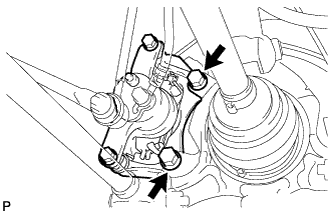
Install the rear disc brake caliper assembly with the 2 bolts.
78 N*m 795 kgf*cm 57 ft.*lbf
-
- Click here
TEMPORARILY INSTALL REAR AXLE SHAFT NUT
-
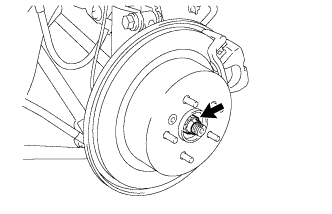
Clean the threaded parts on the rear drive shaft assembly and rear axle shaft nut using a non-residue solvent.
Note:
-
Be sure to perform this work for a new rear drive shaft assembly.
-
Keep the threaded parts free of oil and foreign objects.
-
-
While applying the brakes, temporarily install a new rear axle shaft nut.
294 N*m 2996 kgf*cm 216 ft.*lbf Note:Stake the nut after inspecting for looseness and runout in the following steps.
-
- Click here
INSTALL REAR SPEED SENSOR
-
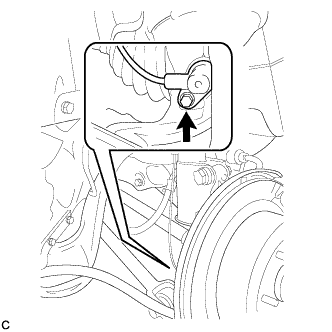
Install the rear speed sensor to the rear axle carrier sub-assembly with the bolt .
8.5 N*m 87 kgf*cm 75 in.*lbf Note:
-
Keep the rear speed sensor tip and sensor installation hole free from foreign matter.
-
To prevent interference with the bearing rotor, do not rotate the rear speed sensor body when inserting the rear speed sensor body or after inserting the rear speed sensor body.
-
Do not twist the rear speed sensor wire when installing.
-
-
- Click here
STABILIZE SUSPENSION
-
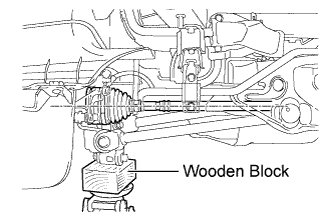
Jack up the rear axle carrier sub-assembly, placing a wooden block underneath to avoid damage. Apply load to the suspension so that the rear drive shaft assembly is positioned horizontally.
CAUTION:Do not jack up the rear axle carrier sub-assembly too high as the vehicle may fall.
Note:Do not bend the brake dust cover.
Tip:
-
If the rear drive shaft assembly cannot be positioned horizontally as shown in the illustration even when the rear axle carrier sub-assembly is jacked up, apply additional load to the vehicle such as by having a person sit in the rear seat.
-
Use the same procedure for the RH side and LH side.
-
-
- Click here
FULLY TIGHTEN REAR NO. 2 SUSPENSION ARM ASSEMBLY
-
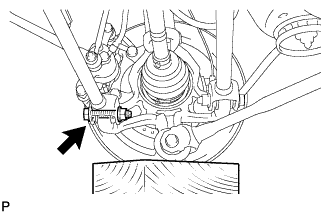
Fully tighten the rear No. 2 suspension arm assembly with the bolt and nut.
112 N*m 1141 kgf*cm 82 ft.*lbf Note:
-
Since a stopper nut is used, fully tighten the bolt.
-
The final torque must be applied under standard vehicle height conditions.
-
-
- Click here
FULLY TIGHTEN REAR NO. 1 SUSPENSION ARM ASSEMBLY
-
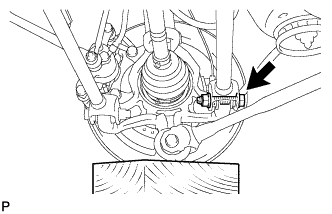
Fully tighten the rear No. 1 suspension arm assembly with the bolt and nut.
112 N*m 1141 kgf*cm 82 ft.*lbf Note:
-
Since a stopper nut is used, fully tighten the bolt.
-
The final torque must be applied under standard vehicle height conditions.
-
-
- Click here
FULLY TIGHTEN REAR STRUT ROD ASSEMBLY
-
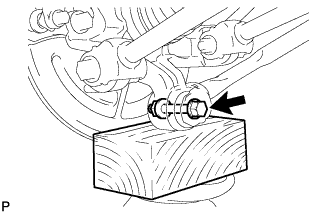
Fully tighten the bolt.
80 N*m 815 kgf*cm 59 ft.*lbf Note:
-
Since a stopper nut is used, fully tighten the bolt.
-
The final torque must be applied under standard vehicle height conditions.
-
-
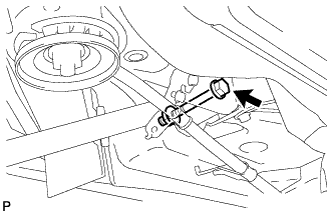
Fully tighten the bolt.
80 N*m 815 kgf*cm 59 ft.*lbf Note:
-
Since a stopper nut is used, fully tighten the bolt.
-
The final torque must be applied under standard vehicle height conditions.
-
-
- Click here
INSTALL NO. 3 PARKING BRAKE CABLE ASSEMBLY
-
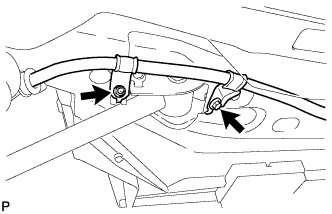
Install the No. 3 parking brake cable assembly with the bolt and the nut.
Bolt 39 N*m 397 kgf*cm 29 ft.*lbf Nut 6.0 N*m 61 kgf*cm 53 in.*lbf Note:Do not twist the No. 3 parking brake cable assembly when installing it.
-
- Click here
SEPARATE REAR DISC BRAKE CALIPER ASSEMBLY
-
Remove the 2 bolts and separate the rear disc brake caliper assembly.
Note:Use wire or an equivalent tool to keep the brake caliper from hanging down by the flexible hose.
-
- Click here
REMOVE REAR DISC
-
Put matchmarks on the rear disc and the axle hub.
-
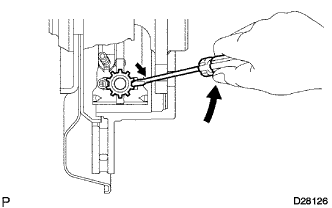
Release the parking brake and remove the rear disc.
Tip:If the disc cannot be removed easily, turn and press firmly the shoe adjuster until the wheel comes free.
-
- Click here
INSPECT REAR AXLE HUB BEARING LOOSENESS
-
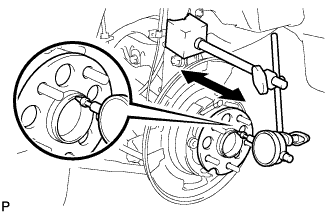
Using a dial indicator, check for looseness near the center of the rear axle hub and bearing assembly.
Maximum looseness 0 mm (0 in.) Note:Ensure that the dial indicator is set perpendicular to the measurement surface.
Tip:If the looseness exceeds the maximum, replace the rear axle hub and bearing assembly.
-
- Click here
INSPECT REAR AXLE HUB RUNOUT
-
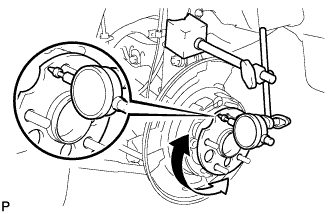
Using a dial indicator, check for runout on the surface of the rear axle hub and bearing assembly outside the rear axle hub bolt.
Maximum runout 0.08 mm (0.0031 in.) Note:Ensure that the dial indicator is set perpendicular to the measurement surface.
Tip:If the runout exceeds the maximum, replace the rear axle hub and bearing assembly.
-
- Click here
INSTALL REAR DISC
-
Align matchmarks and install the rear disc.
Note:When replacing the rear disc with a new one, select the installation position where the rear disc has minimal runout.
-
- Click here
INSTALL REAR DISC BRAKE CALIPER ASSEMBLY
-
Install the rear disc brake caliper assembly with the 2 bolts.
78 N*m 795 kgf*cm 57 ft.*lbf
-
- Click here
INSTALL REAR AXLE SHAFT NUT
-
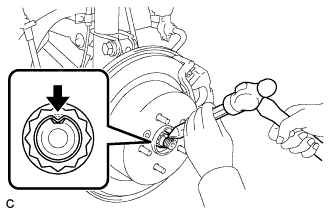
Using a chisel and a hammer, stake the rear axle shaft nut.
-
- Click here
INSTALL REAR WHEEL
103 N*m 1050 kgf*cm 76 ft.*lbf - Click here
INSPECT AND ADJUST REAR WHEEL ALIGNMENT
Tip: - Click here
CHECK FOR SPEED SENSOR SIGNAL
Tip: