- Click here
INSTALL SPEED SENSOR (NC SENSOR)
-
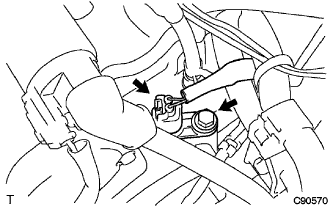
Coat a new O-ring with ATF.
-
Install the speed sensor with the bolt.
11 N*m 112 kgf*cm 8 ft.*lbf Tip:Make sure to install the same manufacturer's sensor.
-
Connect the speed sensor connector.
-
- Click here
INSTALL SPEED SENSOR (NT SENSOR)
-
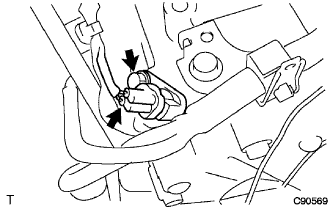
Coat a new O-ring with ATF.
-
Install the speed sensor with the bolt.
11 N*m 112 kgf*cm 8 ft.*lbf Tip:Make sure to install the same manufacturer's sensor.
-
Connect the speed sensor connector.
-
- Click here
INSTALL AIR CLEANER BRACKET
-
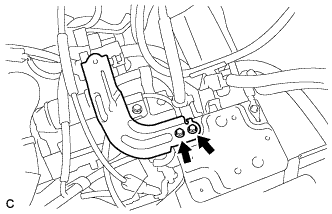
Install the 2 bolts and air cleaner bracket.
12 N*m 123 kgf*cm 9 ft.*lbf
-
- Click here
INSTALL AIR CLEANER CASE SUB-ASSEMBLY
-
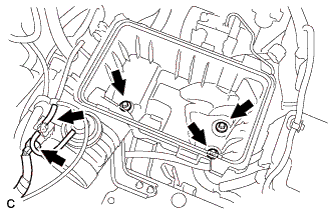
Install the air cleaner case with the 3 bolts.
5.0 N*m 51 kgf*cm 44 in.*lbf -
Connect the hose and connector.
-
- Click here
INSTALL AIR CLEANER FILTER ELEMENT SUB-ASSEMBLY
- Click here
INSTALL AIR CLEANER CAP SUB-ASSEMBLY
-
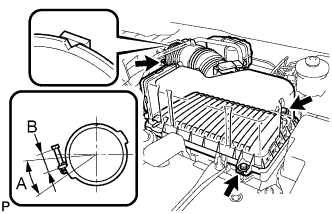
Install the air cleaner filter element, align the groove on the air cleaner hose with the throttle body alignment tab and tighten the clamp as shown in the illustration.
Tip:
-
A = 30°
-
B = 11 to 14 mm (0.433 in. to 0.551 in.)
-
-
Install the air cleaner cap with the 2 bolts and clips.
5.0 N*m 51 kgf*cm 44 in.*lbf -
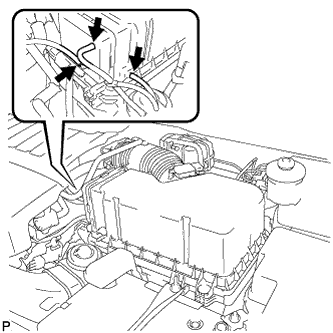
Connect the 3 vacuum hoses.
-
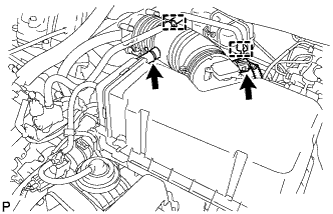
Connect the mass air flow meter connector.
-
Connect the No. 2 ventilation hose and fuel vapor feed hose assembly.
-
- Click here
INSTALL NO. 1 AIR CLEANER INLET
-
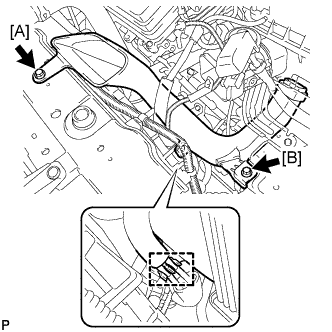
Install the No. 1 air cleaner inlet with the 2 bolts.
7.0 N*m 71 kgf*cm 62 in.*lbf [A] 5.0 N*m 51 kgf*cm 44 in.*lbf [B] -
Connect the 2 vacuum hoses.
-
- Click here
INSTALL NO. 2 AIR CLEANER INLET
-
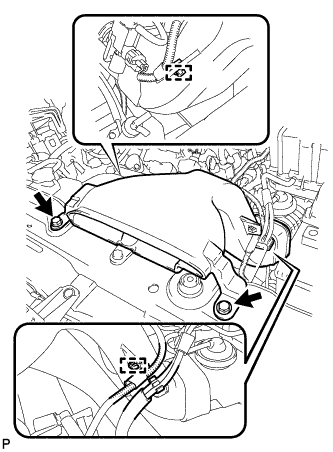
Install the No. 2 air cleaner inlet with the 2 bolts.
7.0 N*m 71 kgf*cm 62 in.*lbf -
Connect the 2 vacuum hoses and harness clamps.
-
- Click here
REMOVE COOL AIR INTAKE DUCT SEAL
-
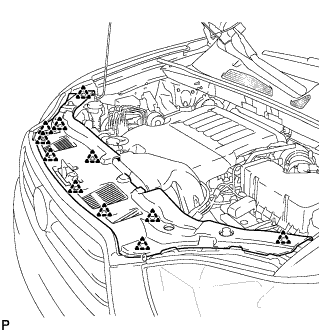
Install the cool air intake duct seal with the 11 clips.
-
- Click here
INSTALL BATTERY
-
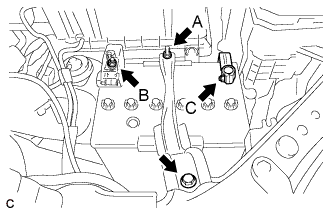
Install the battery tray and battery.
-
Install the battery clamp with the bolt and nut.
Bolt 5.4 N*m 55 kgf*cm 48 in.*lbf Nut A 5.4 N*m 55 kgf*cm 48 in.*lbf Nut B 13 N*m 131 kgf*cm 9 ft.*lbf Nut C 6.4 N*m 64 kgf*cm 57 in.*lbf -
Install the positive battery terminal and nut.
-
Connect the negative battery terminal, and tighten the nut.
-
- Click here
CONNECT CABLE TO NEGATIVE BATTERY TERMINAL
Note:When disconnecting the cable, some systems need to be initialized after the cable is reconnected (Click here).