COOLING FAN MOTOR ON-VEHICLE INSPECTION
-
CHECK NO. 1 COOLING FAN MOTOR
-
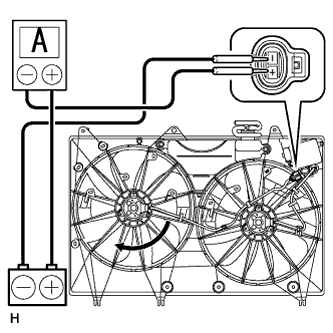
Disconnect the No. 1 fan connector.
-
Connect the battery and an ammeter to the No. 1 fan motor connector.
-
Check that the No. 1 fan rotates smoothly, and then check the reading on the ammeter.
Standard current 14.6 to 18.7 A at 12 V Tech Tips
-
Refer to the indication mark illustration for the indication mark location.
-
If the result is not as specified, replace the No. 1 cooling fan motor.
-
-
Reconnect the No. 1 fan motor connector.
-
-
CHECK NO. 2 COOLING FAN MOTOR
-
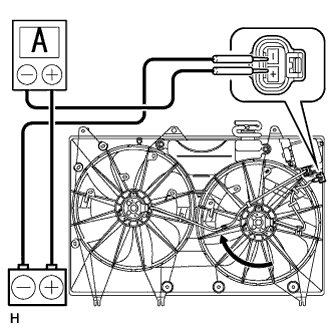
Disconnect the No. 2 fan connector.
-
Connect the battery and an ammeter to the No. 2 fan motor connector.
-
Check that the No. 2 fan rotates smoothly, and then check the reading on the ammeter.
Standard current 14.6 to 18.7 A at 12 V
-
Refer to the indication mark illustration for the indication mark location.
-
If the result is not as specified, replace the No. 2 cooling fan motor.
-
-
Reconnect the No. 2 fan motor connector.
-