ECM INSTALLATION
-
INSTALL ECM
-
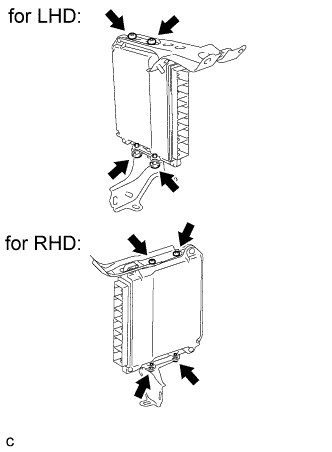
Install the 2 ECM brackets to the ECM with the 4 screws.
-
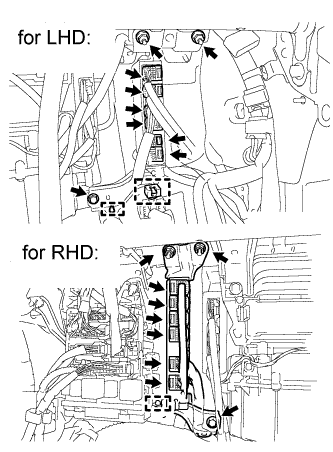
Install the ECM with the ECM bracket with the bolt and 2 nuts.
- Torque:
- for LHD
- 8.5 N*m { 87 kgf*cm, 75 in.*lbf }
- for RHD
- 8.0 N*m { 82 kgf*cm, 71 in.*lbf }
-
Install the 2 wire harness clamps (for LHD).
-
Install the wire harness clamp (for RHD).
-
Connect the 6 ECM connectors.
-
-
INSTALL LOWER INSTRUMENT PANEL SUB-ASSEMBLY
-
Connect each connector and clamp.
-
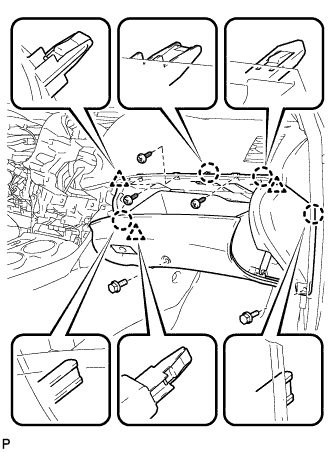
Engage the 4 claws and 3 clips.
-
Install the lower instrument panel sub-assembly with the 2 bolts <B> and 3 screws <E>.
-
-
INSTALL NO. 2 INSTRUMENT PANEL UNDER COVER SUB-ASSEMBLY
-
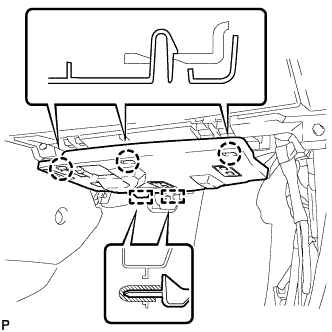
Engage the 2 guides.
-
Engage the 3 claws and install the No. 2 instrument panel under cover sub-assembly.
-
-
INSTALL COWL SIDE TRIM SUB-ASSEMBLY RH (for LHD)
Tech Tips
Use the same procedure for the RH side and the LH side.
-
INSTALL COWL SIDE TRIM SUB-ASSEMBLY LH (for RHD)
-
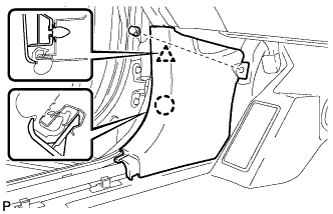
Engage the claw and clip, install the cowl side trim sub-assembly LH.
-
Install the clip.
-
-
INSTALL FRONT DOOR SCUFF PLATE RH (for LHD)
Tech Tips
Use the same procedure for the RH side and the LH side.
-
INSTALL FRONT DOOR SCUFF PLATE LH (for RHD)
-
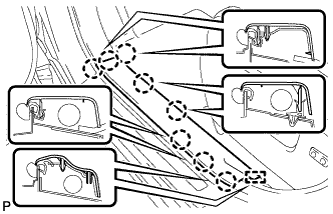
Engage the guide and 8 claws, and install the front door scuff plate LH.
-
-
REGISTER IMMOBILISER COMMUNICATION ID
Note
If the ECM is replaced, register the ECM communication ID for the immobiliser system (Refer to the Service Bulletin for Registration).
-
PERFORM INITIALIZATION
Note
If the ECM is replaced, perform RESET MEMORY (AT initialization) Click here.