SFI SYSTEM, Diagnostic DTC:P0617
| DTC Code | DTC Name |
|---|---|
| P0617 | Starter Relay Circuit High |
DESCRIPTION
-
with Smart Entry and Start System
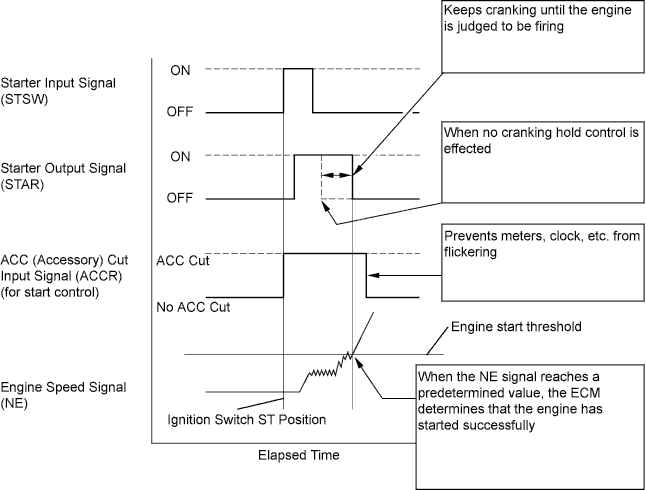
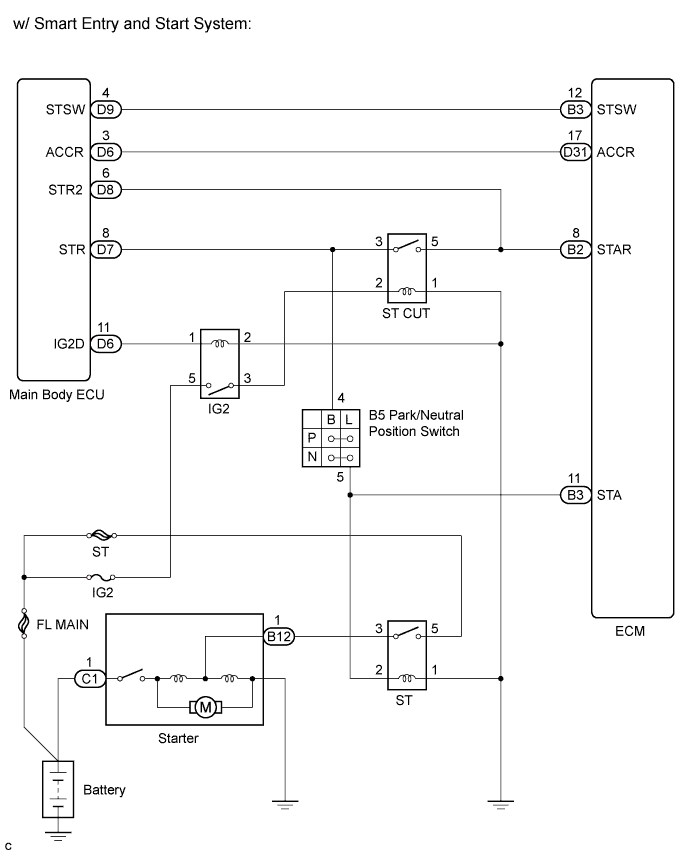
The cranking holding control system keeps energizing the starter relay after the ECM detects the starter signal (STSW signal) from the main body ECU until the ECM performs a judgment of "Engine started". Furthermore, the ECM outputs an accessory cut signal (ACCR signal) to the ACC relay during cranking to prevent flickering of the combination meter, clock, audio system, and so on.
When the ECM detects the STSW signal, the ECM outputs the starter relay drive signal (STAR signal) to the starter relay through the clutch start switch or park/neutral position switch, and then, the engine is cranked. When the ECM receives a stable engine speed signal (NE signal), more specifically, when the NE signal reaches a predetermined value, the ECM stops outputting the STAR signal. Also, the ECM monitors the starter relay operating conditions based on the STA terminal voltage status.
-
without Smart Entry and Start System
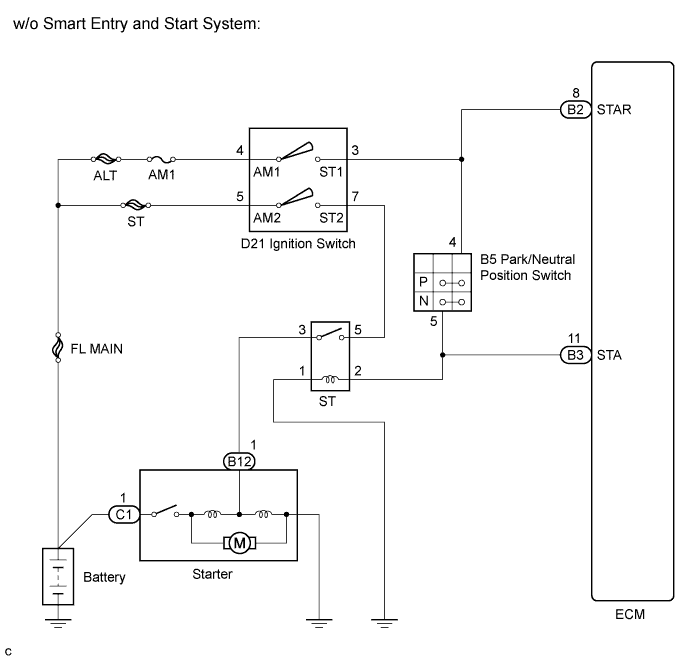
While the engine is being cranked, the positive battery voltage is applied to terminal STA of the ECM.
If the ECM detects the Starter Control (STA) signal while the vehicle is being driven, it determines that there is a malfunction in the STA circuit. The ECM then illuminates the MIL and sets the DTC.
This monitor runs when the vehicle is driven at 20 km/h (12.4 mph) for over 20 seconds.
DTC No. DTC Detection Condition Trouble Area P0617 When conditions (a), (b) and (c) met, positive (+B) battery voltage 10.5 V or more applied to ECM for 20 seconds (1 trip detection logic):
-
(a) Vehicle speed more than 20 km/h (12.4 mph)
-
(b) Engine speed more than 1000 rpm
-
(c) STA signal ON
-
Park/neutral position switch
-
Starter relay circuit
-
Ignition switch*1
-
Cranking holding function circuit*2
-
ECM
-
*1: Only for vehicles w/o Smart Entry and Start System.
-
*2: Only for vehicles w/ Smart Entry and Start System.
-
WIRING DIAGRAM
INSPECTION PROCEDURE
Tech Tips
-
The following troubleshooting flowchart is based on the premise that the engine is cranked normally.
If the engine will not crank, proceed to the problem symptoms table Click here.
-
Read freeze frame data using the intelligent tester. The ECM records vehicle and driving condition information as freeze frame data the moment a DTC is stored. When troubleshooting, freeze frame data can be helpful in determining whether the vehicle was running or stopped, whether the engine was warmed up or not, whether the air-fuel ratio was lean or rich, as well as other data recorded at the time of a malfunction.
PROCEDURE
-
CHECK IF VEHICLE IS EQUIPPED WITH SMART ENTRY AND START SYSTEM
Result Result Proceed to w/o Smart Entry and Start System A w/ Smart Entry and Start System B
B 
READ VALUE USING INTELLIGENT TESTER (STARTER SIGNAL) Click here
A 
-
READ VALUE USING INTELLIGENT TESTER (STARTER SIGNAL)
-
Connect the intelligent tester to the DLC3.
-
Turn the ignition switch on (IG) and turn the tester on.
-
Select the following menu items: Powertrain / Engine / Data List / Starter Signal.
-
Check the result when the ignition switch is turned on (IG).
-
Check the result when the engine starts.
Standard Ignition Switch Condition Tester Display (Starter Signal) On (IG) OFF Engine Starts ON Result Result Proceed to NG A OK B
B 
CHECK FOR INTERMITTENT PROBLEMS Click here
A
-
-
INSPECT PARK/NEUTRAL POSITION SWITCH ASSEMBLY
-
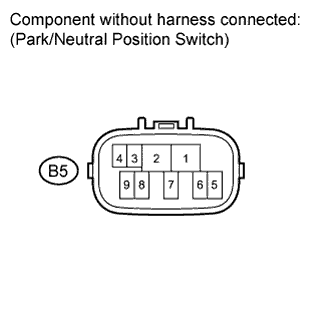
Disconnect the park/neutral position switch connector.
-
Measure the resistance according to the value(s) in the table below.
Standard resistance Gear Selector
Lever Position
Tester Connection Specified Condition P 4 - 5 Below 1 Ω N 4 - 5 Result Result Proceed to NG A OK B -
Reconnect the park/neutral position switch connector.
B
INSPECT IGNITION SWITCH ASSEMBLY Click here
A
-
-
REPLACE PARK/NEUTRAL POSITION SWITCH ASSEMBLY
NEXT
-
READ VALUE USING INTELLIGENT TESTER (STARTER SIGNAL)
-
Connect the intelligent tester to the DLC3.
-
Turn the ignition switch on (IG) and turn the tester on.
-
Select the following menu items: Powertrain / Engine / Data List / Starter Signal.
-
Check the result when the ignition switch is turned on (IG).
-
Check the result when the engine starts.
Standard Ignition Switch Condition Tester Display (Starter Signal) On (IG) OFF Engine Starts ON
NG
INSPECT IGNITION SWITCH ASSEMBLY Click here
OK 
SYSTEM OK
-
-
INSPECT IGNITION SWITCH ASSEMBLY
-
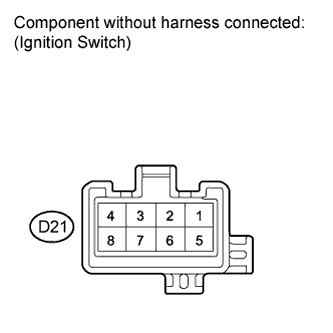
Disconnect the ignition switch connector.
-
Measure the resistance according to the value(s) in the table below.
Standard resistance Ignition Switch Position Tester Connection Specified Condition LOCK All Terminals 10 kΩ or higher ACC 2 - 3 Below 1 Ω ON 2 - 3, 2 - 4, 6 - 7 START 1 - 2, 2 - 4, 6 - 7, 7 - 8 Result Result Proceed to NG A OK B -
Reconnect the ignition switch connector.
B
READ VALUE USING INTELLIGENT TESTER (STARTER SIGNAL) Click here
A
-
-
REPLACE IGNITION SWITCH ASSEMBLY
NEXT
-
READ VALUE USING INTELLIGENT TESTER (STARTER SIGNAL)
-
Connect the intelligent tester to the DLC3.
-
Turn the ignition switch on (IG) and turn the tester on.
-
Select the following menu items: Powertrain / Engine / Data List / Starter Signal.
-
Check the result when the ignition switch is turned on (IG).
-
Check the result when the engine starts.
Standard Ignition Switch Condition Tester Display (Starter Signal) On (IG) OFF Engine Starts ON
NG
REPAIR OR REPLACE HARNESS OR CONNECTOR (PARK/NEUTRAL POSITION SWITCH - ECM) Click here
OK
SYSTEM OK
-
-
REPAIR OR REPLACE HARNESS OR CONNECTOR (PARK/NEUTRAL POSITION SWITCH - ECM)
NEXT
-
CHECK WHETHER DTC OUTPUT RECURS
-
Connect the intelligent tester to the DLC3.
-
Turn the ignition switch on (IG) and turn the tester on.
-
Clear DTCs Click here.
-
Drive the vehicle at more than 20 km/h (12.4 mph) for over 20 seconds.
-
Select the following menu items: Powertrain / Engine / DTC.
-
Read DTCs.
Result Display (DTC Output) Proceed to P0617 A No DTC B
B
SYSTEM OK
A
REPLACE ECM Click here
-
-
READ VALUE USING INTELLIGENT TESTER (STARTER SIGNAL)
-
Connect the intelligent tester to the DLC3.
-
Turn the ignition switch on (IG) and turn the tester on.
-
Select the following menu items: Powertrain / Engine / Data List / Starter Signal.
-
Check the result when the ignition switch is turned on (IG).
-
Check the result when the engine starts.
Standard Ignition Switch Condition Tester Display (Starter Signal) On (IG) OFF Engine Starts ON
NG
INSPECT PARK/NEUTRAL POSITION SWITCH Click here
OK
REPLACE ECM Click here
-
-
INSPECT PARK/NEUTRAL POSITION SWITCH
-
Disconnect the park/neutral position switch connector.
-
Measure the resistance according to the value(s) in the table below.
Standard resistance Gear Selector
Lever Position
Tester Connection Specified Condition P 4 - 5 Below 1 Ω N 4 - 5 Result: Result Proceed To OK A NG (with U151E)) B NG (with U151F) C -
Reconnect the park/neutral position switch connector.
B
REPLACE PARK/NEUTRAL POSITION SWITCH Click here
C
REPLACE PARK/NEUTRAL POSITION SWITCH Click here
A
CHECK CRANKING HOLDING FUNCTION CIRCUIT Click here
-