REAR BLOWER MOTOR REMOVAL
-
REMOVE REAR DOOR SCUFF PLATE RH
Tech Tips
Use the same procedure for the RH side and the LH side.
-
REMOVE REAR DOOR OPENING TRIM WEATHERSTRIP RH
Tech Tips
Use the same procedure for the RH side and the LH side.
-
REMOVE REAR NO. 2 SEAT ASSEMBLY
-
REMOVE REAR FLOOR FINISH PLATE
-
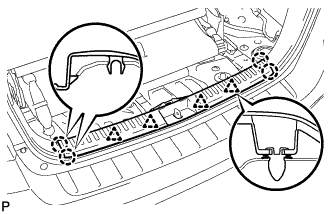
Disengage the 4 clips and 4 claws, and remove the rear floor finish plate.
-
-
REMOVE REAR SEAT SIDE GARNISH CAP
-
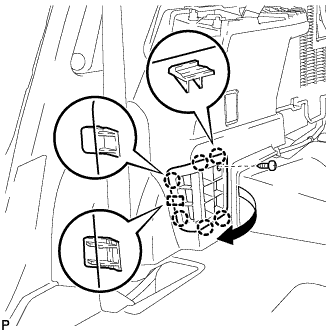
Remove the screw.
-
Disengage the 6 claws and the guide, and remove the rear seat side garnish cap.
-
-
REMOVE DECK SIDE TRIM COVER NO.1
Tech Tips
Use the same procedure for the RH side and the LH side.
-
REMOVE DECK SIDE TRIM RH
Tech Tips
Use the same procedure for the RH side and the LH side.
-
REMOVE SIDE TRIM COVER RH (for Manual Air Conditioning System)
-
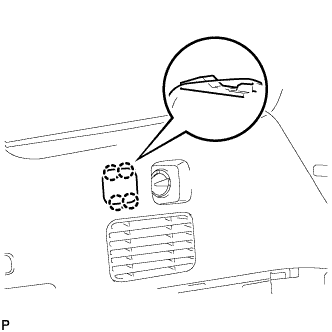
Disengage the 4 claws and remove the side trim cover RH.
-
-
REMOVE REAR ROOM TEMPERATURE SENSOR (for Automatic Air Conditioning System)
-
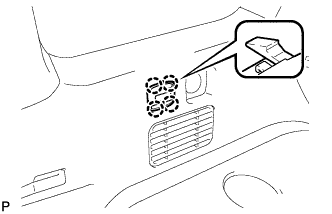
Disengage the 4 claws and remove the rear room temperature sensor.
-
Disconnect the connector.
-
-
REMOVE REAR COMBINATION LIGHT SERVICE COVER RH
-
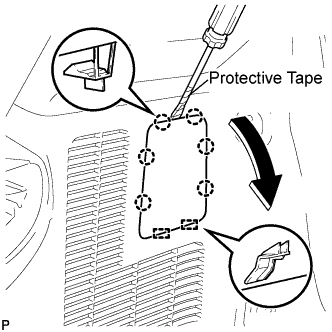
Using a screwdriver, disengage the 6 claws and 2 guides, and remove the rear combination light service cover RH.
Tech Tips
Tape the screwdriver tip before use.
-
-
REMOVE ROPE HOOK ASSEMBLY (for RH Side)
Tech Tips
Use the same procedure for the RH side and the LH side.
-
REMOVE NO. 1 LUGGAGE COMPARTMENT TRIM HOOK
Tech Tips
Use the same procedure for the No. 1 luggage compartment trim hook and the No. 2 deck side trim hook.
-
REMOVE FRONT DECK SIDE TRIM COVER RH
Tech Tips
Use the same procedure for the RH side and the LH side.
-
REMOVE DECK TRIM SIDE PANEL ASSEMBLY RH
-
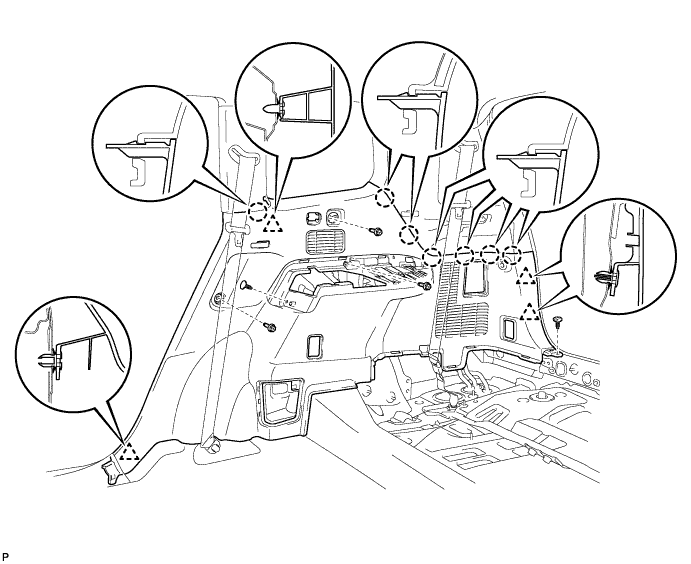
Remove the 3 bolts.
-
Remove the 2 clips.
-
Disengage the 7 claws and 4 clips, and remove the deck trim side panel assembly RH.
-
-
REMOVE ROOF SIDE INNER GARNISH ASSEMBLY RH
Tech Tips
Use the same procedure for the RH side and the LH side.
-
REMOVE REAR BLOWER MOTOR SUB-ASSEMBLY
-
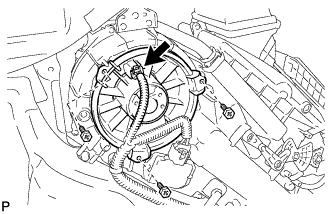
Disconnect the connector.
-
Remove the 3 screws and the rear blower motor sub-assembly.
-