ENGINE IMMOBILISER SYSTEM DTC CHECK / CLEAR

-
CHECK DTC (USING INTELLIGENT TESTER)
-
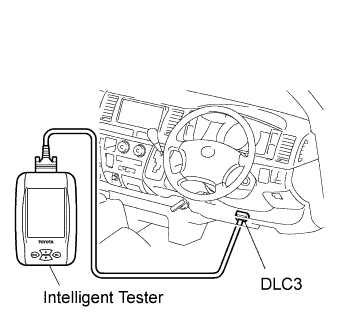
Connect the intelligent tester to the DLC3.
-
Turn the ignition switch ON.
-
Read the DTCs by following the directions on the tester's screen.
Tech Tips
Refer to the intelligent tester operator's manual for further details.
-
-
CHECK DTC (NOT USING INTELLIGENT TESTER)
-
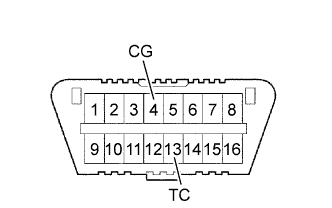
Turn the ignition switch ON.
-
Using SST, connect terminals 13 (TC) and 4 (CG) of the DLC3.
- SST
- 09843-18040
-
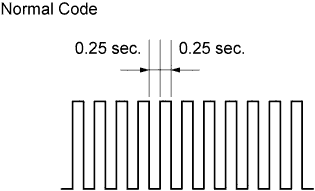
Read DTCs by observing the MIL. If no DTCs are detected, the MIL blinks as shown in the illustration.
-
If DTCs 12 and 99 are detected, the MIL flashes as shown in the illustration (malfunction code). If the interval between the previous DTC and the next DTC is 4.5 seconds, it means the previous DTC is the last one of the detected DTCs. Then the MIL repeats the indication of the DTCs (refer to the illustration (malfunction code)).
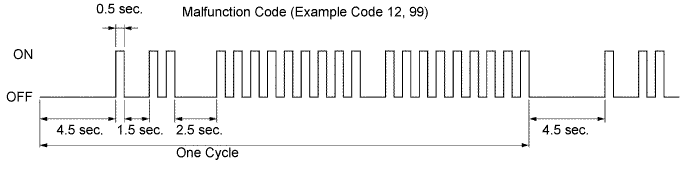
-
Check the details of the malfunction using the DTC chart Click here.
-
After completing the check, disconnect terminals 13 (TC) and 4 (CG) and turn off the display.
-
-
CLEAR DTC (USING INTELLIGENT TESTER)
-
Connect the intelligent tester to the DLC3.
-
Turn the ignition switch ON.
-
Erase the DTCs by following the directions on the tester's screen.
Tech Tips
Refer to the intelligent tester operator's manual for further details.
-
-
CLEAR DTC (NOT USING INTELLIGENT TESTER)
-
Perform either of the following operations.
-
Disconnect the negative battery cable for more than 1 minute.
-
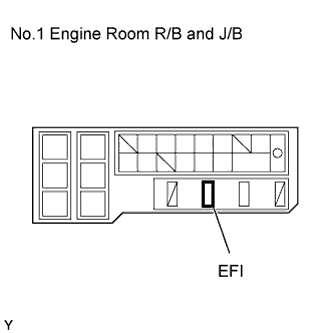
Remove the EFI fuses from the No.1 engine room R/B and J/B (located inside the engine compartment) for more than 1 minute. However, if you disconnect the battery terminal, perform the "INITIALIZE" procedure Click here.
-
-