AUDIO AND VISUAL SYSTEM SYSTEM DESCRIPTION

-
DISC PLAYER OUTLINE
-
A CD player uses a laser pickup to read digital signals recorded on CDs. By converting the digital signals to analog, music and other content can be played.
CAUTION:
Do not look directly at the laser pickup because the CD player uses an invisible laser beam. Be sure to operate the player only as instructed.
Note
-
Do not disassemble any part of the CD player.
-
Do not apply oil to the CD player.
-
Do not insert anything but a CD into the CD player.
-
-
Usable discs
-
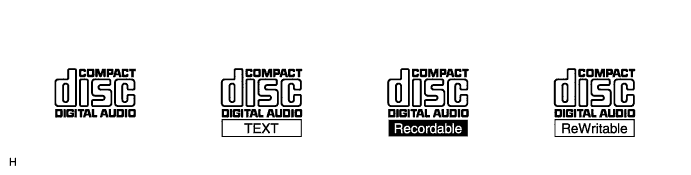
The CD player can only play audio CDs, CD-Rs (CD-Recordable), and CD-RWs (CD-ReWritable) that have any of the following marks:
-
-
Precautions for use of discs
Note
-
Copy-protected CDs cannot be played.
-
CD-Rs and CD-RWs may not be played depending on the recording conditions or characteristics of the discs, or due to damage, dirt, or deterioration caused by leaving the discs in the cabin for a long time.
-
Unfinalized CD-Rs and CD-RWs cannot be played.
-
Keep the discs away from dirt. Be careful not to damage the discs or leave your fingerprints on them.
-
Hold discs by the outer edge and center hole with the label side up.
-
Leaving the disc exposed halfway out of the slot for a long time after pressing the disc eject button may cause deformation of the disc, making the disc unusable.
-
If discs have adhesive tape, stickers, CD-R labels, or any traces of such labels attached, the discs may not be ejected or player malfunctions may result.
-
Keep the discs away from direct sunlight (exposure to direct sunlight may cause deformation of the disc, making the disc unusable).
-
Do not use odd-shaped CDs because these may cause player malfunctions.
-
Do not use discs whose recorded portion is transparent or translucent because they may be unable to be properly inserted, ejected, or played.
Tech Tips
-
When it is cold or raining, if mist forms on the windows, mist and dew may form in the player. In such a case, the CD may skip or the CD may stop playing. Ventilate or dehumidify the cabin for a while before using the player.
-
The CD may skip if the player experiences strong vibrations when the vehicle is driven on rough roads or similar uneven surfaces.
-
-
Cleaning
Note
Do not use a lens cleaner because it may cause a malfunction in the pickup portion of the player.
-
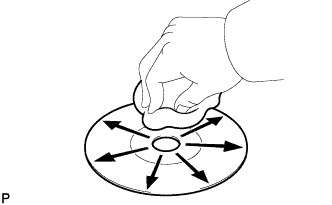
If dirt is on the disc surface, wipe it clean with a soft dry cloth, such as an eyeglass cleaner for plastic lenses, from the inside to the outside in a radial direction.
Note
-
Pressing on the disc by hand or rubbing the disc with a hard cloth may scratch the disc surface.
-
The use of solvents, such as a record spray, antistatic agent, alcohol, benzene, and thinner, or a chemical cloth may cause damage to the disc, making the disc unusable.
-
-
-
-
MP3/WMA OUTLINE
-
Playable MP3 file standards
Compatible standard MP3 (MPEG1 LAYER3, MPEG2 LSF LAYER3) Compatible sampling frequency
-
MPEG1 LAYER3: 32, 44.1, 48 (kHz)
-
MPEG2 LSF LAYER3: 16, 22.05, 24 (kHz)
Compatible bit rate
-
MPEG1 LAYER3: 64, 80, 96, 112, 128, 160, 192, 224, 256, 320 (kbps)
-
MPEG2 LSF LAYER3: 64, 80, 96, 112, 128, 144, 160 (kbps)
-
Compatible with VBR
Compatible channel mode Stereo, joint stereo, dual channel, monaural -
-
Playable WMA file standards
Compatible standard WMA Ver. 7, 8, and 9 Compatible sampling frequency 32, 44.1, 48 (kHz) Compatible bit rate
-
Ver. 7, 8: CBR48, 64, 80, 96, 128, 160, 192 (kbps)
-
Ver. 9: CBR48, 64, 80, 96, 128, 160, 192, 256, 320 (kbps)
-
Compatible with playback of channel 2 only
-
-
ID3 tag and WMA tag
-
Additional textual information called an ID3 tag can be input to MP3 files. Information such as song titles and artist names can be stored.
Tech Tips
This player is compatible with the ID3 tags of ID3 Ver. 1.0 and 1.1, and ID3 Ver. 2.2 and 2.3 (the number of characters complies with ID3 Ver. 1.0 and 1.1.).
-
Additional textual information called a WMA tag can be input to WMA files. Information such as song titles and artist names can be stored.
-
-
Usable media
-
Only CD-ROMs, CD-Rs (CD-Recordable), and CD-RWs (CD-ReWritable) can be used to play MP3/WMA files.
Note
-
CD-Rs and CD-RWs are more easily affected by a hot and humid environment than discs used for normal audio CDs. For this reason, some CD-Rs and CD-RWs may not be playable.
-
If there are fingerprints or scratches on the disc, the disc may not be playable or the CD may skip.
-
Some CD-Rs and CD-RWs deteriorate if they are left in the cabin for a long time.
-
Keep CD-Rs and CD-RWs in a storage case that is impenetrable to light.
-
-
-
Usable media format
-
Usable media format
Disc format CD-ROM Mode 1, CD-ROM XA Mode 2 Form 1 File format ISO 9660 Level 1 and Level 2 (Joliet, Romeo) Tech Tips
-
As for MP3/WMA files written in any format other than those above, the contents of the files may not be playable normally or the file names or folder names may not be displayed correctly.
-
This player is compatible with multi-session discs and can play CD-Rs and CD-RWs on which MP3/WMA files are added. However, only the first session can be played.
-
Discs whose first session includes both music data and MP3 or WMA format data cannot be played.
-
-
Standard and restrictions
Maximum directory levels 8 levels Maximum number of characters for a folder name/file name 32 characters Maximum number of folders 192 (Including empty folders, root folders, and folders that do not contain MP3/WMA files) Maximum number of files on a disc 255 (Including non-MP3/WMA files)
-
-
File names
-
Only files with an extension of ".mp3" or ".wma" can be recognized and played as MP3 or WMA files.
-
Save MP3 or WMA files with an extension of ".mp3" or ".wma".
Note
If saving non-MP3 or non-WMA files with an extension of ".mp3" or ".wma", those files are wrongly recognized as MP3 or WMA files and played. A loud noise may occur and damage to the speakers may result.
-
-