METER / GAUGE SYSTEM CUSTOMIZE PARAMETERS

-
INSPECT T-BELT MODE DISPLAY (for Diesel)
-
Turn the ignition switch ON.
-
Turn the ODO/TRIP display screen to ODO, and turn the ignition switch off.
-
While pressing the trip switch, turn the ignition switch ON and hold it for 5 seconds.
-
Release the trip switch, then press the trip switch again within 5 seconds.
-
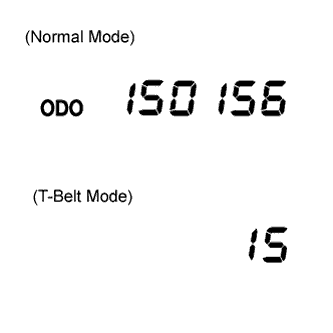
Transfer to the T-BELT mode, and the following initial setting value is displayed.
km : 15 (0.000 km) or 9 (0,000 mile)
Tech Tips
If the meter has been replaced before, the displayed value might not be the same as the initial setting value.
-
-
REWRITING REPLACEMENT SETTING VALUE (for Diesel)
-
Press the trip switch and rewrite the replacement setting value.
Condition Setting value When a belt is replaced km : 15 (0,000 km)
mile : 9 (0,000 mile)
When a meter is replaced km : (15 (0,000 km)) - (Mileage when the meter is replaced.)
mile : (9 (0.000 mile)) - (Mileage when the meter is replaced.)
Tech Tips
Every press of the trip switch adds 10,000 km or 10,000 mile and the meter returns to 10,000 km or 10,000 mile when 200,000 km or 200,000 mile is reached. If switch operation is not performed within 30 seconds, the setting value will not be changed. The display screen turns to "ODO", and the mode returns to the normal mode.
-
-
T-BELT MODE COMPLETION (for Diesel)
Note
If the T-BELT mode is completed, even though belt replacement or meter replacement has not been performed, the T-BELT warning is reset.
-
After setting the replacement setting value, hold the trip switch ON for more than 5 seconds, then release the trip switch.
-
Check that the display is changed to "ODO" and the warning light goes off.
-