ECD SYSTEM REGISTRATION

-
AFTER REPLACING INJECTOR(S) WITH NEW ONE(S), INPUT COMPENSATION CODE(S) OF INJECTOR(S) INTO ECM AS FOLLOWS:
Note
-
When an injector is replaced, the injector's compensation code must be input into the ECM. When the ECM is changed, all of the existing injector compensation codes must be input into the new ECM.
-
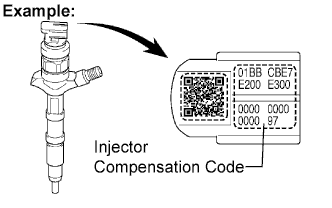
Injector compensation codes are unique, 30-digit, alphanumeric values printed on the head portion of each injector. If an incorrect injector compensation code is input into the ECM, the engine may rattle or engine idling may become rough. In addition, engine failure may occur and the life of the engine may be shortened.
-
Connect the intelligent tester to the DLC3.
-
Turn the ignition switch ON.
-
Turn the tester ON.
Note
Do not start the engine.
Tech Tips
The injector compensation code is imprinted on the head portion of each injector.
-
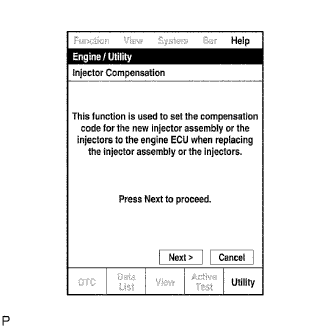
Enter the menu options in this order: Power train / Engine / Utility / Injector Compensation.
-
Press Next.
-
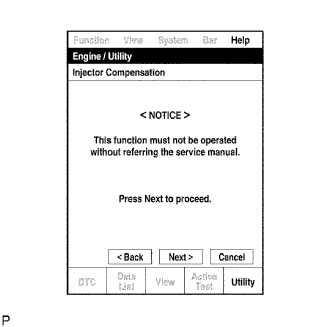
Press Next again to proceed.
-
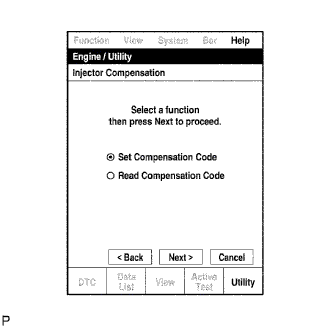
Select "Set Compensation Code".
-
Press Next.
-
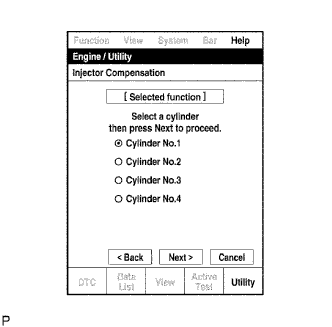
Select the number of the cylinder corresponding to the injector compensation code that you want to read.
-
Press Next.
-
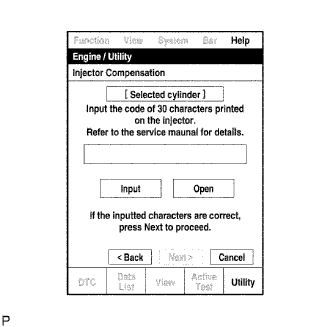
Register compensation code.
-
Press input.
-
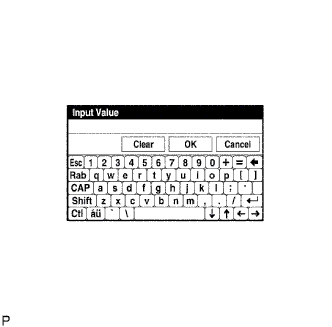
Manually input the cylinder's compensation code using the keyboard on the tester screen. The code is a 30-digit, alphanumeric value imprinted on the injector's head portion.
Tech Tips
Each injector compensation code is unique. The correct compensation code must be input into each cylinder selected on the tester.
-
Confirm that the compensation code is correct for the selected cylinder is correct , and then press OK.
-
-
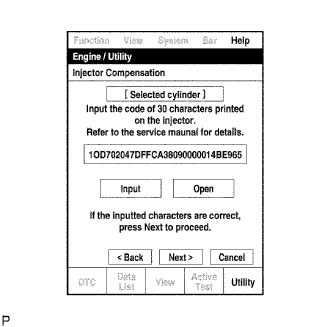
Check that the compensation code displayed on the screen is correct, by comparing it with the 30-digit alphanumeric value on the head portion of the injector.
Note
If an incorrect injector compensation code was input into the ECM, the engine may rattle or engine idling may become rough. In addition, engine failure may occur and the life of the engine may be shortened.
Tech Tips
If a wrong compensation code was input or read, return to the input Value screen by pressing input. The saving process may fail due to a problem with the wire harness or a bad connection with the DLC3. Check the wire harness and the DLC3 connection. If no problem is found with either, the ECM may be malfunctioning. Check the ECM and repeat this operation.
-
Press Next to set the compensation code to the ECM.
Tech Tips
-
If the setting process fails, the compensation code may be incorrect. Check the compensation code again.
-
If the attempted compensation code is correct, a problem with the wire harness or a bad connection with the DLC3 may cause the failure. Check the wire harness and the DLC3 connection. If no problem is found with either, the ECM may be malfunctioning. Check the ECM and restart this operation.
-
-
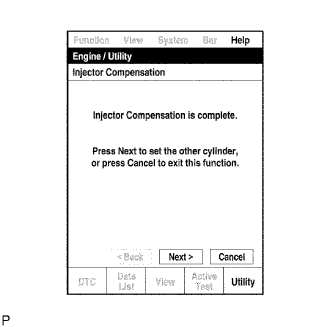
If you want to continue with other compensation code registrations, press Next. To finish the registration, press Cancel.
-
Turn the ignition switch OFF and then turn the tester OFF. Turn the tester OFF and then turn the ignition switch OFF.
-
Wait for at least 30 seconds.
-
Turn the ignition switch ON and then turn the tester ON.
-
Clear DTC P1601/89 stored in the ECM using the tester Click here.
-
-
WHEN REPLACING ECM WITH NEW ONE, INPUT ALL INJECTOR'S COMPENSATION CODES INTO NEW ECM AS FOLLOWS:
Note
-
When an injector is replaced, the injector's compensation code must be input into the ECM. When the ECM is changed, all of the existing injector compensation codes must be input into the new ECM.
-
Injector compensation codes are unique, 30-digit, alphanumeric values printed on the head portion of each injector. If an incorrect injector compensation code is input into the ECM, the engine may rattle or engine idling may become rough. In addition, engine failure may occur and the life of the engine may be shortened.
Tech Tips
The following operation is available with ECMs that can transmit the registered injector compensation codes to the intelligent tester.
-
Connect the intelligent tester to the DLC3.
-
Turn the ignition switch ON.
-
Turn the tester ON.
Note
Do not start the engine.
Tech Tips
The injector compensation code is imprinted on the head portion of each injector.
-
Enter the menu options in this order: Power train / Engine / Utility / Injector Compensation.
-
Press Next.
-
Press Next again to proceed.
-
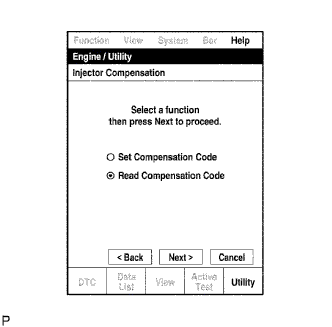
Select Read Compensation Code.
-
Press Next.
-
Select the number of the cylinder corresponding to the injector compensation code that you want to read.
-
Press Next.
Tech Tips
The reading process may fail due to a problem with the wire harness or a bad connection with the DLC3. Check the wire harness and the DLC3 connection. If no problem is found, the ECM may be malfunctioning. Check the ECM and restart this operation.
-
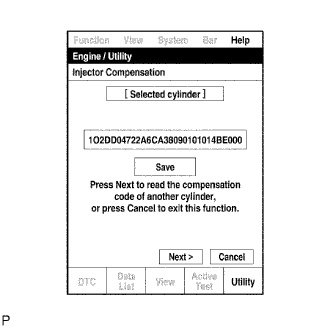
Check the injector compensation code (30-digit alphanumeric value) is displayed on the tester screen.
-
Press Save.
-
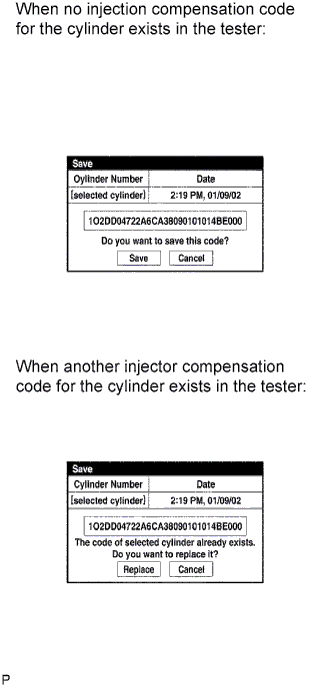
Check that the compensation code displayed on the tester screen is correct.
-
Press Save or Replace, save the injector compensation code.
Tech Tips
-
The existing compensation code is overwritten with the new compensation code and is deleted from the tester.
-
The saving process may fail due to a problem with the wire harness or a bad connection with the DLC3. Check the wire harness and the DLC3 connection. If no problem is found with either, the ECM may be malfunctioning. Check the ECM and restart this operation.
-
-
If you want to read and save other injector compensation codes for other cylinders, press Next to continue. To finish this operation, press Cancel.
-
Turn the ignition switch OFF.
-
Turn the tester OFF.
-
Replace the ECM.
-
Connect the intelligent tester to the DLC3.
-
Turn the ignition switch ON.
-
Turn the tester ON.
Note
Do not start the engine.
Tech Tips
The injector compensation code is imprinted on the head portion of each injector.
-
Enter the menu options in this order: Power train / Engine / Utility / Injector Compensation.
-
Press Next.
-
Press Next again to proceed.
-
Select Set Compensation Code.
-
Press Next.
-
Select the number of the cylinder corresponding to the injector compensation code that you want to read.
-
Press Next.
-
Check that the compensation code displayed on the screen is correct, by comparing it with the 30-digit alphanumeric value on the head portion of the injector.
Note
If an incorrect injector compensation code was input into the ECM, the engine may rattle or engine idling may become rough. In addition, engine failure may occur and the life of the engine may be shortened.
Tech Tips
If a wrong compensation code was input or read, return to the input Value screen by pressing input. The saving process may fail due to a problem with the wire harness or a bad connection with the DLC3. Check the wire harness and the DLC3 connection. If no problem is found with either, the ECM may be malfunctioning. Check the ECM and repeat this operation.
-
Press Next to set the compensation code to the ECM.
Tech Tips
-
If the setting fails, the compensation code may be incorrect. Check the compensation code again.
-
If the attempted compensation code is correct, a problem with the wire harness or a bad connection with the DLC3 may cause the failure. Check the wire harness and the DLC3 connection. If no problem is found with either, the ECM may be malfunctioning. Check the ECM and restart this operation.
-
-
If you want to continue with other compensation code registrations, press Next. To finish the registration, press Cancel.
-
Turn the ignition switch OFF and then turn the tester OFF. Turn the tester OFF and then turn the ignition switch OFF.
-
Wait for at least 30 seconds.
-
Turn the ignition switch ON and then turn the tester ON.
-
Clear DTC P1601/89 stored in the ECM using the tester Click here.
-