ECD SYSTEM (w/o DPF) DTC CHECK / CLEAR

Note
When the diagnosis system is changed from the normal mode to check mode or vice versa, all DTCs and freeze frame data recorded in normal mode are erased. Before changing modes, always check and make a note of DTCs and freeze frame data.
Tech Tips
-
DTCs which are stored in the ECM can be displayed on the intelligent tester. The intelligent tester can display current and pending DTCs.
-
Same DTCs are not set if the ECM does not detect the same malfunction again during a second consecutive driving cycle. However, such malfunctions, detected on only one occasion, are stored as pending DTCs.
-
CHECK DTC (Using Intelligent Tester)
-
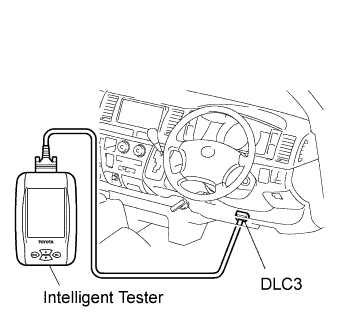
Connect the intelligent tester to the DLC3.
-
Turn the ignition switch to ON.
-
Turn the tester ON.
-
Select the following menu items: Powertrain / Engine / DTC.
-
Check the DTC(s) and freeze frame data, and then write them down.
-
Check the details of the DTC(s) Click here.
-
-
CLEAR DTC (Using Intelligent Tester)
-
Connect the intelligent tester to the DLC3.
-
Turn the ignition switch to ON.
-
Turn the tester ON.
-
Select the following menu items: Powertrain / Engine / DTC / Clear.
-
Press the YES button.
Note
When DTC P0405, P0406, P2BAB or P2BAC is detected, the DTC cannot be cleared using the intelligent tester.
-
-
CLEAR DTC (Without using Intelligent Tester)
-
Perform either one of the following operations.
-
Disconnect the negative battery cable for more than 1 minute.
-
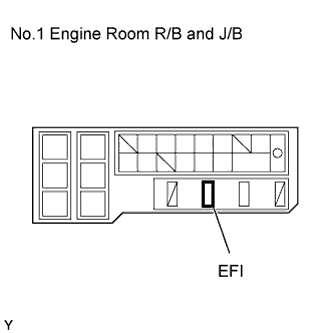
Remove the EFI fuses from the No.1 engine room R/B and J/B (located inside the engine compartment) for more than 1 minute.
-
-