REPAIR INSTRUCTION INITIALIZATION
Note
When disconnecting the cable from negative (-) battery terminal, initialize the following system(s) after the terminal is reconnected.
-
The initialization procedures are show below the table.
| System Name |
|---|
| Power Window Control System |
| Power Slide Door System |
-
RESET (INITIALIZE) POWER WINDOW REGULATOR MOTOR
Note
-
Resetting the power window motor (initializing the pulse sensor) is necessary when the battery terminal is disconnected; when the power window regulator master switch, power window regulator switch, wire harness, power window regulator and power window motor are replaced or removed/installed; or when the PWR fuse and DOOR fuse are replaced. AUTO operation function, jam protection function and remote operation function via the power window regulator master switch do not operate without resetting.
-
Be sure to reset the power window regulator motors using the power window switch on each door because the motors cannot be reset by remote operation using the power window master switch.
-
In order to prevent a large amount of current from flowing in the wires, do not simultaneously reset 2 or more power window regulator motors.
-
If the power window switch has been continuously operated for a long time, the power window regulator motor will stop so that no additional load will be applied to the motor. Continuing to operate the switch even after the motor has stopped will cause the switch to blink while restricting the AUTO UP/DOWN function and the remote UP/DOWN function. If this happens, reset the motor again after several minutes have passed.
-
Whenever disconnecting the battery terminal, reset all the other systems besides the power window control system.
-
Turn the ignition switch ON.
-
Halfway open the power window by pressing the power window switch.
-
Fully pull up the switch until the power window is fully closed and continue to hold the switch for approx. 1 second after the power window is fully closed.
-
Check that the AUTO UP/DOWN function operates normally.
If the AUTO UP/DOWN function operates normally, reset operations have been completed at this time. If not normal, follow steps below.
-
Disconnect the negative battery terminal for 10 seconds.
-
Connect the battery terminal.
-
Turn the ignition switch ON.
-
Halfway open the power window by pressing the power window switch.
-
If the AUTO UP/DOWN function operates normally, reset operations have been completed at this time.
If not normal, follow steps below.
-
Turn the ignition switch ON.
-
Halfway open the power window by pressing the power window switch.
-
Fully pull up the switch until the power window is fully closed and continue to hold the switch for approx. 12 seconds after the power window is fully closed.
-
Check that the AUTO UP/DOWN function operates normally.
-
-
-
RESET SLIDE DOOR CLOSED POSITION
-
When disconnecting the cable from the battery terminal, close the slide door fully.
Tech Tips
If the slide door is closed when disconnecting the cable from the battery terminal, it is not necessary to reset it.
-
-
SUPPLY PUMP INITIALIZATION PROCEDURE (for 1KD-FTV)
Tech Tips
After replacing the supply pump and/or the ECM:
-
If the engine is defective or stalls immediately after startup, the ECM's learned values must be initialized. The engine can be initialized through the intelligent tester or by short-circuiting DLC3 terminals.
-
If the engine starts normally, initialization is not necessary. Perform the "idle the engine" procedure below only.
-
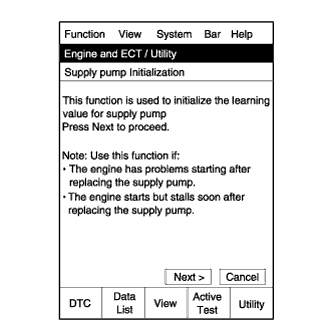
Connect the intelligent tester to the DLC3.
-
Turn the ignition switch ON.
Note
Do not start the engine.
-
Turn the tester ON.
-
Select the following menu items: Powertrain / Engine / Utility / Supply Pump Initialization.
-
Press "Next".
-
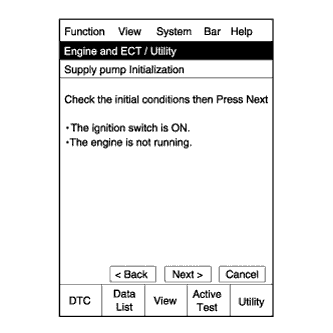
Press "Next".
-
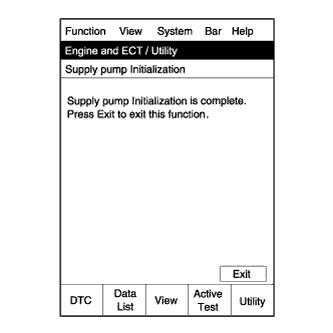
Press "Exit".
-
Start the engine to check if the initialization is complete. If the engine cannot be started, repeat the initialization procedures from the beginning.
-
Idle the engine for at least 1 minute under the following conditions:
-
The water temperature is 60°C (140°F) or more.
-
The fuel temperature is 20°C (68°F) or more.
Note
Do not race the engine immediately after starting the engine. After warming up the engine, racing the engine is acceptable.
Tech Tips
If the temperature is difficult to estimate, use the intelligent tester and select the following menu items: Powertrain / Engine / Data List / Coolant Temp and Fuel Temperature.
-
-
Initialization is complete.
-
-
SUPPLY PUMP INITIALIZATION PROCEDURE (for 2KD-FTV)
Tech Tips
After replacing the supply pump and/or the ECM.
-
If the engine is defective or stalls immediately after startup, the ECM's learned values must be initialized. The engine can be initialized through the intelligent tester or by short-circuiting DLC3 terminals.
-
If the engine starts normally, initialization is not necessary. Perform steps (i) and (j) only.
-
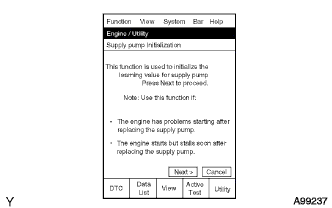
When using intelligent tester:
-
Connect the intelligent tester to the DLC3.
-
Turn the ignition switch ON.
Note
Do not start the engine.
-
Turn the intelligent tester ON.
-
Enter the following menus: Power train / Engine / Utility / Supply Pump Initialization.
-
Press Next.
-
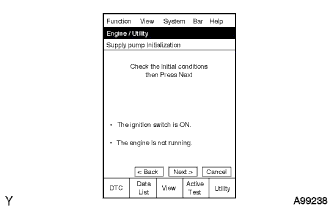
Press Next.
-
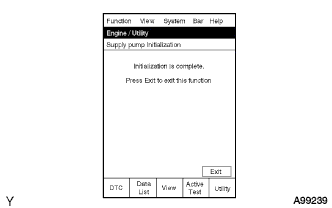
Press Exit.
-
Start the engine to check if the initialization is complete. If the engine cannot be started, repeat the initialization procedures from the beginning.
-
Idle the engine for at least 1 minute under the following conditions:
-
The water temperature is 60°C (140°F) or more.
-
The fuel temperature is 20°C (68°F) or more.
Note
Do not race the engine immediately after starting the engine. After idling the engine, racing the engine is acceptable.
Tech Tips
-
The water temperature can be estimated by touching the outlet hose.
-
The fuel temperature can be estimated by using the ambient temperature as a substitute.
-
If the water temperature is difficult to estimate, use the intelligent tester and enter the following menus: Power train / Engine / Data List / Coolant Temp.
-
-
Initialization is complete.
-
-
When not using intelligent tester:
-
Using SST, connect the terminals TC and DG of the DLC3.
- SST
- 09843-18040
-
Turn ignition switch ON.
-
Wait 3 minutes.
-
Turn ignition switch OFF.
-
Remove connecting from terminals TC and CG.
-
Start engine.
If the engine cannot be started, repeat the initialization procedures from the beginning.
-
Idle engine for at least 1 minute under the following conditions:
-
The water temperature is 60°C (140°F) or more.
-
The fuel temperature is 20°C (68°F) or more.
Note
-
Do not race engine immediately after starting engine.
-
After idling engine, racing engine is acceptable.
Tech Tips
-
Water temperature can be estimated by touching outlet hose.
-
Fuel temperature can be estimated by using ambient temperature as a substitute.
-
-
Initialization complete.
-
-