CRANKSHAFT POSITION SENSOR REMOVAL

-
DISCONNECT CABLE FROM NEGATIVE BATTERY TERMINAL
-
REMOVE ENGINE UNDER COVER NO.1 (w/ Engine Under Cover No.1 and Air Conditioning)
-
REMOVE FRONT SEAT ASSEMBLY RH (for Hi-back Seat Type, w/ Air Conditioning)
Tech Tips
Use the same procedures described for the LH side. Click here
-
REMOVE FRONT SEAT ASSEMBLY RH (for Low-back Seat Type, w/ Air Conditioning)
Tech Tips
Use the same procedures described for the LH side. Click here
-
REMOVE FRONT DOOR SCUFF PLATE RH (w/ Air Conditioning)
-
REMOVE ENGINE SERVICE HOLE SUB COVER SUB-ASSEMBLY (w/ Air Conditioning)
-
Roll up the carpet, and remove the 5 bolts and engine service hole sub cover.
-
-
REMOVE OIL LEVEL GAUGE GUIDE (w/ Air Conditioning System)
-
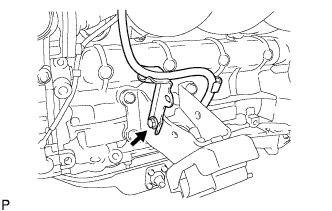
Remove the bolt and gauge guide.
-
-
REMOVE FAN & GENERATOR V BELT (w/ Air Conditioning)
-
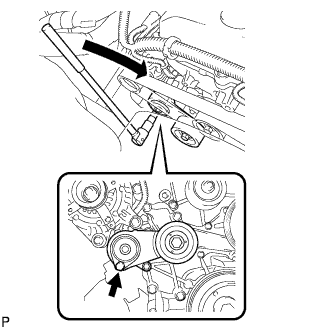
Use the hexagon-shaped part indicated by the arrow in the illustration to move the tensioner pulley downward and decrease the tension in the drive belt. Then remove the drive belt.
Note
When removing the drive belt, do not use the idle pulley's bolt.
Tech Tips
After removing the drive belt, move the tensioner upward to the maximum amount.
-
-
SEPARATE COMPRESSOR AND MAGNETIC CLUTCH (w/ Air Conditioning)
-
Disconnect the compressor connector.
-
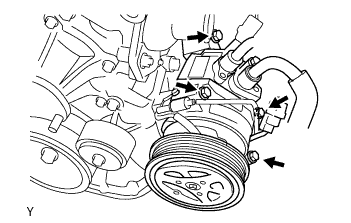
Remove the 4 bolts and disconnect the compressor from the engine.
Tech Tips
Disconnect the compressor with the low pressure hose and high pressure hose stuck by suspended from the rope.
-
Support the cooler compressor securely.
-
-
REMOVE COMPRESSOR MOUNTING BRACKET NO.1 (w/ Air Conditioning)
-
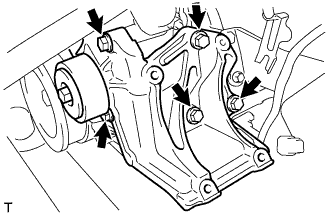
Remove the 5 bolts and compressor mounting bracket.
-
-
REMOVE CRANKSHAFT POSITION SENSOR
-
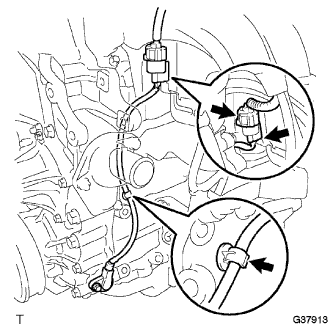
Disconnect the crankshaft position sensor connector and the 2 wire harness clamps.
-
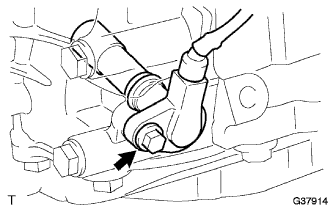
Remove the bolt and crankshaft position sensor.
-