SFI SYSTEM (w/o Secondary Air Injection System) DTC CHECK / CLEAR

Note
Intelligent tester only:
When the diagnosis system is changed from normal mode to check mode, or vice versa, all DTCs and freeze frame data recorded in normal mode will be erased. Before changing modes, always check and make a note of DTCs and freeze frame data.
-
CHECK DTC (using an intelligent tester)
-
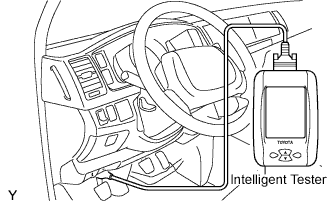
DTCs which are stored in the ECM can be displayed with the intelligent tester and generic OBD scan tool.
These scan tools can display pending DTCs and current DTCs.
Some DTCs aren't stored if the ECM doesn't detect a malfunction during consecutive driving. However, the detected malfunction during once driving is stored as a pending DTC.
-
Connect the intelligent tester to the DLC3.
-
Turn the ignition switch to the ON position and turn the intelligent tester ON.
-
Enter the following menus: Powertrain/Engine and ECT/DTC.
-
Check and make a note of DTCs and freeze frame data.
-
Refer to the DIAGNOSTIC TROUBLE CODE CHART to confirm the details of the DTCs Click here.
Note
When simulating a symptom with the scan tool to check the DTCs, use normal mode. For codes on DIAGNOSTIC TROUBLE CODE CHART which are subject to "2-trip detection logic", perform the following procedures.
-
-
Turn the ignition switch off after the symptom is simulated once. Then repeat the simulation process again. When the problem has been simulated twice, the MIL illuminates and the DTCs are recorded in the ECM.
-
-
CHECK DTC (not using an intelligent tester)
-
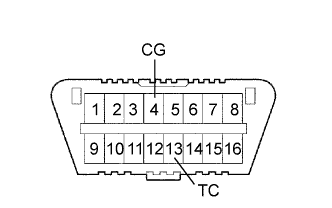
Turn the ignition switch to the ON position.
-
Using SST, connect between terminals 13 (TC) and 4 (CG) of the DLC3.
- SST
- 09843-18040
-
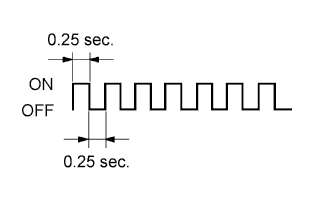
Read DTCs by observing the MIL. If any DTC is not detected, the MIL blinks as shown in the illustration.
-
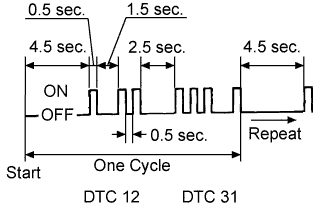
Example
-
DTCs 12 and 31 are detected and the MIL starts displaying the DTCs, as shown on the left. The MIL blinking pattern of DTC 12 will be displayed first.
-
A 2.5 second pause will occur. This pause will occur between the MIL blinking patterns of each DTC.
-
The MIL blinking pattern of DTC 31 will be displayed.
-
A 4.5 second pause will occur. This pause will occur when the MIL blinking pattern is the last of a string of multiple DTCs.
-
The MIL will repeat the display of the string of DTCs again.
-
-
Check the details of the malfunction using the DTC chart.
-
After completing the check, disconnect terminals 13 (TC) and 4 (CG) and turn off the display.
Tech Tips
If 2 or more DTCs are detected, the MIL will indicate the smaller number DTC first.
-
Confirm the details of the DTCs Click here.
-
-
CLEAR DTCS AND FREEZE FRAME DATA (using an intelligent tester)
-
Connect the intelligent tester to the DLC3.
-
Turn the ignition switch to the ON position (do not start the engine) and turn the intelligent tester ON.
-
Enter the following menus: Powertrain / Engine and ECT / DTC / Clear.
-
Erase DTCs and freeze frame data by pressing YES on the tester.
-
Turn the ignition switch off and then turn it on again, and check that no DTCs are displayed on the monitor.
If any DTCs are displayed, repeat from step (c).
-
-
CLEAR DTCS AND FREEZE FRAME DATA (without using an intelligent tester)
-
Perform either of the following operations:
-
Disconnect the battery negative (-) cable for more than 1 minutes.
-
Remove the EFI fuses from the engine room R/B for 1 minute or more.
However, if you disconnect the battery terminal, perform the "INITIALIZE" procedure.
-
-