ANTI-LOCK BRAKE SYSTEM DIAGNOSIS SYSTEM

-
DIAGNOSIS SYSTEM
-
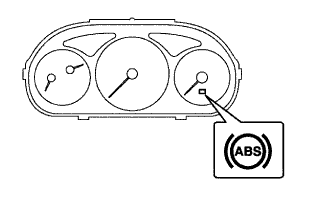
Check the warning light.
When the ignition switch is turned ON, check that the ABS warning light goes on for 3 sec.
Tech Tips
If the indicator check result is not normal, proceed to troubleshooting for the ABS warning light circuit Click here.
-
In case of not using intelligent tester:
Check the DTC.
-
Using SST, connect terminals Tc and CG of DLC3.
- SST
- 09843-18040
-
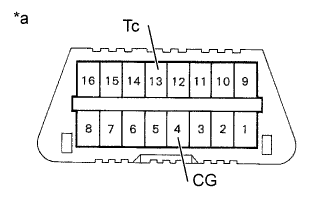
Text in Illustration *a Front view of DLC3 Turn the ignition switch ON.
-
Read the DTC from the ABS warning light on the combination meter.
Tech Tips
-
If no code appears, inspect the diagnostic circuit or ABS warning light circuit Click here or Click here.
-
As on example, the blinking patterns for normal code and codes 11 and 21 are shown on the left.
-
-
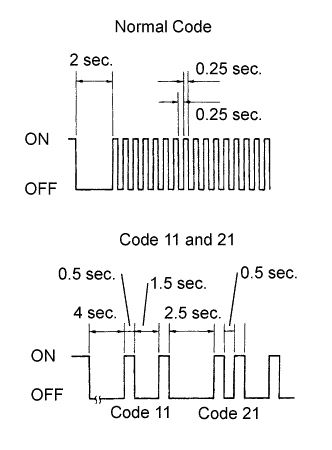
Codes are explained in the code table on page Click here.
If 2 or more malfunctions are indicated at the same time the lowest numbered DTC will be displayed 1st.
-
After completing the check, remove the SST from the DLC3.
- SST
- 09843-18040
-
-
In case of using intelligent tester:
Check the DTC.
-
Read the DTC by following the prompts on the tester screen.
Tech Tips
Please refer to the intelligent tester operator's manual for further details.
-
-
In case of not using intelligent tester:
Clear DTC.
-
Using SST, connect the terminals Tc and CG of the DLC3.
- SST
- 09843-18040
-
Turn the ignition switch ON.
-
Clear DTC stored in ECU by depressing the brake pedal 8 or more times within 5 sec.
-
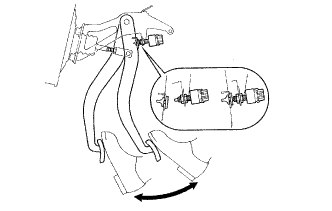
Check that the ABS warning light shows the normal code.
-
Remove the SST from the DLC3.
Tech Tips
Disconnecting the battery cable during repairs will not erase the DTC in the ECU.
-
-
In case of using intelligent tester:
Clear the DTC.
-
Turn the ignition switch ON.
-
Operate the intelligent tester to erase the codes.
Tech Tips
Please refer to the intelligent tester operator's manual for further details.
-
-