ANTI-LOCK BRAKE SYSTEM TEST MODE PROCEDURE

-
SPEED SENSOR SIGNAL CHECK
Tech Tips
If the ignition switch is turned from ON to ACC or LOCK during test mode, DTC will be erased.
-
In case of not using intelligent tester:
Check the speed sensor signal.
-
Turn the ignition switch ON.
-
Using SST, connect the terminals Ts and CG of DLC3.
- SST
- 09843-18040
-
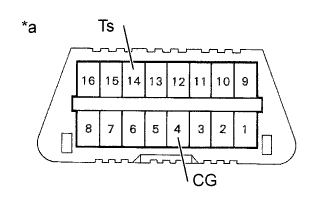
Text in Illustration *a Front view of DLC3 Start the engine.
-
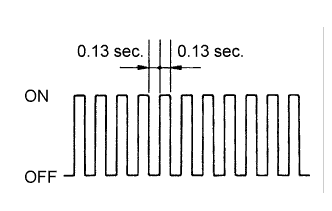
Check that the ABS warning light blinks.
Tech Tips
If the ABS warning light does not blink, inspect the ABS warning light circuit and Ts circuit Click here and Click here.
-
Drive the vehicle straight forward.
Drive the vehicle with the speed faster than 45 km/h (28 mph) for several sec.
-
Stop the vehicle.
-
Using SST, connect the terminals Tc and CG of the DLC3.
- SST
- 09843-18040
-
Read the number of blinks of the ABS warning light.
Tech Tips
-
See the list of DTC shown on the Click here.
-
If every sensor is normal, a normal code is output (A cycle of 0.25 sec. ON and 0.25 sec. OFF is repeated).
-
If 2 or more malfunctions are indicated at the same time, the lowest numbered code will be displayed.
-
-
After doing the check, turn the ignition switch OFF, and remove the SST from the DLC3.
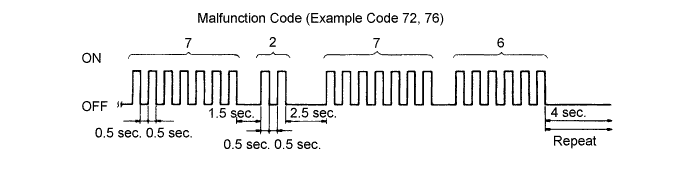
-
-
In case of using intelligent tester:
Check the sensor signal.
-
Do step (3) to (6) on the previous page.
-
Read the DTC by following the prompts on the tester screen.
Tech Tips
Please refer to the intelligent tester operator's manual for further details.
-
-