ECD SYSTEM (w/ DPF) After Treatment Control System
INSPECTION PROCEDURE
PROCEDURE
-
TAKE SNAPSHOT DURING IDLING AND 4000 RPM (PROCEDURE 1)
-
Connect the intelligent tester to the DLC3.
-
Start the engine and turn the tester on.
-
Enter the following menus: Powertrain / Engine and ECT / Data List / All Data.
-
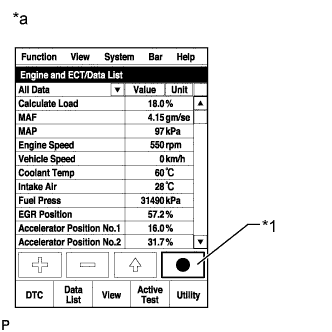
Text in Illustration *1 Snapshot Button *a Reference Take a snapshot of the following Data List items.
Tech Tips
-
A snapshot can be used to compare vehicle data from the time of the malfunction to normal data and is very useful for troubleshooting. The data in the list below is that of a normal vehicle, but as the data varies between individual vehicles, this data should only be used for reference.
-
Graphs like the ones shown below can be displayed by transferring the stored snapshot data from the tester to a PC (Personal Computer). Intelligent Viewer must be installed on the PC.
-
Check the Data List at idling and at 4000 rpm with no load after the engine is warmed up.
-
NEXT 
-
-
READ VALUE USING INTELLIGENT TESTER (CATALYST DIFFERENTIAL PRESS)
-
Check Catalyst Differential Press in the snapshot taken in procedure 1 when the engine was running at 4000 rpm with no load.
Result Result Proceed to Catalyst Differential Press is more than 0.27 A Except above B
B 
END
A
-
-
REPLACE FRONT EXHAUST PIPE ASSEMBLY
-
Replace the front exhaust pipe assembly Click here.
NEXT
-
-
CATALYST RECORD CLEAR
-
Connect the intelligent tester to the DLC3.
-
Turn the ignition switch to ON and turn the tester on.
-
Enter the following menus: Powertrain / Engine and ECT / Utility / Catalyst Record Clear.
NEXT
-
-
CONFIRM WHETHER MALFUNCTION HAS BEEN SUCCESSFULLY REPAIRED
NEXT 
END