ECD SYSTEM (w/ DPF) REGISTRATION
-
LEARNING VALUES CONFIRMATION
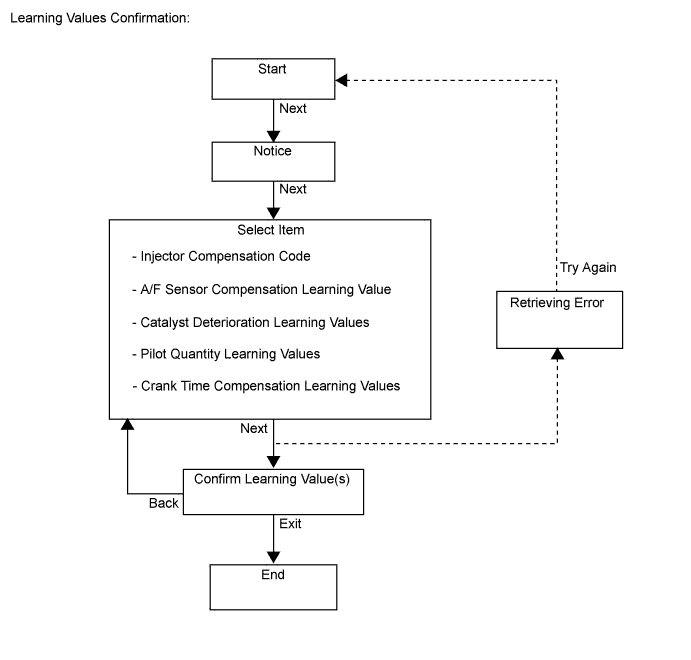
This procedure uses the intelligent tester to display the learned values (injector compensation code, pilot quantity learning value, crank time compensation learning value, catalyst deterioration learning value and A/F sensor learning value) stored in the ECM.
Tech Tips
-
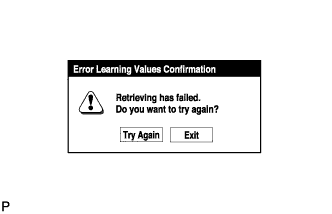
A malfunction may occur when reading the values if there is a problem with the ECM, a wire harness or the connection to the DLC3. If the wire harnesses and the connection to the DLC3 are inspected and found to be normal, the ECM may be malfunctioning.
-
Connect the intelligent tester to the DLC3.
-
Turn the ignition switch to ON and turn the tester on.
Note
Do not start the engine.
-
Enter the following menus: Powertrain / Engine and ECT / Utility / Learning values confirmation.
-
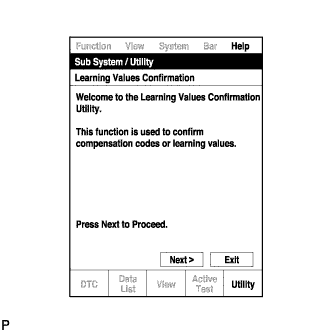
Press "Next".
-
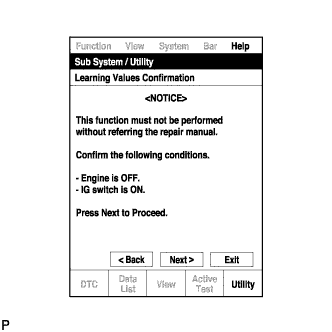
Press "Next" again to proceed.
-
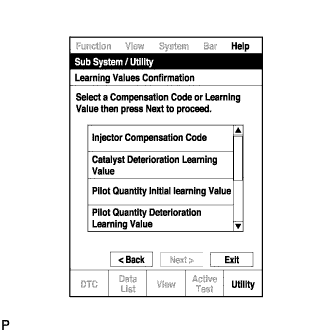
Select the value to confirm and press "Next".
-
When the next screen is displayed, confirm the contents and press "Exit".
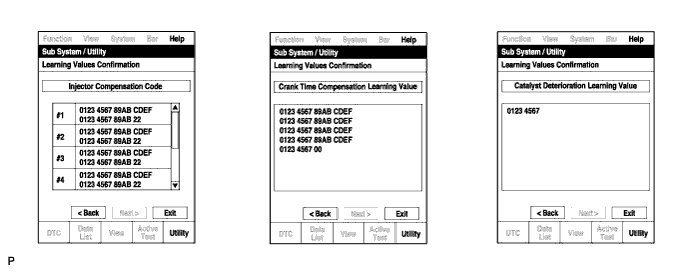
-
-
LEARNING VALUES SAVE
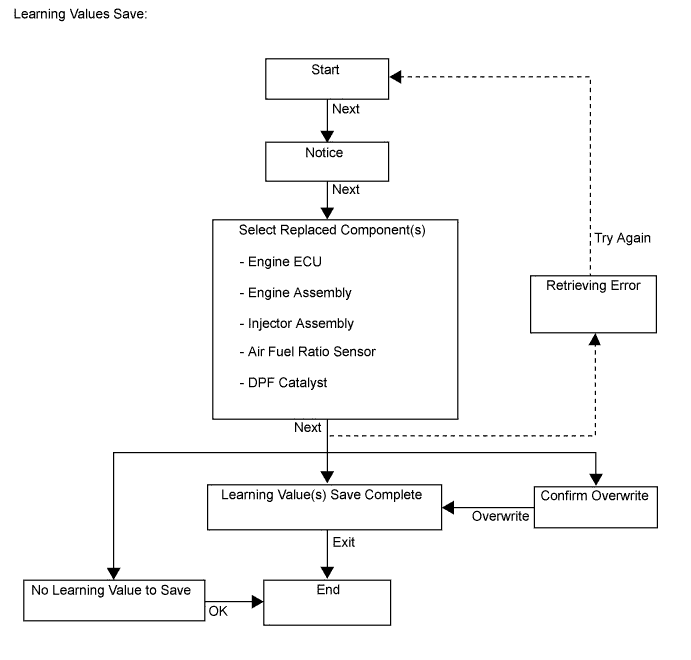
This procedure uses the intelligent tester to save the learned values (injector compensation code, pilot quantity learning value, crank time compensation learning value, catalyst deterioration learning value and A/F sensor learning value) stored in the ECM in the intelligent tester depending on the components being replaced.
Tech Tips
-
When replacing the engine assembly, injector assembly, catalytic converter or the air fuel ratio sensor together with the ECM, this function automatically determines the data which can be transferred (old data) and saves the data in the intelligent tester.
-
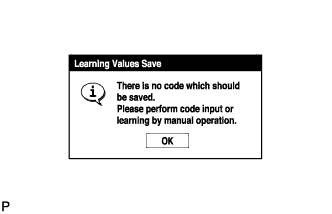
When there is no data to read from the ECM, manually perform the procedure to register each compensation code and learning value in the ECM.
-
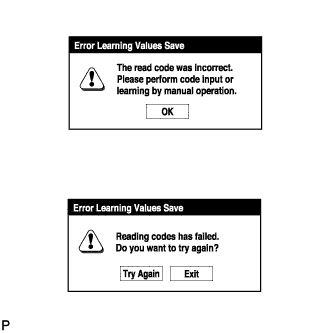
A malfunction may occur when reading the values if there is a problem with the ECM, a wire harness or the connection to the DLC3. If the wire harnesses and the connection to the DLC3 are inspected and found to be normal, the ECM may be malfunctioning.
-
Connect the intelligent tester to the DLC3.
-
Turn the ignition switch to ON and turn the tester on.
Note
Do not start the engine.
-
Enter the following menus: Powertrain / Engine and ECT / Utility / Learning values save.
-
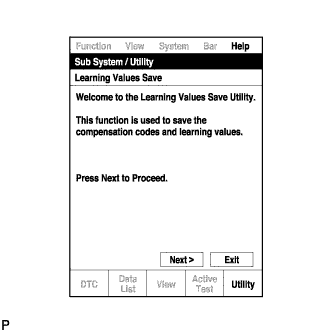
Press "Next".
-
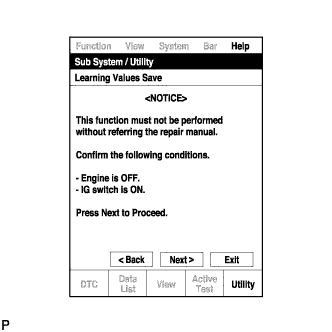
Press "Next" again to proceed.
-
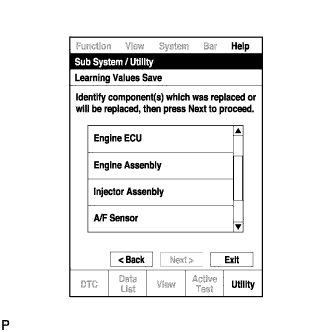
Select any components being replaced and press "Next". If no applicable components are displayed, press "Next" without selecting anything.
-
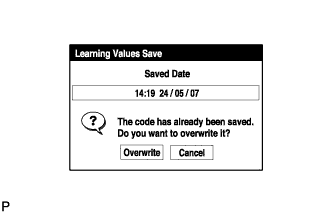
If the overwrite confirmation screen is displayed, press "Overwrite".
-
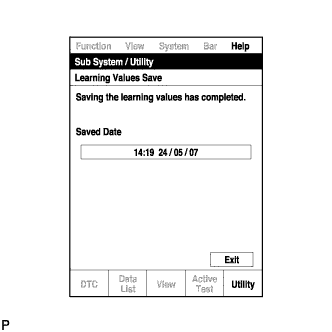
When the operation is finished, confirm the date and time of the save operation, and press "Exit".
-
-
LEARNING VALUES WRITE
This procedure uses the intelligent tester to write all of the learned values (injector compensation code, pilot quantity learning value, crank time compensation learning value, catalyst deterioration learning value and A/F sensor learning value) stored in the intelligent tester to the ECM.
Tech Tips
-
A malfunction may occur when writing the values if there is a problem with the ECM, a wire harness or the connection to the DLC3. If the wire harnesses and the connection to the DLC3 are inspected and found to be normal, the ECM may be malfunctioning.
-
Connect the intelligent tester to the DLC3.
-
Turn the ignition switch to ON and turn the tester on.
Note
Do not start the engine.
-
Enter the following menus: Powertrain / Engine and ECT / Utility / Learning values write.
-
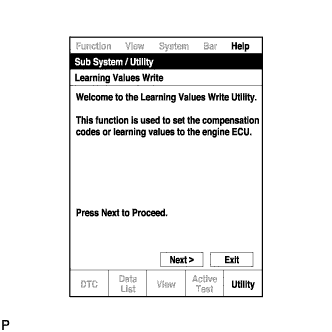
Press "Next".
-
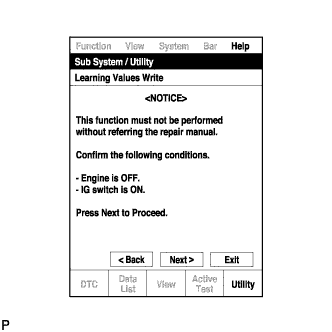
Press "Next" again to proceed.
-
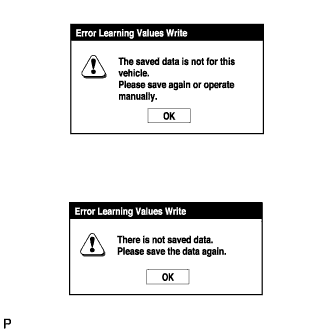
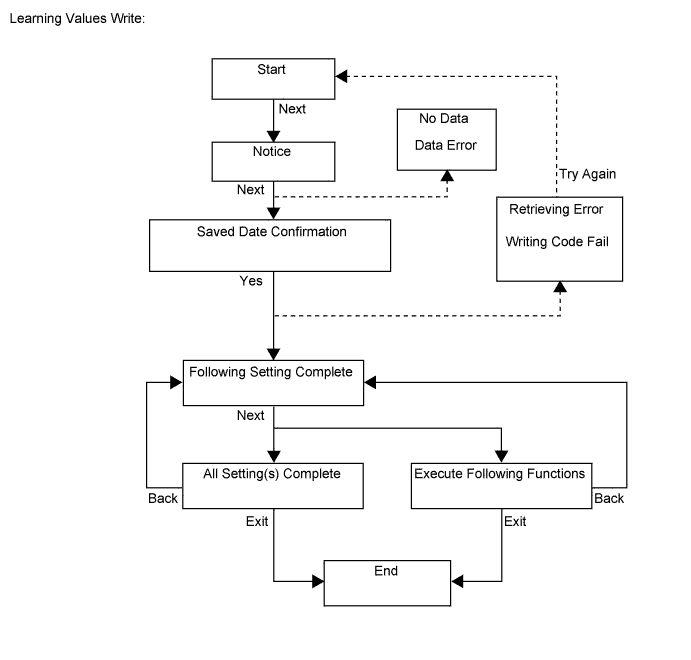
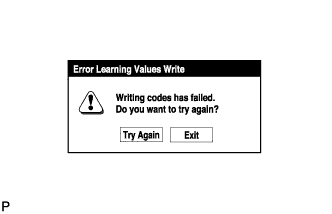
If the "Error Learning Values Write" screen indicating a problem with the saved value(s) or that there are no saved values is displayed, perform "Learning Values Save" again.
-
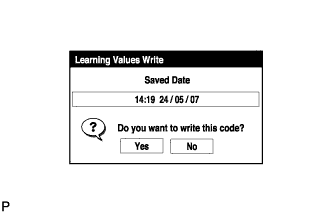
Confirm the date and time of the save operation, and then press "Yes".
-
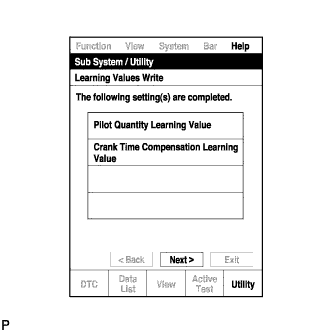
Confirm the contents, and then press "Next".
-
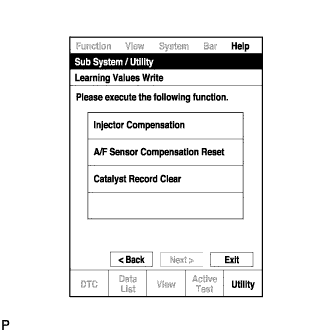
If any instructions are displayed on the tester, manually perform the procedure to register each applicable compensation code or learning value in the ECM.
-
Clear DTCs.
-
-
INPUT INJECTOR COMPENSATION CODE(S) INTO ECM
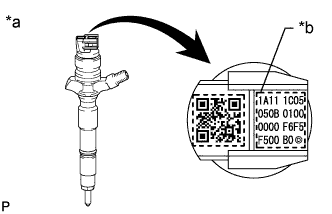
Note
-
When a injector assembly is replaced, the new injector compensation code must be input into the ECM. When the ECM is replaced, all of the existing injector compensation codes must be input into the new ECM.
-
Injector compensation codes are unique, 30-digit, alphanumeric values printed on the head portion of each injector assembly. If an incorrect injector compensation code is input into the ECM, the engine assembly may rattle or engine idling may become rough. In addition, engine failure may occur and the life of the engine may be shortened.
-
When a injector compensation code is input into the ECM, the pilot quantity learning values stored in the ECM are initialized. Also, DTC P062F is stored when the pilot quantity learning values are initialized.
Text in Illustration *a Example *b Injector Compensation Code
-
After replacing injector assembly(s) with new one(s), input compensation code(s) of the injector assembly(s) into the ECM as follows:
Tech Tips
-
Each injector assembly has different fuel injection characteristics. In order to optimize the fuel injections, the ECM uses the compensation codes to balance the different fuel injections between each injector assembly.
-
When only one or more injector assemblies are replaced, input the injector compensation code(s), perform pilot quantity learning, and then clear the DTCs.
-
When the ignition switch is turned to ON after replacing the ECM, DTC P062F is stored. This indicates that the injector compensation code(s) need to be registered. Manually clear the DTC upon completion of pilot quantity learning.
-
Input the compensation code(s), which is/are imprinted on the head portion(s) of the new injector assembly(s), into the intelligent tester.
-
Input the new compensation code(s) into the ECM using the tester.
-
Turn the tester off and turn the ignition switch off.
-
Wait for at least 30 seconds.
-
Turn the ignition switch to ON and turn the tester on.
-
Perform pilot quantity learning.
-
Clear DTC P062F stored in the ECM using the tester Click here.
Note
If the DTCs are cleared without performing pilot quantity learning, DTC P062F is stored immediately after clearing DTCs.
-
-
Register compensation codes.
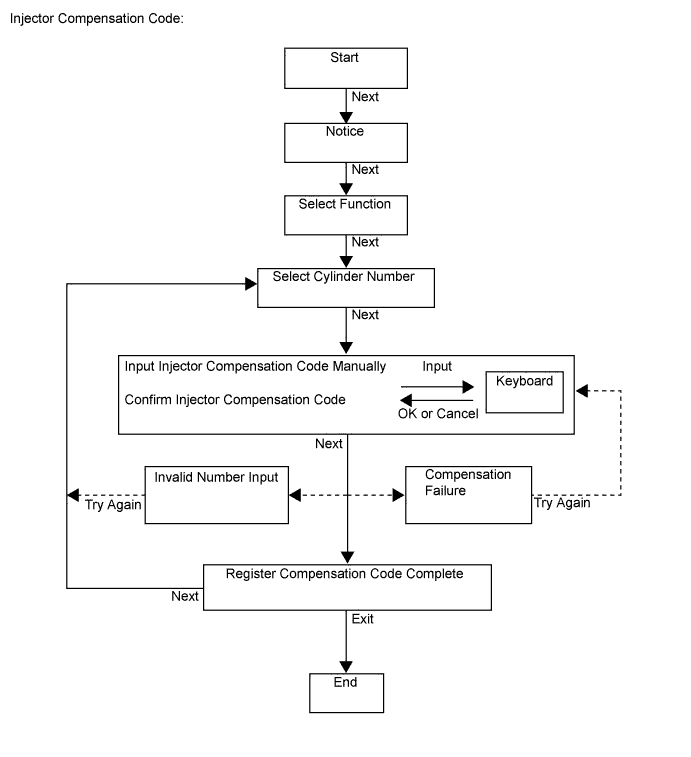
-
Connect the intelligent tester to the DLC3.
-
Turn the ignition switch to ON.
Note
Do not start the engine.
-
Turn the tester on.
-
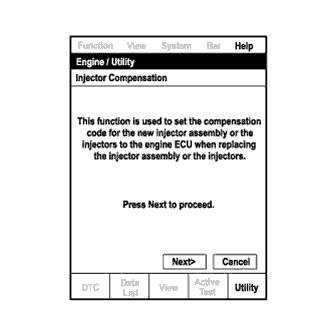
Enter the following menus: Powertrain / Engine and ECT / Utility / Injector Compensation.
-
Press Next.
-
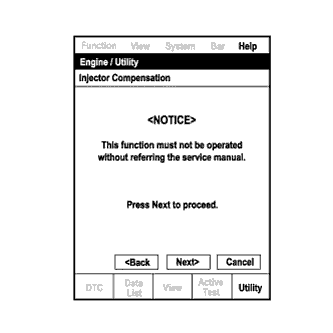
Press Next again to proceed.
-
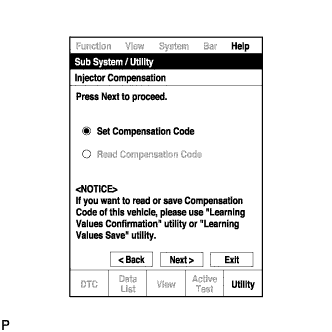
Select "Set Compensation Code".
-
Press Next.
-
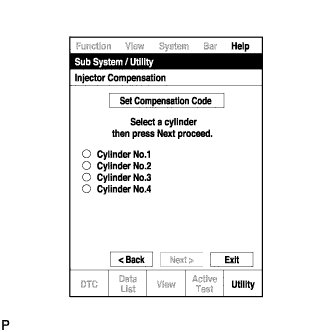
Select the number of the cylinder corresponding to the injector compensation code that you want to register.
-
Press Next.
-
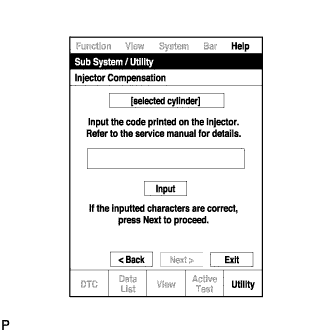
Register compensation code.
-
Press Input.
-
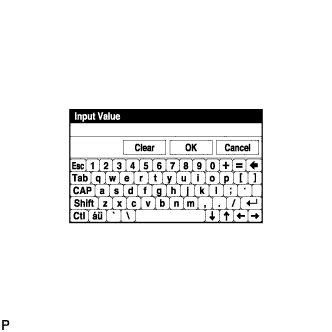
Manually input the cylinder compensation code using the keyboard on the tester screen. The code is a 30-digit, alphanumeric value printed on the injector head portion.
Tech Tips
Each injector compensation code is unique. The compensation code for each selected cylinder must be input into the tester correctly.
-
Confirm that the compensation code for the selected cylinder is correct, and then press OK.
-
-
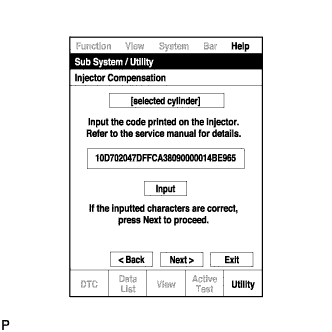
Check that the compensation code displayed on the screen is correct by comparing it with the 30-digit alphanumeric value on the head portion of the injector assembly.
Note
If an incorrect injector compensation code is input into the ECM, the engine may rattle or engine idling may become rough. In addition, engine failure may occur and the life of the engine may be shortened.
Tech Tips
-
If a wrong compensation code is input or read, return to the Input Value screen by pressing Input.
-
The saving process may fail due to a problem with the wire harness or a bad connection with the DLC3. Check the wire harness and DLC3 connection. If no problem is found with either, the ECM may be malfunctioning. Check the ECM and repeat this operation.
-
-
Press Next to register the compensation code in the ECM.
Tech Tips
-
If the registration process fails, the compensation code may be incorrect. Check the compensation code again.
-
If the input compensation code fails to register even though it is input correctly, there may be a problem with the wire harness or a bad connection with the DLC3. Check the wire harness and DLC3 connection. If no problem is found with either, the ECM may be malfunctioning. Check the ECM and restart this operation.
-
-
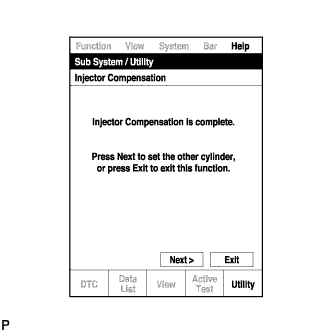
If you want to continue with other compensation code registrations, press Next. To finish the registration, press Exit.
-
Turn the tester off and turn the ignition switch off.
-
Wait for at least 30 seconds.
-
Turn the ignition switch to ON, and then turn the tester on.
-
Perform pilot quantity learning.
-
Clear DTC P062F stored in the ECM using the tester Click here.
Note
If the DTCs are cleared without performing pilot quantity learning, DTC P062F is stored immediately after clearing DTCs.
-
-
-
PILOT QUANTITY LEARNING
-
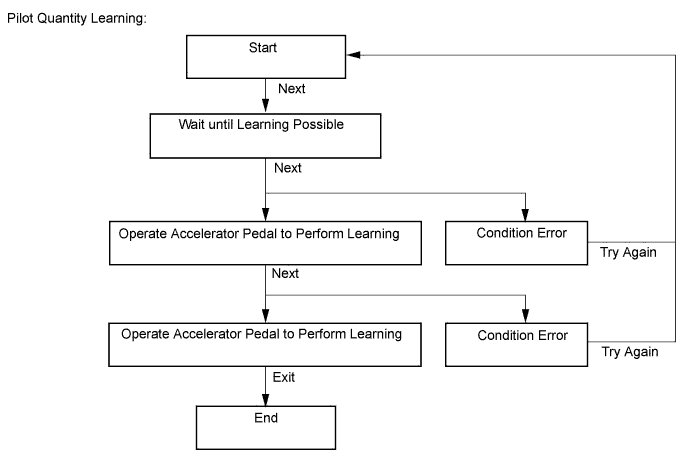
"Pilot Quantity Learning" is performed when injector assemblies have been replaced and injector compensation codes have been registered. "Pilot Quantity Learning (Detail)" is performed when there are engine problems but no DTCs are output and the technician wishes to clear the learned values and have the vehicle relearn the values.
-
This procedure uses the intelligent tester to perform "Pilot Quantity Learning".
-
When replacing the injector assembly, engine or ECM, perform this procedure after performing injector compensation (manual ID code registration).
Note
After completing this procedure, clear the DTCs using the intelligent tester.
Tech Tips
-
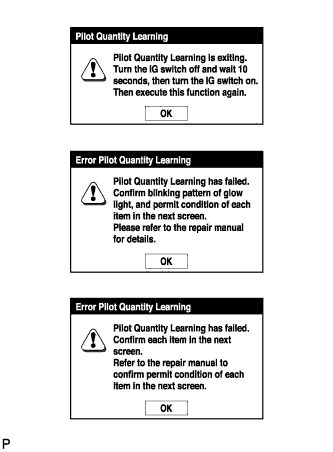
If "Exit" is pushed during the step where the accelerator pedal is operated and "Pilot Quantity Learning" is canceled, turn the ignition switch off, wait 10 seconds, check the vehicle condition, and then perform learning again.
-
If an error occurs during learning, check the vehicle condition after turning the ignition switch off, and then perform learning again.
-
If learning is canceled and DTCs are output due to excessive racing of the engine (depressing the accelerator pedal for 2 seconds or more), turn the ignition switch off, and then perform learning again.
-
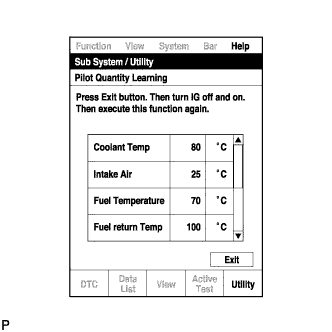
A communication malfunction may occur if there is a problem with the ECM, a wire harness or the connection to the DLC3. If the wire harnesses and the connection to the DLC3 are inspected and found to be normal, the ECM may be malfunctioning.
-
Connect the intelligent tester to the DLC3.
-
Start the engine.
-
Turn the tester on.
-
Enter the following menus: Powertrain / Engine and ECT / Utility / Pilot quantity learning.
-
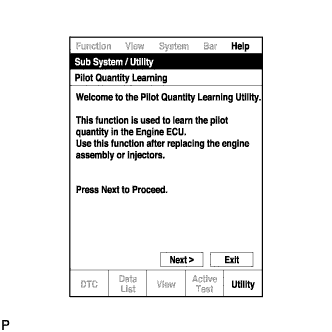
Press "Next".
-
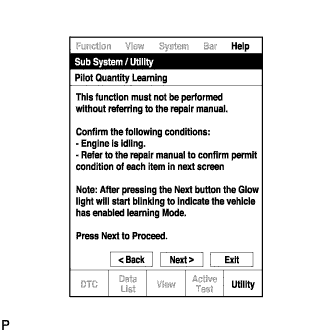
Press "Next" again to proceed.
-

Confirm that the atmospheric pressure screen is displayed.
-
Confirm the displayed atmospheric pressure.
Standard value Atmosphere Pressure is 85 kPa (637.5 mmHg, 25.1 in.Hg) or more. Note
-
If the atmospheric pressure is below the standard range, "Pilot Quantity Learning" cannot be performed. In this case, press "Exit" and clear the learned values using "Pilot Quantity Learning Value Clear".
-
If the atmospheric pressure is below the standard range, even if "Pilot Quantity Learning" is performed, learning will not be completed.
-
-
If the atmospheric pressure is within the standard range, proceed to the next screen.
-
-
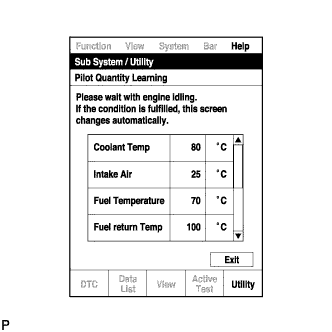
Confirm the condition of the engine and wait until learning can be performed.
Essential Conditions for Learning Tester Display Standard Coolant Temp 70 to 100°C Intake Air 10 to 120°C Fuel Temperature 25 to 96°C Fuel Return Temp 55 to 110°C Battery Voltage 10 V or higher Pilot Quantity State (CAT) READY Tech Tips
-
If the values deviate from the standard above, "Pilot Quantity Learning" enters a standby state or is canceled.
-
When the display indicates that "Pilot Quantity State (CAT)" is prohibited, perform "Pilot Quantity Learning" after performing the "Activate the DPF Rejuvenate (PM)" Active Test using the intelligent tester Click here.
-
When the essential conditions to perform learning are met, the screen will change automatically.
Note
-
If "Activate the DPF Rejuvenate (PM)" is performed after an injector compensation code is input but before "Pilot Quantity Learning" is performed, DTC P062F is stored and the MIL illuminates due to "Pilot Quantity Learning" being incomplete.
-
Using the intelligent tester, make sure that DTCs other than DTC P062F are not output.
-
If DTCs other than DTC P062F are output, perform troubleshooting for those DTCs, and then perform "Activate the DPF Rejuvenate (PM)".
Tech Tips
DTC P062F is stored when the value registered in the ECM for an input injector compensation code, catalyst deterioration learning value and/or pilot quantity deterioration learning value is the initial value.
-
-
Follow the prompts on the screen and repeat the following procedure until the screen changes: Starting with the engine idling, race the engine until the engine speed is 3000 rpm or more for no more than 2 seconds, and then let the engine return to idling.
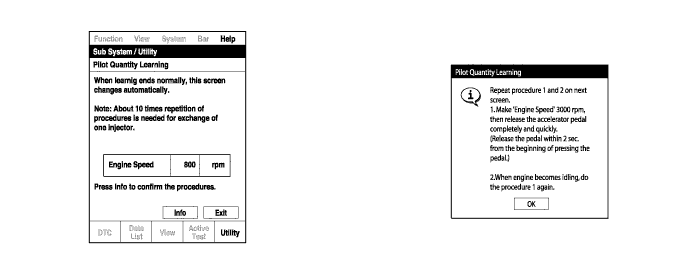
Tech Tips
-
After confirming that the engine speed has reached 3000 rpm, completely release the accelerator pedal in order for the throttle opening amount to become 0%.
-
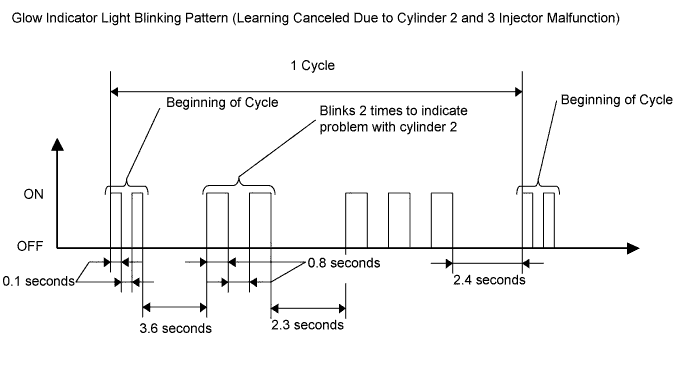
It is possible to confirm the status of the learning operation during "Pilot Quantity Learning" by observing the blinking pattern of the glow indicator light.
Glow Indicator Light Blinking Pattern Learning Status Glow Indicator Light Condition Conditions essential to start learning have not been met Blinking at 0.5 second intervals Conditions essential to start learning have been met Blinking at 1 second intervals During racing (learning is being performed) Blinking at 1 second intervals Learning is finished Off Learning has been canceled Blinking at 1.5 second intervals Learning has been canceled (malfunctioning cylinder is indicated by blinking pattern) Blinking at 0.8 second intervals (2.3 second intervals between each set of blinks representing the number of a malfunctioning cylinder) 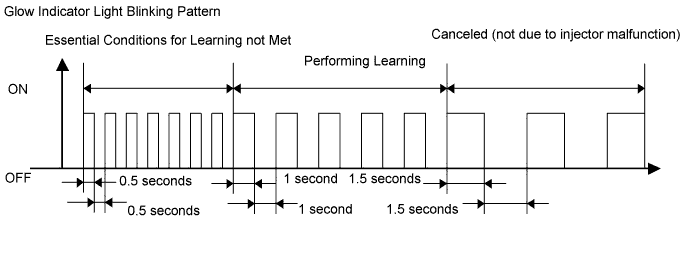
-
-
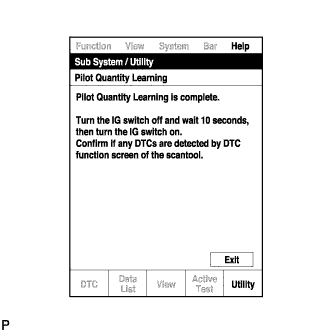
When the screen changes, push "Exit".
-
Turn the tester off and turn the ignition switch off.
-
Wait for at least 10 seconds.
-
Turn the ignition switch to ON, and then turn the tester on.
-
Clear DTCs Click here.
-
Turn the ignition switch off.
Note
Do not disconnect the cable from the negative (-) battery terminal for 30 seconds after turning the ignition switch off.
Tech Tips
-
The main relay turns off after the learned value is stored in the ECM.
-
The main relay turns off within approximately 5 to 10 seconds of turning the ignition switch off.
-
-
-
PILOT QUANTITY LEARNING (DETAIL)
-
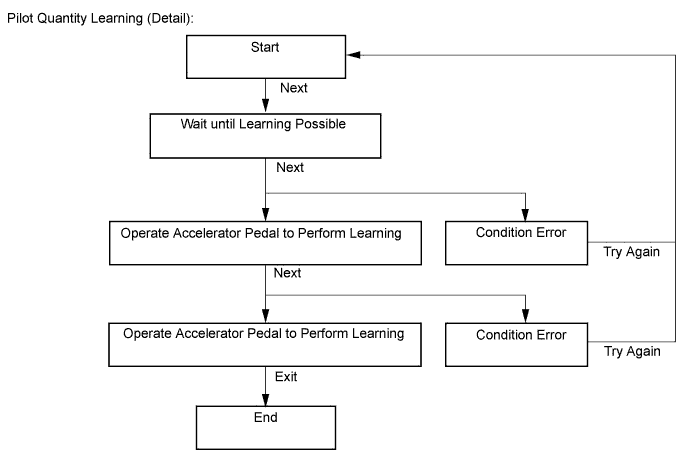
"Pilot Quantity Learning" is performed when injector assemblies have been replaced and injector compensation codes have been registered. "Pilot Quantity Learning (Detail)" is performed when there are engine problems but no DTCs are output and the technician wishes to clear the learned values and have the vehicle relearn the values.
It takes time to clear the learned values and perform learning for all cylinders.
-
This procedure uses the intelligent tester to perform "Pilot Quantity Learning (Detail)".
-
When replacing the injector assembly, engine or ECM, perform this procedure after performing injector compensation (manual ID code registration).
Note
After completing this procedure, clear the DTCs using the intelligent tester.
Tech Tips
-
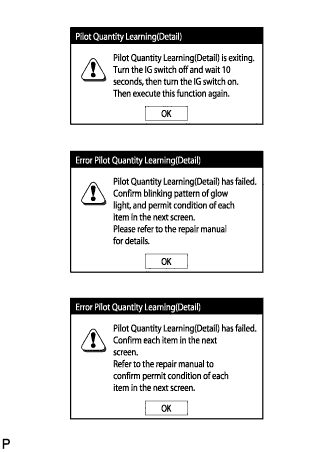
If "Exit" is pushed during the step where the accelerator pedal is operated and "Pilot Quantity Learning (Detail)" is canceled, turn the ignition switch off, wait 10 seconds, check the vehicle condition, and then perform learning again.
-
If an error occurs during learning, check the vehicle condition after turning the ignition switch off, and then perform learning again.
-
If learning is canceled and DTCs are output due to excessive racing of the engine (depressing the accelerator pedal for 2 seconds or more), turn the ignition switch off, and then perform learning again.
-
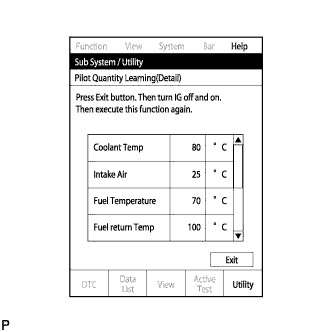
A communication malfunction may occur if there is a problem with the ECM, a wire harness or the connection to the DLC3. If the wire harnesses and the connection to the DLC3 are inspected and found to be normal, the ECM may be malfunctioning.
-
Connect the intelligent tester to the DLC3.
-
Start the engine.
-
Turn the tester on.
-
Enter the following menus: Powertrain / Engine and ECT / Utility / Pilot quantity learning (Detail).
-
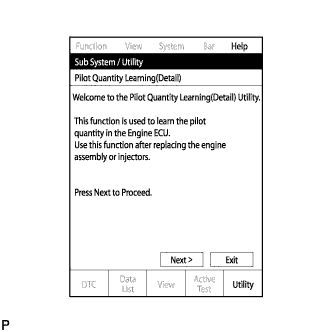
Press "Next".
-
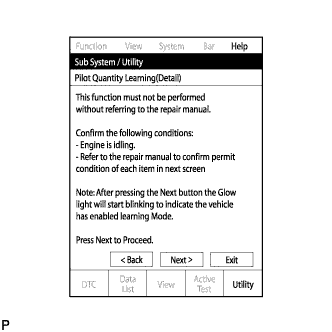
Press "Next" again to proceed.
-
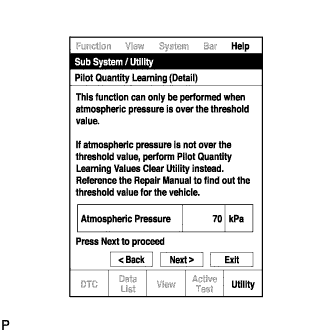
Confirm that the atmospheric pressure screen is displayed.
-
Confirm the displayed atmospheric pressure.
Standard value Atmosphere Pressure is 85 kPa (637.5 mmHg, 25.1 in.Hg) or more. Note
-
If the atmospheric pressure is below the standard range, "Pilot Quantity Learning" cannot be performed. In this case, press "Exit" and clear the learned values using "Pilot Quantity Learning Value Clear".
-
If the atmospheric pressure is below the standard range, even if "Pilot Quantity Learning" is performed, learning will not be completed.
-
-
If the atmospheric pressure is within the standard range, proceed to the next screen.
-
-
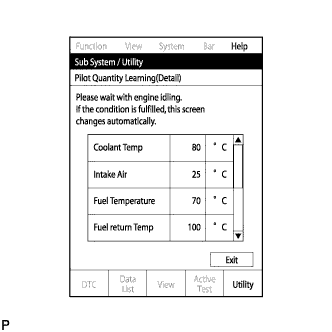
Confirm the condition of the engine and wait until learning can be performed.
Essential Conditions for Learning Tester Display Standard Coolant Temp 70 to 100°C Intake Air 10 to 120°C Fuel Temperature 25 to 96°C Fuel Return Temp 55 to 110°C Battery Voltage 10 V or higher Pilot Quantity State (CAT) READY Tech Tips
-
If the values deviate from the standard above, "Pilot Quantity Learning (Detail)" enters a standby state or is canceled.
-
When the display indicates that "Pilot Quantity State (CAT)" is prohibited, perform "Pilot Quantity Learning" after performing the "Activate the DPF Rejuvenate (PM)" Active Test using the intelligent tester Click here.
-
When the essential conditions to perform learning are met, the screen will change automatically.
Note
-
If "Activate the DPF Rejuvenate (PM)" is performed after an injector compensation code is input but before "Pilot Quantity Learning" is performed, DTC P062F is stored and the MIL illuminates due to "Pilot Quantity Learning" being incomplete.
-
Using the intelligent tester, make sure that DTCs other than DTC P062F are not output.
-
If DTCs other than DTC P062F are output, perform troubleshooting for those DTCs, and then perform "Activate the DPF Rejuvenate (PM)".
Tech Tips
DTC P062F is stored when the value registered in the ECM for an input injector compensation code, catalyst deterioration learning value and/or pilot quantity deterioration learning value is the initial value.
-
-
Follow the prompts on the screen and repeat the following procedure until the screen changes: Starting with the engine idling, race the engine until the engine speed is 3000 rpm or more for no more than 2 seconds, and then let the engine return to idling.
Tech Tips
-
After confirming that the engine speed has reached 3000 rpm, completely release the accelerator pedal in order for the throttle opening amount to become 0%.
-
It is possible to confirm the status of the learning operation during "Pilot Quantity Learning (Detail)" by observing the blinking pattern of the glow indicator light.
Glow Indicator Light Blinking Pattern Learning Status Glow Indicator Light Condition Conditions essential to start learning have not been met Blinking at 0.5 second intervals Conditions essential to start learning have been met Blinking at 1 second intervals During racing (learning is being performed) Blinking at 1 second intervals Learning is finished Off Learning has been canceled Blinking at 1.5 second intervals Learning has been canceled (malfunctioning cylinder is indicated by blinking pattern) Blinking at 0.8 second intervals (2.3 second intervals between each set of blinks representing the number of a malfunctioning cylinder)
-
-
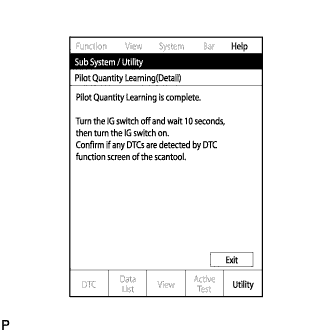
When the screen changes, push "Exit".
-
Turn the tester off and turn the ignition switch off.
-
Wait for at least 10 seconds.
-
Turn the ignition switch to ON, and then turn the tester on.
-
Clear DTCs Click here.
-
Turn the ignition switch off.
Note
Do not disconnect the cable from the negative (-) battery terminal for 30 seconds after turning the ignition switch off.
Tech Tips
-
The main relay turns off after the learned value is stored in the ECM.
-
The main relay turns off within approximately 5 to 10 seconds of turning the ignition switch off.
-
-
-
PILOT QUANTITY LEARNING VALUE CLEAR
Tech Tips
-
If the atmospheric pressure is below the threshold value, "Pilot Quantity Learning" will not be completed and DTC P062F is stored. After "Pilot Quantity Learning Value Clear" is performed, DTC P062F will not be stored.
-
Clear the learned values using the following procedure.
-
Connect the intelligent tester to the DLC3.
-
Turn the ignition switch to ON and turn the tester on.
-
Enter the following menus: Powertrain / Engine and ECT / Utility / Pilot Quantity Learning Value Clear
-
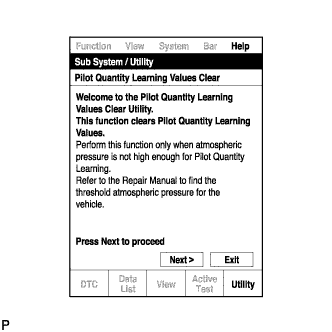
Press "Next".
-
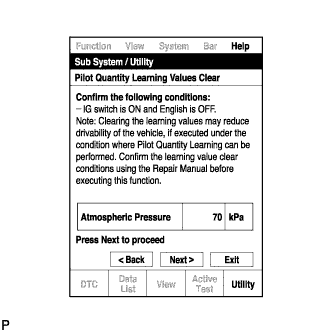
Confirm that the atmospheric pressure screen is displayed.
-
Confirm the displayed atmospheric pressure.
Standard value Atmosphere Pressure is below 85 kPa (637.5 mmHg, 25.1 in.Hg). Note
-
If the atmospheric pressure is higher than the standard range for performing "Pilot Quantity Learning Value Clear", do not clear the learned values. Instead, perform "Pilot Quantity Learning".
-
When the atmospheric pressure is higher than the standard range, perform "Pilot Quantity Learning" without initializing the learned values using "Pilot Quantity Learning Value Clear". If the learned values are initialized when the atmospheric pressure is higher than the standard range, the following symptoms may appear. Be sure to correctly follow procedures.
-
Driveability problems
-
Rough idle
-
Emission of white or black smoke, etc.
-
-
Proceed to the next screen.
-
-
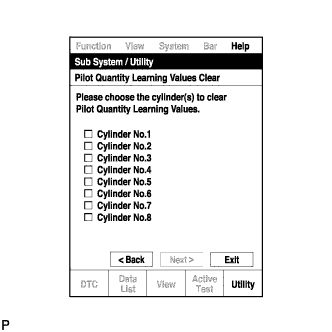
Select the cylinders whose learned value will be cleared.
Note
-
Multiple cylinders can be selected.
-
Only the cylinders for which injector compensation codes have been written must have their learned value cleared.
-
-
After selecting the cylinders whose learned value will be cleared, press "Next" to begin the initialization.
-
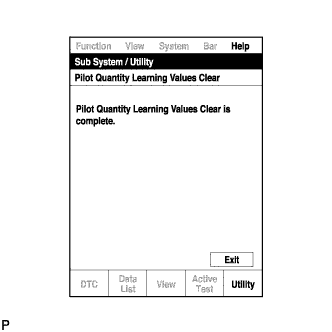
When the screen changes, push "Exit".
-
Turn the tester off and turn the ignition switch off.
-
Wait for at least 10 seconds.
-
Turn the ignition switch to ON and turn the tester on.
-
Clear DTCs Click here.
-
Turn the ignition switch off and leave the vehicle for 30 seconds or more.
-
Turn the ignition switch to ON for 1 second.
-
Enter the following menus: Powertrain / Engine and ECT / DTC.
-
Read DTCs.
-
Confirm that no DTCs are output.
-