GENERATOR REASSEMBLY

-
INSTALL GENERATOR ROTOR ASSEMBLY
-
Install the generator rotor assembly to the drive end frame.
Tech Tips
If the generator rotor is difficult to engage, lightly tap it using a plastic hammer.
-
Place the generator washer on the rotor.
-
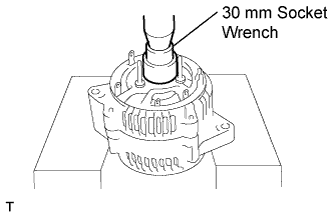
Using a 30 mm socket wrench and press, slowly press in the rectifier end frame.
-
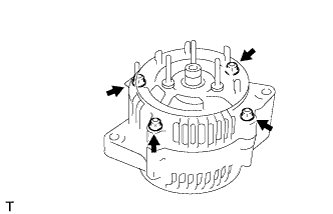
Install the 4 nuts.
- Torque:
- 4.5 N*m { 46 kgf*cm, 40 in.*lbf }
-
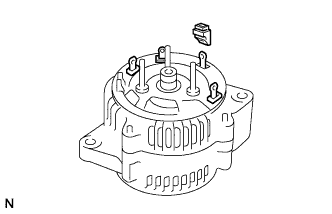
Install the 4 rubber insulators on the lead wires.
Note
Make sure each rubber insulator is oriented as shown in the illustration.
-
-
INSTALL GENERATOR HOLDER WITH RECTIFIER
-
Place the generator holder with rectifier on the rectifier end frame.
-
Push the generator holder with rectifier down and install it with the 4 screws.
- Torque:
- 2.9 N*m { 30 kgf*cm, 26 in.*lbf }
-
-
INSTALL GENERATOR REGULATOR ASSEMBLY
-
Place the plate seal on the generator holder with rectifier.
-
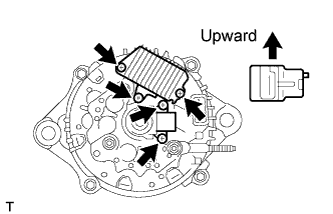
Install the generator regulator assembly with the 3 screws.
- Torque:
- 2.0 N*m { 20 kgf*cm, 18 in.*lbf }
-
-
INSTALL GENERATOR BRUSH HOLDER ASSEMBLY
-
Install the generator brush holder assembly with the 2 screws.
- Torque:
- 2.0 N*m { 20 kgf*cm, 18 in.*lbf }
Note
Be careful of the holder installation direction.
-
Place the generator brush cover on the generator brush holder assembly.
-
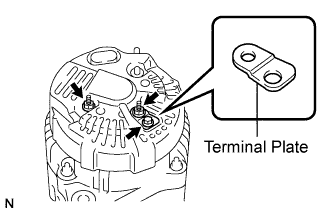
Install the rear end cover and the terminal plate with the 2 nuts and bolt.
- Torque:
- Bolt
- 3.9 N*m { 39 kgf*cm, 35 in.*lbf }
- Nut
- 4.4 N*m { 45 kgf*cm, 39 in.*lbf }
-
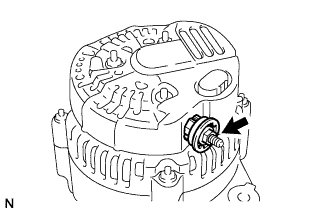
Install the terminal insulator with the nut.
- Torque:
- 3.6 N*m { 37 kgf*cm, 32 in.*lbf }
-
Install the No. 2 generator rear end cover with the 3 nuts.
- Torque:
- 4.4 N*m { 45 kgf*cm, 38 in.*lbf }
-
-
INSTALL GENERATOR PULLEY
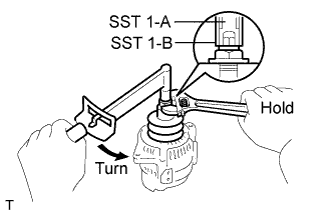
-
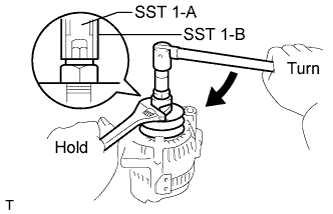
Install the generator pulley onto the rotor shaft by tightening the generator pulley nut by hand.
-
While holding the nut below SST 1-A with a torque wrench, turn and tighten SST 1-B clockwise to the specified torque.
- SST
- 09820-63010 ( 09820-06010, 09820-06020 )
Tech Tips
SST 1-A and 1-B 09820-06010 SST 2 09820-06020 - Torque:
- 39 N*m { 400 kgf*cm, 29 ft.*lbf }
Note
Check that SST is secured to the rotor shaft.
-
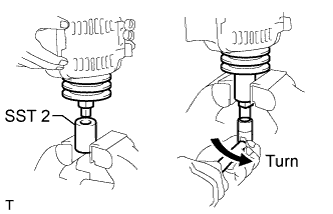
Mount SST 2 in a vise.
-
Insert SST 1-A and 1-B into SST 2, and attach the generator pulley nut to SST 2.
-
Tighten the generator pulley nut by turning SST 1-A in the direction shown in the illustration.
- Torque:
- 133 N*m { 1351 kgf*cm, 98 ft.*lbf }
-
Remove the generator from SST 2.
-
While holding the nut below SST 1-B, turn and remove SST 1-A and 1-B.
-
Turn the generator pulley, and check that the generator pulley moves smoothly.
-