ECD SYSTEM, Diagnostic DTC:P0219

| DTC Code | DTC Name |
|---|---|
| P0219 | Engine Overspeed Condition |
DESCRIPTION
This DTC is stored when the engine speed exceeds the threshold.
| DTC Detection Drive Pattern | DTC Detection Condition | Trouble Area |
|---|---|---|
| - | The engine speed is 3740 rpm or more for 0.5 seconds or more when the vehicle is being driven at a speed of 3 km/h (1.8 mph) or more and the battery voltage is 16 V or higher. (1 trip detection logic) |
Amount of engine oil |
INSPECTION PROCEDURE
Note
-
Using the intelligent tester to clear DTC P0219 will cause the DTC to be output again. Therefore, make sure to clear the DTC by removing a fuse or disconnecting the cable from the negative (-) battery terminal Click here.
-
When clearing DTCs, make sure to clear the engine history data at the same time Click here.
Tech Tips
-
For manual transmissions, the engine may over rev due to the way the customer shifts gears. Therefore, be sure to ask the customer about their shifting habits and give advice if the customer has mentioned that the engine over revved.
-
The engine may suck in an excessive amount of oil and over rev due to an increase in the engine oil level. Therefore, be sure to ask the customer about their vehicle usage and give advice if the customer has mentioned that the engine over revved.
-
If any other DTCs are output, perform troubleshooting for those DTCs first.
-
Read freeze frame data using the intelligent tester. Freeze frame data records the engine condition when malfunctions are detected. When troubleshooting, freeze frame data can help determine if the vehicle was moving or stationary, if the engine was warmed up or not, and other data from the time the malfunction occurred.
-
When confirming the freeze frame data, be sure to check all 5 sets of freeze frame data.
-
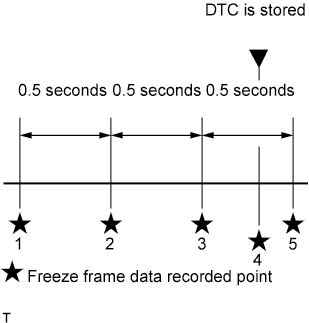
The fourth set of freeze frame data is the data recorded when the DTC is stored.
PROCEDURE
-
READ OUTPUT DTC (RECORD STORED DTC AND FREEZE FRAME DATA)
-
Replace the normal DLC3 cable (12 V specification) for the intelligent tester with the 24 V DLC3 cable.
Note
Be sure to use the 24 V DLC3 cable when connecting the intelligent tester to the DLC3. Using the normal DLC3 cable (12 V specification) will cause damage to the tester.
-
Connect the intelligent tester to the DLC3.
-
Turn the ignition switch to ON.
-
Turn the tester on.
-
Enter the following menus: Powertrain / Engine and ECT / DTC.
-
Record the stored DTC and freeze frame data.
Tech Tips
This freeze frame data shows the actual engine conditions when engine stall trouble occurred.
NEXT 
-
-
CHECK OTHER DTC OUTPUT
-
Replace the normal DLC3 cable (12 V specification) for the intelligent tester with the 24 V DLC3 cable.
Note
Be sure to use the 24 V DLC3 cable when connecting the intelligent tester to the DLC3. Using the normal DLC3 cable (12 V specification) will cause damage to the tester.
-
Connect the intelligent tester to the DLC3.
-
Turn the ignition switch to ON.
-
Turn the tester on.
-
Enter the following menus: Powertrain / Engine and ECT / DTC.
-
Read the DTCs.
Result Result Proceed to DTC P0219 is output A DTC is not output B
B 
GO TO DTC CHART Click here
A
-
-
CHECK ENGINE ASSEMBLY
-
Inspect the engine assembly Click here.
NEXT 
REPAIR OR REPLACE MALFUNCTIONING PARTS
-