ECD SYSTEM Engine Knocking or Rattling
DESCRIPTION
| Malfunction Condition | Main Trouble Areas | Related Trouble Areas |
|---|---|---|
|
|
|
Tech Tips
-
Specified values in the following troubleshooting flowchart are for reference only. Variations in the Data List values may occur depending on the measuring conditions or the vehicle's age. Do not judge the vehicle to be normal even when the Data List values indicate a standard level. There are possibly some concealed factors causing the malfunction.
-
Check that the vehicle has not been modified in any way prior to the vehicle inspection.
INSPECTION PROCEDURE
Note
-
After replacing the supply pump, the ECM needs initialization Click here.
-
After replacing an injector, the ECM needs registration Click here.
Tech Tips
-
This troubleshooting procedure checks for knocking and rattling.
-
Knocking is most likely to occur while the engine is idling.
PROCEDURE
-
CHECK SOUND AREA
-
Find source of the abnormal sound using a mechanic's stethoscope.
Result Result Proceed to Sound from supply pump A Sound from parts other than supply pump B
B 
REPAIR OR REPLACE MALFUNCTION PARTS
A 
-
-
CHECK WIRE HARNESS IN ENGINE COMPARTMENT
-
Check the wire harness connections.
OK Wire harnesses are connected securely.
NG
REPAIR OR REPLACE HARNESS OR CONNECTOR
OK
-
-
PERFORM CONFIRMATION DRIVING PATTERN
Tech Tips
Drive the vehicle according to the driving pattern below to allow the ECM to set DTCs relating to malfunctions of the fuel system, EGR system and throttle valve. If DTCs are set, problem areas can be identified.
-
Enter CHECK MODE Click here.
-
Fully warm up the engine.
-
Allow the engine to idle for 5 minutes or more.
-
Drive the vehicle at more than 40 km/h (25 mph) for 1 minute or more (Procedure "A").
-
Decelerate and stop the vehicle (Procedure "B").
-
Repeat procedure "A" and procedure "B" 4 times or more.
-
Stop the engine and wait for at least 10 seconds (Procedure "C").
-
Repeat procedure "A" and procedure "C" described above (to set DTCs relating to the EGR system and throttle valve).
-
Drive the vehicle at more than 70 km/h (43 mph) for at least 1 minute (to set DTCs relating to the supply pump).
NEXT
-
-
READ OUTPUT DTC (RELATING TO ENGINE)
-
Connect the intelligent tester to the DLC3.
-
Turn the ignition switch to the ON position.
-
Turn the tester on.
-
Enter the following menu items: Powertrain / Engine and ECT / DTC.
-
Read the pending DTCs.
Result Display (DTC Output) Proceed to No output A Engine related DTCs B
B
GO TO DTC CHART
A
-
-
PERFORM ACTIVE TEST USING INTELLIGENT TESTER (TEST THE FUEL LEAK)
Tech Tips
By performing this Active Test, the engine speed is maintained. As a result, a fuel leak check can be conducted while retaining the high common rail pressure.
-
Connect the intelligent tester to the DLC3.
-
Start the engine.
-
Turn the tester on.
-
Enter the following menu items: Powertrain / Engine and ECT / Active Test / Test the Fuel Leak.
-
Visually check the supply pump, injector, and fuel line located between the supply pump and common rail for fuel leaks and fuel pressure leaks. Also, perform the same check on the fuel line between the common rail and the injector.
Tech Tips
There may be fuel leaks inside the components, such as the supply pump.
OK No fuel leakage.
NG
REPAIR OR REPLACE FUEL LEAKAGE POINT
OK
-
-
READ VALUE USING INTELLIGENT TESTER
-
Connect the intelligent tester to the DLC3.
-
Start the engine, and warm it up.
-
Turn the tester on.
-
Enter the following menu items: Powertrain / Engine and ECT / Data List.
-
Select the following menu items in order and read the values.
-
MAP
-
MAF
-
Fuel Press
Standard Item Engine Speed *1 Standard Range Description MAP Ignition switch in the ON position (engine stopped) Same as atmospheric pressure Intake manifold internal pressure detected by manifold absolute pressure sensor Idling 90 to 105 kPa (675 to 788 mmHg, 26.57 to 31.00 in.Hg) 3000 rpm (no engine load) 110 to 140 kPa (825 to 1050 mmHg, 32.48 to 41.35 in.Hg) MAF Ignition switch in the ON position (engine stopped) 0 g/s Intake air volume detected by mass air flow meter Idling 8 to 12 g/s 3000 rpm (no engine load) 80 to 90 g/s Fuel Press Idling 25 to 35 MPa Common rail internal fuel pressure 2000 rpm (no engine load) 80 to 90 MPa 3000 rpm (no engine load) 100 to 110 MPa Result Item Result Proceed to MAP, MAF, and Fuel press Standard range A MAP and MAF Outside standard range B Only MAP Outside standard range C Only MAF Outside standard range D Only Fuel Press Outside standard range E Tech Tips
*1: The A/C switch and all accessory switches should be off with a fully-warmed engine.
-
B 
CHECK INTAKE SYSTEM Click here
C
GO TO DTC PO105, P0107 AND P0108 (RELATED TO MANIFOLD ABSOLUTE PRESSURE SENSOR)
D
GO TO DTC P0100, P0102 AND P0103 (RELATED TO MAF METER)
E
INSPECT COMMON RAIL ASSEMBLY (FUEL PRESSURE SENSOR) Click here
A
-
-
READ VALUE USING INJECTOR ASSEMBLY (INJECTION FEED BACK VAL AND INJECTION VOLUME)
-
Select the following menu items in order and read the values.
-
Injection Feedback Val #1, #2, #3, and #4
-
Injection Volume
Standard Item Engine Speed* Standard Range Description Injection Feedback Val #1 Idling -3.0 to 3.0 mm3
Value of injector fuel injection volume compensates for differences in combustion condition of cylinders
-
Positive values indicate control which corrects combustion degradation
-
Negative values indicate control which corrects excessive combustion pressure
-
If problems exist, Injection Feedback Val may deviate from -3.0 and 3.0 mm range
Injection Feedback Val #2 Idling -3.0 to 3.0 mm3
Injection Feedback Val #3 Idling -3.0 to 3.0 mm3
Injection Feedback Val #4 Idling -3.0 to 3.0 mm3
Injection Volume Idling 5.0 to 12.0 mm3
Fuel injection volume controlled by ECU
-
Controls NE signal, fuel temperature, engine coolant temperature, intake air temperature, boost pressure, atmospheric pressure, and EGR volume.
-
If problems exist, Injection Volume may be outside standard range
Result Result Proceed to Standard range A Injection Feedback Val #1 to #4 and/or Injection Volume outside standard range B Tech Tips
*: The A/C switch and all accessory switches should be off, and the engine should be fully warmed up.
-
B
IDENTIFY MALFUNCTIONING CYLINDER INJECTOR Click here
A
-
-
CHECK INJECTOR COMPENSATION CODE
Tech Tips
If the injector compensation code is not correctly registered, it may cause malfunctions Click here.
OK Compensation code of the installed injector is the same as the code registered in the ECM.
NG
REGISTER INJECTOR COMPENSATION CODE
OK
-
RESET ECM
-
Disconnect the cable from the negative battery terminal for at least 2 minutes.
-
Reconnect the cable to the negative battery terminal.
-
Check whether the malfunction has been successfully repaired by performing a driving test using the freeze frame data recorded at the time the malfunction occurred.
OK Malfunction has been repaired successfully.
OK
END
NG
-
-
CHECK INTAKE SYSTEM
-
Check for air leaks and blockage between the air cleaner and turbocharger.
-
Check for air leaks and blockage between the turbocharger and intake manifold.
OK No air leakage or blockage.
NG
REPAIR OR REPLACE MALFUNCTION PARTS
OK
-
-
INSPECT EXHAUST RETARDER ASSEMBLY
-
Inspect the exhaust retarder assembly.
NG
REPLACE EXHAUST RETARDER ASSEMBLY
OK
-
-
CHECK EGR VALVE ASSEMBLY
-
Check the EGR valve assembly Click here.
NG
REPLACE EGR VALVE ASSEMBLY
OK
-
-
INSPECT DIESEL THROTTLE BODY ASSEMBLY
-
Connect the intelligent tester to the DLC3.
-
Turn the ignition switch to the ON position.
-
Turn the tester on.
-
Enter the following menu items: Powertrain / Engine and ECT / Actual Throttle Position.
-
Read the value.
Standard Ignition switch in the ON position 0% Idling (Warmed up engine) 70% Accelerator pedal fully depressed 0%
NG
REPLACE DIESEL THROTTLE BODY ASSEMBLY
OK
-
-
CHECK COMBUSTION SOUND
-
Confirm type of sound emitted.
Result Result Proceed to Knocking A Mechanical sound other than knocking B
B
BLEED AIR FROM FUEL SYSTEM Click here
A
-
-
INSPECT INJECTOR ASSEMBLY
-
Start the engine.
-
Disconnect the connectors for the No. 1 through No. 4 injectors in this order.
-
Check the engine idling condition during the fuel injection of each cylinder.
NEXT
-
-
CHECK CYLINDER COMPRESSION PRESSURE
-
Check the cylinder compression pressure Click here.
NG
CHECK ENGINE TO DETERMINE CAUSE OF LOW COMPRESSION
OK
-
-
CHECK MALFUNCTIONING CYLINDER'S INJECTOR FOR DEPOSITS
Tech Tips
If an injector is contaminated with deposits, the fuel injection volume deviates from the standard range. This may cause malfunctions.
-
Check the injector for any deposits.
Result Result Proceed to Deposits A No deposits B
B
REPLACE INJECTOR ASSEMBLY OF MALFUNCTIONING CYLINDER
A
-
-
CLEAN INJECTOR ASSEMBLY
-
Wipe away deposits from the tips of the injectors.
Tech Tips
-
Solvent or carbon removal agents help remove deposits easily.
-
Exercise extreme care not to damage the injectors while wiping off the deposits.
-
NEXT
-
-
READ VALUE USING INJECTOR ASSEMBLY (INJECTION FEEDBACK VAL AND INJECTION VOLUME)
-
Reinstall the injector to the cylinder head.
-
Connect the intelligent tester to the DLC3.
-
Turn the ignition switch to the ON position.
-
Turn the tester on.
-
Start the engine and warm it up.
-
Enter the following menu items: Powertrain / Engine and ECT / Data List.
-
Select the following menu items in order and read the values.
-
Injection Feedback Val #1, #2, #3, and #4
-
Injection Volume
Standard Item Engine Speed* Reference Value Injection Feedback Val #1 to #4 Idling -3.0 to 3.0 mm3
Injection Volume Idling 5.0 to 12.0 mm3
Tech Tips
-
*: The A/C switch and all accessory switches should be off, and the engine should be fully warmed up.
-
When the values are outside the standard range, deposits inside the injector may be causing the problem.
OK Values are within the standard range. -
NG
REPLACE INJECTOR ASSEMBLY OF MALFUNCTIONING CYLINDER
OK 
END
-
-
IDENTIFY MALFUNCTIONING CYLINDER INJECTOR
-
Follow the instructions in the table below according to the check result of the intelligent tester.
Tech Tips
This operation is based on the premise that the common rail pressure is normal.
Standard Item Engine Speed* Reference Value Injection Feedback Val #1 to #4 Idling -3.0 to 3.0 mm3
Injection Volume Idling 5.0 to 12.0 mm3
Tech Tips
*: The A/C switch and all accessory switches should be off, and the engine should be fully warmed up.
Result Injection Volume Injection Volume Injection Feedback Val #1 to #4 Less than 5.0 mm3
Between 5.0 and 15.0 mm3(Normal)
More than 15.0 mm3
2.0 mm3or more, -2.0 mm3or less
A B B Between -2.0 and 2.0 mm3
- Normal C* Proceed to Inspection Areas Descriptions A Inspect and repair cylinder injector with revised injection volume of less than -3.0 mm3:
-
Perform power balance inspection and identify malfunctioning cylinder
-
Replace malfunctioning cylinder injector
Abnormal cylinder injector injects excessively large quantity of fuel B Identify malfunctioning cylinders by conducting power balance inspection:
-
Perform power balance inspection to identify malfunctioning cylinders
-
Clean malfunctioning cylinder injector, then check and repair it
Abnormal cylinder injector injects excessively large quantity of fuel:
-
Fuel injection volume too low due to injector nozzle being blocked by deposits
-
Abnormal value cylinder injector compression decreases
-
Abnormal value cylinder injector injects excessively large quantity of fuel
C Inspect and repair all cylinder injectors:
Clean all cylinder injectors, and then inspect and repair them
All cylinder injectors inject excessively small quantity of fuel:
Fuel injection volume too low due to all cylinder injector nozzles being blocked by deposits
Tech Tips
*: When the Injection Volume displayed on the intelligent tester is large despite the Fuel Press and Injection Feedback Val #1 to #4 in the Data List being normal, the injector may be clogged. In this case, there may be deposits inside or outside the injector.
-
Despite the injector functioning normally, the indicated Injection Feedback Val #1 to #4 values may be outside the normal operating range due to compensation for other problems (such as low compression).
-
Injection Feedback Val #1 to #4 is the value used to correct the fuel injection volumes of each cylinder, in order to optimize (compensate for the unevenness between) all the cylinder combustion conditions. If any of the cylinders malfunction, the fuel injection volumes for the normal cylinders are corrected simultaneously. As a result, the Injection Feedback Val #1 to #4 may deviate from the standard range.
-
B
CHECK MALFUNCTIONING CYLINDER'S INJECTOR FOR DEPOSITS Click here
C
CHECK INJECTORS FOR DEPOSITS (EXCEPT FUEL ADDITION INJECTOR) Click here
A
-
-
INSPECT INJECTOR ASSEMBLY
-
Start the engine.
-
Disconnect the connectors for the No. 1 through No. 4 injectors in this order.
-
Check the engine idling condition during fuel injection of each cylinder.
NEXT
REPLACE INJECTOR ASSEMBLY OF MALFUNCTIONING CYLINDER
-
-
CHECK INJECTORS FOR DEPOSITS (EXCEPT FUEL ADDITION INJECTOR)
Tech Tips
If an injector is contaminated with deposits, the fuel injection volume deviates from the standard range. This may cause malfunctions.
-
Check the injector for any deposits.
Result Injector Condition Proceed to Deposits A No Deposits B
B
REPLACE INJECTOR ASSEMBLY
A
-
-
CLEAN INJECTOR ASSEMBLY
-
Wipe away deposits from the tips of the injectors.
Tech Tips
-
Solvent or carbon removal agents help remove deposits easily.
-
Exercise extreme care not to damage the injectors while wiping off the deposits.
-
NEXT
-
-
READ VALUE USING INJECTOR (INJECTION FEEDBACK VAL AND INJECTION VOLUME)
-
Reinstall the injector to the cylinder head.
-
Connect the intelligent tester to the DLC3.
-
Turn the ignition switch to the ON position.
-
Turn the tester on.
-
Start the engine and warm it up.
-
Enter the following menu items: Powertrain / Engine and ECT / Data List.
-
Select the following menu items in order and read the values displayed on the intelligent tester respectively.
-
Injection Feedback Val #1, #2, #3, and #4
-
Injection Volume
Standard Item Engine Speed* Reference Value Injection Feedback Val #1 to #4 Idling -2.0 to 2.0 mm3
Injection Volume Idling 5.0 to 12.0 mm3
*: The A/C switch and all accessory switches should be off, and the engine should be fully warmed up.
Tech Tips
When the values are outside the standard range, deposits inside the injector may be causing the problem.
OK Values are within the standard range. -
NG
REPLACE INJECTOR ASSEMBLY
OK
END
-
-
BLEED AIR FROM FUEL SYSTEM
-
To bleed air from the priming pump, pump the priming pump until it becomes hard and cannot be pumped any more.
NEXT
-
-
CONFIRM WHETHER MALFUNCTION HAS BEEN SUCCESSFULLY REPAIRED
-
Check whether the knocking has been successfully repaired by performing a driving test.
OK Malfunction has been repaired successfully.
NEXT
END
-
-
INSPECT COMMON RAIL ASSEMBLY (FUEL PRESSURE SENSOR)
-
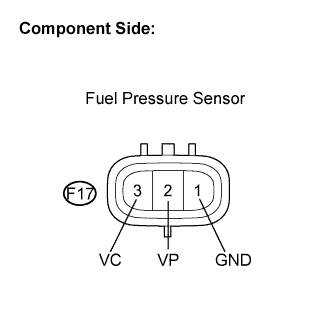
Disconnect the fuel pressure sensor connector.
-
Measure the resistance between each terminal of the fuel pressure sensor connector.
Standard resistance Tester Connection Specified Condition F17-2 (VP) - F17-1 (GND) 16.4 kΩ or less F17-2 (VP) - F17-3 (VC) 3 kΩ or less -
Reconnect the fuel pressure sensor connector.
NG
REPLACE COMMON RAIL ASSEMBLY
OK
-
-
INSPECT SUPPLY PUMP ASSEMBLY
-
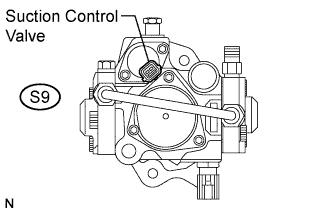
Measure the resistance between the suction control valve terminals.
Standard resistance Tester Connection Condition Specified Condition S9-1 - S9-2 20°C (68°F) 1.9 to 2.3 Ω
NG
REPLACE SUPPLY PUMP ASSEMBLY
OK
-
-
READ VALUE USING INTELLIGENT TESTER (PCV OPEN CURRENT FB VAL)
-
Connect the intelligent tester to the DLC3.
-
Start the engine.
-
Turn the tester on.
-
Enter the following menu items: Powertrain / Engine and ECT / Data List / PCV Open Current FB Val.
-
Read the value.
Standard Engine Speed Result Idling 1050 to 1150 mA
NG
REPLACE SUPPLY PUMP ASSEMBLY
OK
REPAIR OR REPLACE COMMON RAIL ASSEMBLY (PRESSURE DISCHARGE VALVE)
-