ECD SYSTEM DTC CHECK / CLEAR

-
CHECK DTC AND FREEZE FRAME DATA
-
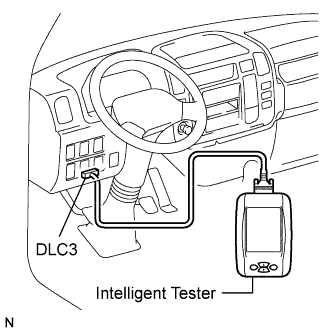
Replace the normal DLC3 cable (12 V specification) for the intelligent tester with the 24 V DLC3 cable.
Note
Be sure to use the 24 V DLC3 cable when connecting the intelligent tester to the DLC3. Using the normal DLC3 cable (12 V specification) will cause damage to the tester.
-
Connect the intelligent tester to the DLC3.
-
Turn the ignition switch to the ON position.
-
Turn the tester on.
-
Enter the following menu items: Powertrain / Engine and ECT / DTC.
-
Check and make a note of the DTCs and freeze frame data.
-
Confirm the details of the DTCs Click here.
-
-
CLEAR DTC AND FREEZE FRAME DATA
-
Replace the normal DLC3 cable (12 V specification) for the intelligent tester with the 24 V DLC3 cable.
Note
Be sure to use the 24 V DLC3 cable when connecting the intelligent tester to the DLC3. Using the normal DLC3 cable (12 V specification) will cause damage to the tester.
-
Connect the intelligent tester to the DLC3.
-
Turn the ignition switch to the ON position (do not start the engine).
-
Turn the tester on.
-
Enter the following menu items: Powertrain / Engine and ECT / DTC / Clear.
-
Erase the DTCs and freeze frame data by pressing YES on the tester.
-