CONDENSER DISASSEMBLY

-
REMOVE NO. 5 COOLER CONDENSER BRACKET
-
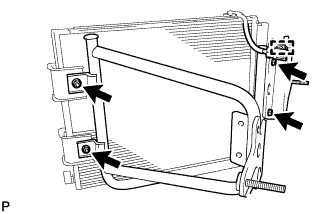
Detach the clamp.
-
Remove the 4 nuts and No. 5 cooler condenser bracket.
-
-
REMOVE GROMMET
-
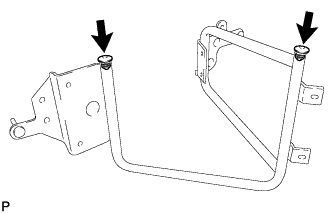
Remove the 2 grommets.
-
-
REMOVE COOLER WIRING
-
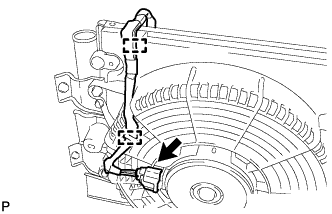
Disconnect the connector.
-
Detach the 2 clamps and remove the cooler wiring.
-
-
REMOVE BLOWER WITH SHROUD ASSEMBLY
-
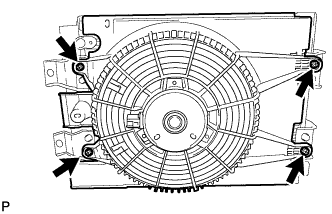
Remove the 4 bolts and the blower with shroud assembly.
-
-
REMOVE COOLING FAN
-
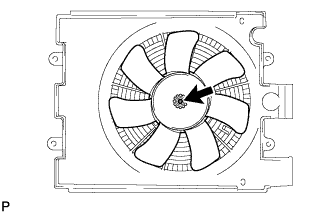
Remove the nut and the cooling fan.
-
-
REMOVE CONDENSER BLOWER MOTOR ASSEMBLY
-
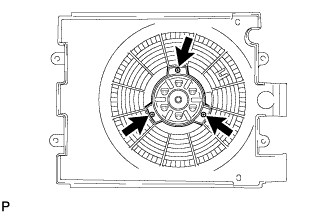
Remove the 3 screws and condenser blower motor assembly.
-
-
REMOVE NO. 1 COOLER CONDENSER BRACKET
-
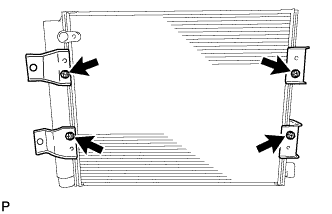
Remove the bolt and No. 1 cooler condenser bracket.
-
Remove the bolt and No. 2 cooler condenser bracket.
-
Remove the bolt and No. 3 cooler condenser bracket.
-
Remove the bolt and No. 4 cooler condenser bracket.
-
-
REMOVE COOLER DRYER
-
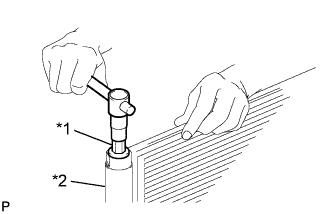
Text in Illustration *1 14 mm Straight Hexagon Wrench *2 Modulator Using a 14 mm straight hexagon wrench, remove the cap from the modulator.
-
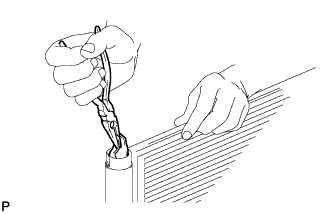
Using pliers, remove the cooler dryer.
-