STEERING ANGLE SENSOR INSTALLATION

-
INSTALL SPIRAL CABLE SUB-ASSEMBLY
-
Attach the 3 claws to install the spiral cable sub-assembly.
-
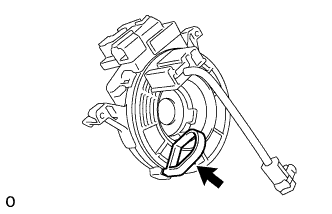
If installing a new spiral cable sub-assembly: Remove the lock pin.
-
Connect the connector to the spiral cable sub-assembly.
-
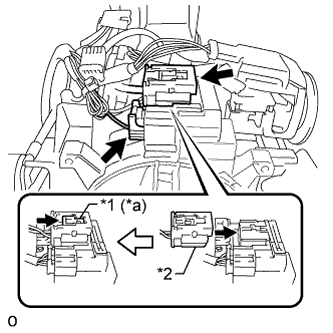
Text in Illustration *1 Lock Slider *2 Airbag Connector (Yellow Colored) *a Lock Position Connect the airbag connector (yellow colored) to the spiral cable sub-assembly.
Note
When handling the airbag connector, take care not to damage the airbag wire harness.
-
Connect the connectors to the spiral cable.
-
-
INSTALL UPPER STEERING COLUMN COVER
-
Engage the 3 claws and install the steering column cover plate.
-
Install the upper steering column cover onto the steering column.
-
-
INSTALL LOWER STEERING COLUMN COVER
-
Engage the 4 claws and install the lower steering column cover.
-
Install the 5 screws.
-
-
ADJUST SPIRAL CABLE SUB-ASSEMBLY
-
Check that the ignition switch is off.
-
Check that the cable is disconnected from the negative (-) battery terminal.
CAUTION:
Wait at least 90 seconds after disconnecting the cable from the negative (-) battery terminal to disable the SRS system.
-
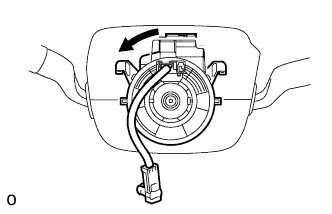
Rotate the spiral cable sub-assembly counterclockwise slowly by hand until it feels firm.
Note
Do not turn the spiral cable sub-assembly by the airbag wire harness.
-
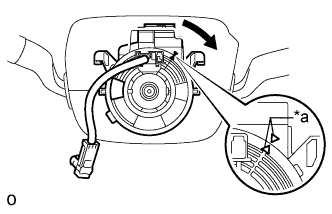
Text in Illustration *a Alignment Mark Rotate the spiral cable sub-assembly clockwise approximately 4 turns to align the alignment marks.
Note
Do not turn the spiral cable sub-assembly by the airbag wire harness.
Tech Tips
The spiral cable sub-assembly can be rotated approximately 4 turns both clockwise and counterclockwise from the center position.
-
-
INSTALL STEERING WHEEL ASSEMBLY
-
CONNECT CABLE TO NEGATIVE BATTERY TERMINAL
Note
When disconnecting the cable, some systems need to be initialized after the cable is reconnected Click here.
-
PERFORM DIAGNOSTIC SYSTEM CHECK
-
CHECK SRS WARNING LIGHT