EASY AND SMOOTH START SYSTEM DTC CHECK / CLEAR

-
DTC CHECK/CLEAR (When Using the Intelligent Tester)
-
Check for DTCs.
-
Connect the intelligent tester (with 24 V DLC3 cable) to the DLC3.
CAUTION:
Be sure to use the 24 V DLC3 cable when connecting the intelligent tester to the DLC3. Using the normal DLC3 cable (12 V specification) will cause damage to the tester.
-
Turn the ignition switch to ON.
-
Turn the intelligent tester on.
-
Read the DTCs following the prompts on the intelligent tester. Enter the following menus: Chassis / ABS/VSC/TRC / Trouble Codes.
-
Check the details of the DTCs Click here.
-
-
Clear the DTCs.
-
Connect the intelligent tester to the DLC3.
-
Turn the ignition switch to ON.
-
Turn the intelligent tester on.
-
Operate the intelligent tester to clear the codes. Enter the following menus: Chassis / ABS/VSC/TRC / Trouble Codes.
-
According to the display on the intelligent tester, select the trouble code data display with the clear button.
-
-
-
DTC CHECK/CLEAR (When not Using the Intelligent Tester)
-
Check for DTCs.
-
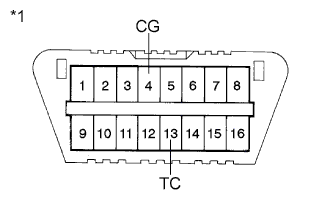
Text in Illustration *1 DLC3 Using SST, connect terminals 13 (TC) and 4 (CG) of the DLC3.
- SST
- 09843-18040
-
Turn the ignition switch to ON.
-
Observe the blinking pattern of the ABS warning light in order to identify the DTC.
-
Count the number of blinks of the ABS warning light.
Tech Tips
-
How to read DTCs:
Diagnostic trouble codes are represented by the number of blinks of a warning light. For example, code 21 would be shown by 2 blinks, a pause of 1.5 seconds, and then 1 blink.
-
If one code is detected:
The light repeats the same code after a pause of 4 seconds.
-
If multiple codes are detected:
The light outputs one code after another with a 2.5-second pause between each code. When all codes have been output, there is a 4-second pause and then the light begins to output the codes again.
-
-
Check the details of the DTCs Click here.
-
After completing the check, disconnect terminals TC and CG of the DLC3 to turn off the display.
If 2 or more DTCs are detected at the same time, the DTCs will be displayed in ascending order.
-
-
Clear the DTCs.
-
Text in Illustration *1 DLC3 Using SST, connect terminals 13 (TC) and 4 (CG) of the DLC3.
- SST
- 09843-18040
-
Turn the ignition switch to ON.
-
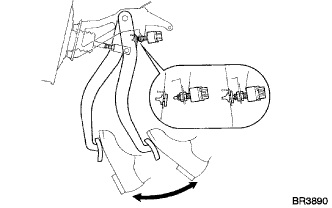
Clear the DTCs stored in the ECU by depressing the brake pedal 8 times or more within 5 seconds.
-
Check that the warning light indicates a normal system code.
-
Remove SST from the terminals of the DLC3.
Tech Tips
Clearing the DTCs cannot be performed by disconnecting the battery terminal or the ECU-IG fuse.
-
-
-
END OF DTC CHECK/CLEAR
-
Turn the ignition switch to ON.
-
Check that the ABS warning light goes off within approximately 3 seconds after turning the ignition switch to ON.
-