LIGHTING SYSTEM CUSTOMIZE PARAMETERS
-
CUSTOMIZE LIGHTING SYSTEM (EXT)
Tech Tips
The following items can be customized.
Note
-
When the customer requests a change in a function, first make sure that the function can be customized.
-
Record the current settings before customizing.
-
Customizing with the intelligent tester.
-
Connect the intelligent tester to the DLC3.
-
Turn the ignition switch to ON.
-
Turn the intelligent tester on.
-
Enter the following menus: Body / Main Body / Utility / Customize / Light Control.
-
Select the setting by referring to the table below.
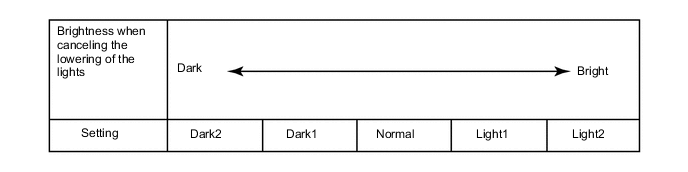
Light Control Display Default Content Setting Relevant ECU Sensitivity*1 Normal Adjusts the sensitivity of the automatic light control system*A. Normal, Dark2, Dark1, Light1 or Light2 Main body ECU DRL Function*2 ON ON/OFF of the DRL function OFF or ON Main body ECU Disp Ex ON Sen*1 Normal Changes the ambient brightness level required to dim the lights such as the indicator lights*B. Normal, Dark2, Dark1, Light1 or Light2 Main body ECU Disp Ex OFF Sen*1 Normal Changes the ambient brightness level required to cancel the dimming of the lights such as the indicator lights*C. Normal, Dark2, Dark1, Light1 or Light2 Main body ECU Follow Me Home Lighting Time 30 s Changes the low beam headlight lighting time when ignition switch is off and dimmer switch is pulled to flash headlights once. 30 s, 60 s, 90 s or 120 s Main body ECU
-
*1: w/ Automatic Light Control System
-
*2: w/ Daytime Running Light System
Tech Tips
The sensitivity adjustment may be difficult to confirm. Check by driving the customer's vehicle.
Figure 1. *A
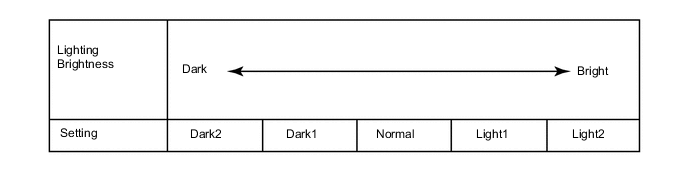
Figure 2. *B
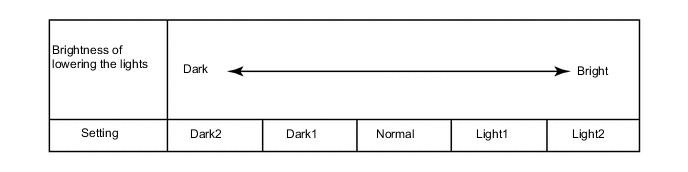
Figure 3. *C
-
-
-
Customizing with radio and display assembly
-
Turn the ignition switch to ON.
-
Enter the following menus: Set up / Vehicle.
-
Select the setting by referring to the table below.
Vehicle Settings Display Content Setting Relevant ECU Light sensor Sensitivity Adjusts the sensitivity of the automatic light control system.*1 "-" or "+" Main body ECU Daytime running lights ON/OFF of the DRL function ON or OFF Main body ECU Tech Tips
The sensitivity adjustment may be difficult to confirm. Check by driving the customer's vehicle.
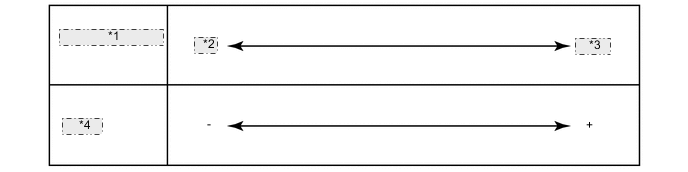
*1 Lighting Brightness *2 Dark *3 Bright *4 Setting
-
-