IMMOBILISER SYSTEM(for GRMN with Entry and Start System) Immobiliser System does not Operate Properly
DESCRIPTION
The immobiliser system compares the ID code that is registered in the certification ECU (smart key ECU assembly) with the ID code of the transponder chip that is embedded in the electrical key transmitter sub-assembly.
The system unsets if these ID codes match. Thus, the ID Code Box (Immobiliser Code ECU) and the network gateway ECU communicate with each other enabling the engine to start.
WIRING DIAGRAM
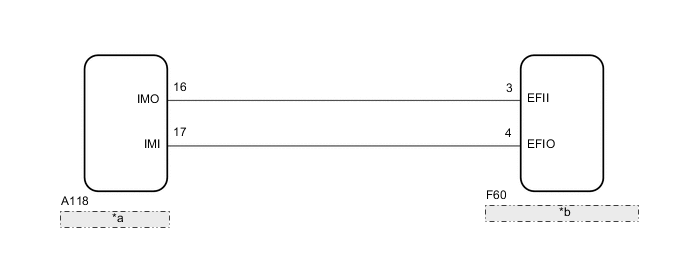
| *a | Network Gateway ECU |
| *b | ID Code Box (Immobiliser Code ECU) |
CAUTION / NOTICE / HINT
Note
-
When using the GTS with the vehicle engine switch off, connect the GTS to the DLC3 and turn a courtesy light switch on and off at intervals of 1.5 seconds or less until communication between the GTS and the vehicle begins. Then select the Model Code "KEY REGIST" under manual mode and enter the following menus: Body Electrical / Entry&Start(CAN). While using the GTS, periodically turn a courtesy light switch on and off at intervals of 1.5 seconds or less to maintain communication between the GTS and the vehicle.
-
The immobiliser system uses the LIN communication system. Inspect the communication function by following How to Proceed with Troubleshooting. Troubleshoot the immobiliser system after confirming that the communication systems are functioning properly.
-
Before replacing the ID code box (immobiliser code ECU) or network gateway ECU, refer to the entry and start system (for Entry Function)
-
After repair, confirm that no DTCs are output by performing "DTC Output Confirmation Operation."
PROCEDURE
-
CHECK FOR DTC
-
Check for DTCs.
Tech Tips
Before checking for DTCs, perform the "DTC Output Confirmation Operation" procedure.
Result Result Proceed to No DTC output A DTC output B
B 
GO TO DIAGNOSTIC TROUBLE CODE CHART Click here
A 
-
-
CHECK WHETHER ENGINE STARTS
-
It leaves for 5 seconds by the engine switch on (IG) status, and the engine starting operation is done.
Result Result Proceed to Engine cannot be started A Engine can be started B
B
USE SIMULATION METHOD TO CHECK Click here
A
-
-
READ VALUE USING GTS (IMMOBILISER FUEL CUT)
-
Turn the engine switch off.
-
Connect the GTS to the DLC3.
-
Turn the engine switch on (IG).
-
Turn the GTS on.
-
Enter the following menus: Powertrain / Engine and ECT / Data List.
Engine and ECT Tester Display Measurement Item/Range Normal Condition Stored as Freeze Frame Data Immobiliser Fuel Cut Status of immobiliser fuel cut/
ON or OFF
- Yes OK The item in the Data List indicates "OFF" Result Result Proceed to NG A OK B
B
GO TO SFI SYSTEM Click here
A
-
-
CHECK ECM (TERMINAL IMO, IMI)
-
Using an oscilloscope, check the waveform.
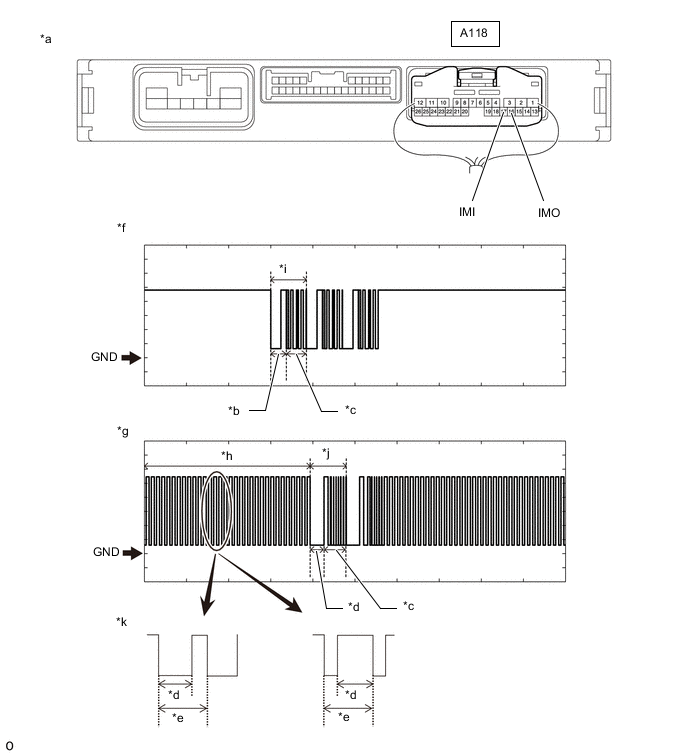
*a Component with harness connected
(Network Gateway ECU)
*b Approximately 160 ms. *c Approximately 270 ms. *d Approximately 40 ms. *e Approximately 60 ms. *f IMO waveform *g IMI waveform *h Waveform 1 *i Waveform 2 *j Waveform 3 *k Waveform 1 (detail) - - Note
The waveform shown in the illustration is an example for reference only. Noise, chattering, etc. are not shown.
Measurement Condition Tester Connection Condition Tool Setting Specified Condition A118-16 (IMO) - Body ground Within 3 seconds of engine start or within 3 seconds of engine switch turned on (IG) after battery cable disconnected and reconnected 2 V/DIV., 500 ms./DIV. Pulse generation
(See waveform 2)
A118-17 (IMI) - Body ground Within 3 seconds of engine start or within 3 seconds of engine switch turned on (IG) after battery cable disconnected and reconnected 2 V/DIV., 500 ms./DIV. Pulse generation
(See waveform 1 and 3)
Result Result Proceed to Normal waveform A Waveform 1 is not output, or has abnormal wavelength or shape B Waveform 2 is not output, or has abnormal wavelength or shape C Waveform 3 is not output, or has abnormal wavelength or shape D
B 
CHECK HARNESS AND CONNECTOR (ID CODE BOX (IMMOBILISER CODE ECU) - NETWORK GATEWAY ECU) Click here
C
REPLACE NETWORK GATEWAY ECU Click here
D
REPLACE ID CODE BOX (IMMOBILISER CODE ECU) Click here
A
-
-
REGISTER ECU COMMUNICATION ID
-
Register the ECU communication ID.
Tech Tips
Refer to Service Bulletin.
NEXT
-
-
CHECK WHETHER ENGINE STARTS
-
Check that the engine starts with the key.
OK Engine starts normally.
OK
END (REGISTERED COMMUNICATION ID WAS DEFECTIVE)
NG
-
-
REPLACE ID CODE BOX (IMMOBILISER CODE ECU)
-
Replace the ID code box (immobiliser code ECU) with a new one.
Tech Tips
Refer to Service Bulletin.
NEXT
-
-
REGISTER RECOGNITION CODE
-
Register the recognition codes to the ECUs.
Tech Tips
Refer to Service Bulletin.
NEXT
-
-
REGISTER ECU COMMUNICATION ID
-
Register the ECU communication ID code.
Tech Tips
Refer to Service Bulletin.
NEXT
-
-
CHECK WHETHER ENGINE STARTS
-
Check that the engine starts with the key.
OK Engine starts normally.
OK
END (ID CODE BOX (IMMOBILISER CODE ECU) WAS DEFECTIVE)
NG
GO TO SFI SYSTEM Click here
-
-
CHECK HARNESS AND CONNECTOR (ID CODE BOX (IMMOBILISER CODE ECU) - NETWORK GATEWAY ECU)
-
Disconnect the F60 ID code box (immobiliser code ECU) connector.
-
Disconnect the A118 network gateway ECU connector.
-
Measure the resistance according to the value(s) in the table below.
Standard Resistance Tester Connection Condition Specified Condition F60-3 (EFII) - A118-16 (IMO) Always Below 1 Ω F60-4 (EFIO) - A118-17 (IMI) Always Below 1 Ω F60-3 (EFII) or A118-16 (IMO) - Body ground Always 10 kΩ or higher F60-4 (EFIO) or A118-17 (IMI) - Body ground Always 10 kΩ or higher
NG
REPAIR OR REPLACE HARNESS OR CONNECTOR
OK
-
-
REPLACE ID CODE BOX (IMMOBILISER CODE ECU)
-
Replace the ID code box (immobiliser code ECU) with a new one.
Tech Tips
Refer to Service Bulletin.
NEXT
-
-
REGISTER RECOGNITION CODE
-
Register the recognition codes to the ECUs.
Tech Tips
Refer to Service Bulletin.
NEXT
-
-
REGISTER ECU COMMUNICATION ID
-
Register the ECU communication ID code.
Tech Tips
Refer to Service Bulletin.
NEXT
-
-
CHECK WHETHER ENGINE STARTS
-
Check that the engine starts with the key.
OK Engine starts normally.
OK
END (ID CODE BOX (IMMOBILISER CODE ECU) WAS DEFECTIVE)
NG
GO TO SFI SYSTEM Click here
-
-
REPLACE ID CODE BOX (IMMOBILISER CODE ECU)
-
Replace the ID code box (immobiliser code ECU) with a new one.
Tech Tips
Refer to Service Bulletin.
NEXT
-
-
REGISTER RECOGNITION CODE
-
Register the recognition codes to the ECUs.
Tech Tips
Refer to Service Bulletin.
NEXT
-
-
REGISTER ECU COMMUNICATION ID
-
Register the ECU communication ID code.
Tech Tips
Refer to Service Bulletin.
NEXT
-
-
CHECK WHETHER ENGINE STARTS
-
Check that the engine starts with the key.
OK Engine starts normally.
OK
END (ID CODE BOX (IMMOBILISER CODE ECU) WAS DEFECTIVE)
NG
GO TO SFI SYSTEM Click here
-